
Navarra Selectividad 18-19 B2 Problem
Loading the math board and drawing, please wait…
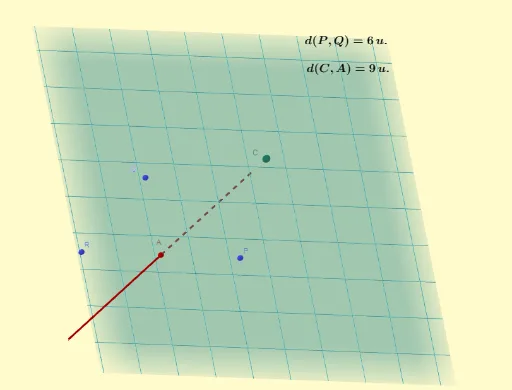
This example demonstrates a problem involving a pyramid in solid geometry. Key mathematical concepts include vectors, line segments, cubes, polygons, and ellipses. Using GeoGebra commands such as Midpoint, Plane, CurveCartesian, and Distance, the construction of the pyramid, cube, and related geometric figures is illustrated. Suitable for high school mathematics education and learning.
GeoGebra Commands & Parameters
Midpoint(R, P) → APlane(R, Q, P) → pLaTeX(p, true, true) → text3CurveCartesian(4 + (2 * λ), -4 + (2 * λ), 1 - λ, λ, -8, 8) → bLaTeX(b, true, true) → text6LaTeX(C, true, true) → text7Distance(Q, P) → distanceQPDistance(C, A) → distanceCAMirror(Q, A) → Q'Polygon(R, Q, P, Q') → q1, r, q, p_1, q'Mirror(A, C) → A'Prism(q1, A') → c, B, edgeBQ, edgeDP, edgeEQ', edgeA'B, edgeBD, edgeDE, edgeA'E, D, E, faceA'BQR, faceBDPQ, faceDEQ'P, faceA'EQ'R, faceA'BDE, edgeA'RPolygon(Q, P, Q', R) → q2, q_1, p_2, f, r_1Mirror(A, C) → A'_1Prism(q2, A'_1) → d, F, edgeFP, edgeGQ', edgeHR, edge2, edgeFG, edgeGH, edge3, G, H, face1, faceFGQ'P, faceGHRQ', face2, face3, edge1
AI Drawing Prompt Reference
Draw a pyramid with a cube and related geometric figures. Start by defining the base and apex of the pyramid, then draw the midpoint of the base and a plane passing through this midpoint. Next, draw a curve to represent part of the plane, calculate the distances between points. Then, mirror the apex and the base midpoint to construct the pyramid's sides. Finally, draw the mirrored cube and pyramid to form the complete geometric figure.
The prompt above was compiled from the original drawing commands and is for reference only.