
Mathematical Modeling of the Oblation Statue
Loading the math board and drawing, please wait…
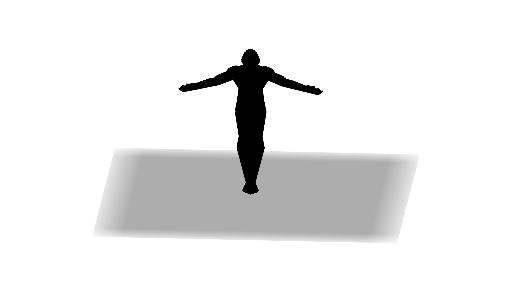
This example demonstrates the geometric construction of the Oblation statue using GeoGebra, involving concepts like solid geometry, symmetry, rotation, and mirroring. Key commands used include Polygon, Rotate, and Mirror to create and manipulate the shape. Suitable for high school and above to understand 3D figure construction.
GeoGebra Commands & Parameters
Polygon(K_1, J_1, A_1, Z, W, V, U, T, S, R, Q, O, I_1, N, P, M, L, G, F, E, D, C, M_1, H_1, G_1, F_1, E_1, D_1, C_1, B_1) → poly1, k_1, b_1, a_1, z_1, w, v, u, t, s, r, q, j_1, o, n, p, m, l, g, f, e, d, c, i_1, m_1, h_1, g_1, f_1, e_1, d_1, c_1Polygon(C, M_1, L_1, K, J, H, I) → poly2, c_2, h, l_1, k, j, h_2, iRotate(K_1, 90°, xAxis) → N_1Rotate(J_1, 90°, xAxis) → O_1Rotate(I_1, 90°, xAxis) → P_1Rotate(H_1, 90°, xAxis) → Q_1Rotate(G_1, 90°, xAxis) → R_1Rotate(F_1, 90°, xAxis) → S_1Rotate(E_1, 90°, xAxis) → T_1Rotate(D_1, 90°, xAxis) → U_1Rotate(C_1, 90°, xAxis) → V_1Rotate(B_1, 90°, xAxis) → W_1Rotate(A_1, 90°, xAxis) → Z_1Rotate(Z, 90°, xAxis) → Z'Rotate(W, 90°, xAxis) → W'Rotate(V, 90°, xAxis) → V'Rotate(U, 90°, xAxis) → U'Rotate(T, 90°, xAxis) → T'Rotate(S, 90°, xAxis) → S'Rotate(R, 90°, xAxis) → R'Rotate(Q, 90°, xAxis) → Q'Rotate(O, 90°, xAxis) → O'Rotate(N, 90°, xAxis) → N'Rotate(P, 90°, xAxis) → P'Rotate(M, 90°, xAxis) → M'Rotate(L, 90°, xAxis) → L'Rotate(G, 90°, xAxis) → G'Rotate(F, 90°, xAxis) → F'Rotate(E, 90°, xAxis) → E'Rotate(D, 90°, xAxis) → D'Rotate(C, 90°, xAxis) → C'Rotate(M_1, 90°, xAxis) → A_2Polygon(N_1, O_1, Z_1, Z', W', V', U', T', S', R', Q', O', P_1, N', P', M', L', G', F', E', D', C', A_2, Q_1, R_1, S_1, T_1, U_1, V_1, W_1) → poly1', n_1, w_1, a, z', w', v', u', t', s', r', q', o_1, o', n', p', m', l', g', f', e', d', c', p_1, a_2, q_1, r_1, s_1, t_1, u_1, v_1Rotate(poly2, 90°, xAxis) → poly2'Mirror(poly1', eq1) → poly1''Mirror(poly2', eq1) → poly2''
AI Drawing Prompt Reference
Construct a 3D solid-like sculpture silhouette in 2D by combining rotation and mirroring of polygon faces. First, create a main polygon surface using a large ordered set of points to form the primary body, then create a second polygon surface from another set of points to serve as a paired side piece. Choose one horizontal axis and rotate the first polygon around it by 90 degrees repeatedly to produce several corresponding side copies; rotate the second polygon around the same axis in the same way to obtain its matching copies. Finally, mirror the rotated copies of both polygons across a given symmetry line to complete the overall symmetric statue shape.
The prompt above was compiled from the original drawing commands and is for reference only.