
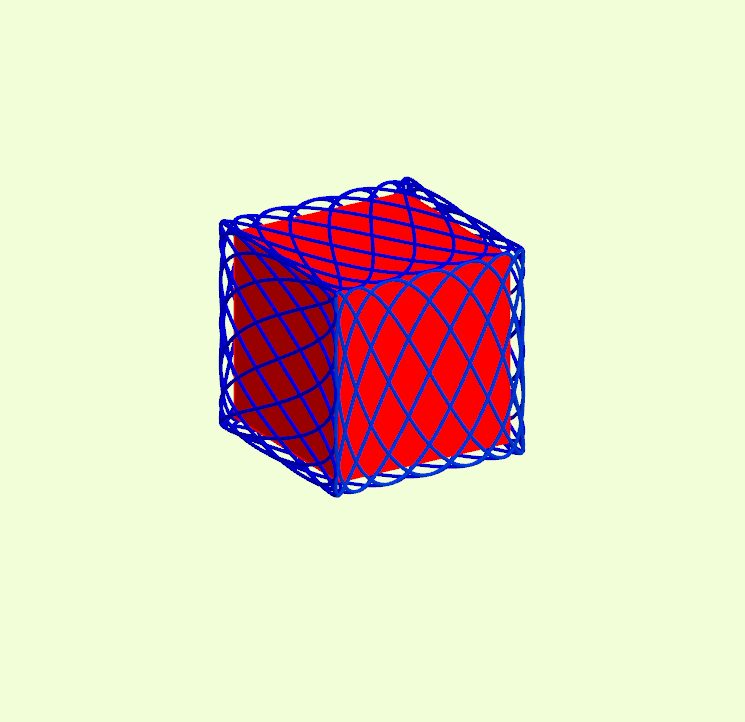
Lissajous figures on the cube
Loading the math board and drawing, please wait…
This example demonstrates the construction of Lissajous figures on the surface of a cube. The key mathematical concepts involved include spatial geometry, parametric equations, and transformations. The construction uses GeoGebra commands such as CurveCartesian, Rotate, Point, and Cube to create the cube surface, along with Mirror and Polygon for graphical operations. It is suitable for high school students or college freshmen to learn about spatial geometry and parametric equations.
GeoGebra Commands & Parameters
CurveCartesian(a, (a * sin((n_2 * t))), (b * sin((k * t))), t, 0, 6.28319) → eRotate(e, -90*°, yAxis) → e'Rotate(e, 90*°, yAxis) → e'_1Rotate(e, -180*°, yAxis) → e'_2Point(Circle[D, Distance[F, D], Segment[F, D]]) → GCube(F, D, G) → g, H, граньGHLK, граньIJKL, реброFH, реброDF, реброDG, реброGH, реброFI, реброHL, реброIL, реброIJ, I, реброDJ, реброJK, реброGK, реброKL, J, K, L, граньDFHG, граньFHLI, граньDFIJ, граньDGKJRotate(e', -90*°, xAxis) → e''Rotate(e', 90*°, xAxis) → e''_1Mirror(E, yAxis) → E'Mirror(M, yAxis) → M'Polygon(M, M', 4) → многоугольник1, f, j, k_1, l, N, OCurveCartesian(((d * a) * sin((n_2 * t))), ((d * b) * sin((k * t))), t, 0, 6.28319) → oLine(C, D) → cPoint(zAxis) → PSegment(P, Q) → h
AI Drawing Prompt Reference
Draw a cube and Lissajous figures on its surface. First, create a cube. Then, draw Lissajous curves on one of its faces using rotation and mirroring operations. Next, create a point at one of the cube's vertices and draw a line segment from this point to the center of one of the cube's faces. Finally, use these elements to draw a polygon that intersects the cube's surface.
The prompt above was compiled from the original drawing commands and is for reference only.