
Triangular Pyramid Construction Example
Loading the math board and drawing, please wait…
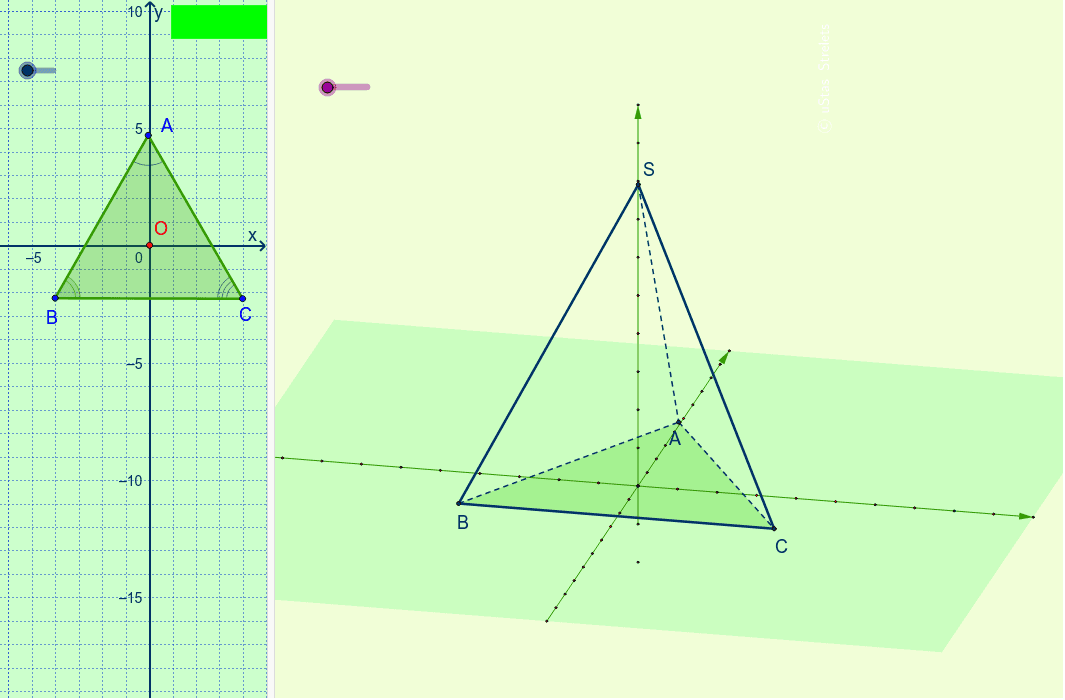
This is an example for teachers to demonstrate the construction of a triangular pyramid. It involves basic geometric concepts of a triangular pyramid such as vertices, base, and edges. Using GeoGebra commands like Translate, Mirror, Vector, etc., the construction process can be dynamically shown. Suitable for math education from middle school and above.
GeoGebra Commands & Parameters
Translate(O, Vector[u * x_0]) → O'_1Translate(O, Vector[u * y_0]) → O'_2Translate(O, Vector[u * z_0]) → O'_3Mirror(O'_1, O) → GTranslate(O, Vector[-0.1 * u * z_0]) → O'_5Translate(O, Vector[-u * y_0]) → O'Vector(O', O'_2) → vVector(G, O'_1) → wVector(O'_5, O'_3) → zSegment(O', O'_2) → cSegment(O'_1, G) → dLine(O, O'_3) → iSequence(O + i * y_0, i, -u, u) → liste5Sequence(O + i * x_0, i, -u, u) → liste1Sequence(O + i * z_0, i, -u + 8, u) → liste3RotateText("\copyright uStas\;\;Strelets", 90*°) → надпись24Отрезок3D(S, A, C, B) → e, fОтрезок3D(S, C, B, A) → g, jОтрезок3D(S, B, A, C) → k, lОтрезок3D(B, A, S, C) → m, nОтрезок3D(C, B, S, A) → p, qОтрезок3D(A, C, S, B) → r, sSegment(S, O_1) → tPolygon(А, В, С) → многоугольник1, c_2, a_2, b_2Circle(А, В, С) → c_1LineBisector(А, С) → a_1LineBisector(С, В) → b_1Intersect(b_1, a_1) → I_2AngularBisector(В, А, С) → d_1AngularBisector(А, В, С) → e_1Intersect(e_1, d_1) → J_3OrthogonalLine(J_3, c_2) → f_1Intersect(c_2, f_1) → KCircle(J_3, K) → g_1Point(w) → MPoint(w) → LPoint(v) → NPoint(v) → PLine(P, d) → h_1Line(N, d) → i_1Line(M, c) → j_1Line(L, c) → k_1Intersect(h_1, j_1) → DIntersect(i_1, j_1) → EIntersect(k_1, i_1) → FIntersect(h_1, k_1) → HPolygon(D, E, F, H) → многоугольник2, d_2, e_2, f_2, h_2Polygon(B, A, C) → многоугольник3, c_3, b_3, a_3Point(c_1) → VPoint(c_1) → WConic(J_1, B, A, I_1, C) → p_1Intersect(g_1, b_2) → O_3,Intersect(g_1, a_2) → Q,Point(g_1) → RPoint(g_1) → TConic(U, Z, B_1, C_1, D_1) → q_1Area(А, В, С) → l_1Segment(B_1, J) → n_1Segment(J, U) → r_1Segment(J, C_1) → s_1Segment(J_3, K) → t_1Segment(O_3, J_3) → g_2Segment(J_3, Q) → i_2Segment(I_2, С) → j_2Segment(А, I_2) → k_2Segment(I_2, В) → l_2Segment(A, I) → n_2Segment(I, C) → p_2Segment(I, B) → q_2Distance(А, В) → расстояниеАВDistance(А, В) → bDistance(В, С) → w_1Distance(А, С) → aArea(А, В, С) → z_1Angle(В, А, С) → γAngle(С, В, А) → δAngle(А, С, В) → εSegment(A, S) → s_2Segment(S, C) → t_2Segment(S, B) → d_3Segment(A, B) → e_3Segment(B, C) → f_3Segment(A, C) → g_3Distance(А, O_2) → j_3Distance(В, O_2) → l_3Distance(С, O_2) → n_3
AI Drawing Prompt Reference
Draw a triangular pyramid with base triangle ABC and apex S. First, create the base triangle ABC, then construct the three edges SA, SB, and SC from point S to the sides of the base triangle to form the triangular pyramid. Next, use the sides of the base triangle to construct auxiliary lines and angle bisectors to determine the position of point S.
The prompt above was compiled from the original drawing commands and is for reference only.