
Surface Area of Rectangular Prisms Demo
Loading the math board and drawing, please wait…
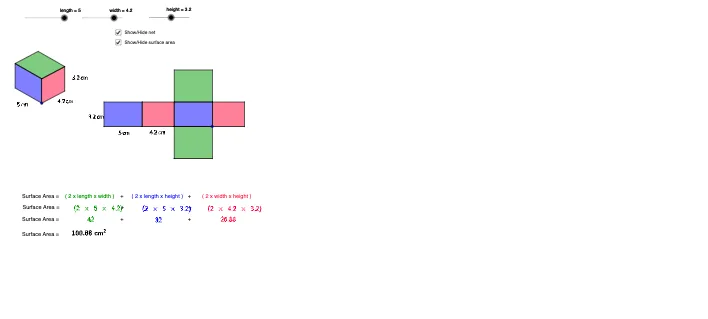
① This example shows how dragging the length, width, and height parameters dynamically computes and displays the total surface area of a rectangular prism. ② Core concepts include solid geometry of rectangular prisms, the surface‑area formula, vectors, and translation transformations. ③ Construction highlights: Vector creates edge vectors, Translate copies faces, Polygon builds the six faces, Line and Intersect locate vertices, Midpoint provides auxiliary points; key objects are length, width, height, points A‑D, and polygons poly1‑poly3. ④ Suitable for middle‑school geometry lessons on surface area, high‑school solid‑geometry review, and as an introductory GeoGebra modeling activity.
GeoGebra Commands & Parameters
Vector(A, B) → uVector(A, C) → vVector(A, D) → wTranslate(E, Vector[(height * u)]) → E'Vector(E, E') → zTranslate(E, Vector[(width * w)]) → E'_1Translate(E, Vector[(length * v)]) → E'_2Translate(E'_2, Vector[(height * u)]) → FTranslate(E'_1, Vector[(height * u)]) → GPolygon(F, E'_2, E, E') → poly1, f, e'_2, e, e'Polygon(E, E'_1, G, E') → poly2, e_1, e'_1, g, e'_3Line(F, g) → dLine(G, e') → hIntersect(d, h) → HPolygon(F, E', G, H) → poly3, f_1, e'_4, g_1, h_1Polygon(J, I, K, L) → poly4, j, i, k, lPolygon(N, J, I, M) → poly5, n, j_1, i_1, mPolygon(N, P, O, M) → poly6, n_1, p, o, m_1Polygon(Q, R, N, J) → poly7, q, r, n_2, j_2Polygon(T, S, I, M) → poly8, t, s, i_2, m_2Polygon(V, U, O, P) → poly9, v_1, u_1, o_1, p_1Midpoint(e'_2) → WMidpoint(e_1) → ZMidpoint(e'_1) → A_1Midpoint(v_1) → B_1Midpoint(u_1) → C_1Midpoint(o) → D_1Midpoint(m_2) → E_1Midpoint(t) → F_1
AI Drawing Prompt Reference
Draw a rectangular prism with dynamic surface area calculation. Drag length, width, and height to compute and display the area. Use vectors for edges, translation for face copying, and polygons for the six faces. Locate vertices with lines and intersections, and use midpoints for auxiliary points. The result is a prism formed by multiple polygons, highlighting geometric construction and vector transformations.
The prompt above was compiled from the original drawing commands and is for reference only.