
Petrie–Coxeter Honeycomb Origami Animation
Loading the math board and drawing, please wait…
In collections
Action Modular Origami
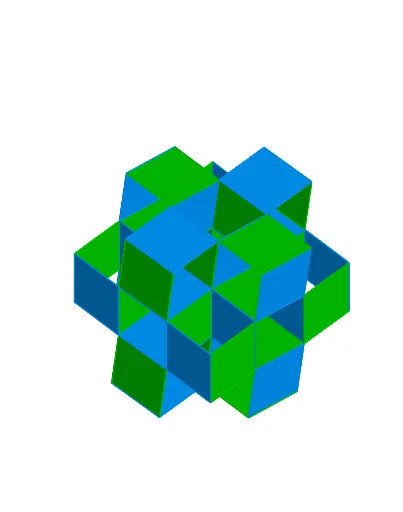
This example demonstrates a 3D animated model of a Petrie–Coxeter honeycomb folded from paper, illustrating the periodic arrangement of regular polyhedra in space. The core mathematical concepts involve solid geometry, polyhedral symmetry, translation and rotation, and spatial tessellation. The construction uses GeoGebra commands such as Point, Circle, Line, OrthogonalLine, Intersect, Rotate, Polygon, Vector, Translate, Plane, Sphere, IntersectConic, OrthogonalPlane, and Angle to build the geometric framework, with sliders controlling the animation. It is suitable for high school and above, or for math enthusiasts interested in polyhedral tilings, spatial symmetry, and parametric animation construction.
GeoGebra Commands & Parameters
Point(yAxis) → OOOCircle(OOO, Z) → c_2Line(OOO, Z) → i_2OrthogonalLine(OOO, i_2) → j_2Intersect(c_2, j_2, 2) → B_1Rotate(B_1, 120°, OOO) → C_1Rotate(B_1, (-(120°)), OOO) → D_1Polygon(C_1, D_1, B_1) → poly10, b_2, c_3, d_2PointIn(poly10) → E_1OrthogonalLine(E_1, d_2) → m_2Intersect(m_2, d_2) → I_1Segment(E_1, I_1) → p_2Intersect(b_2, j_2) → J_1Segment(B_1, J_1) → r_2OrthogonalLine(E_1, b_2) → k_2Intersect(k_2, poly10) → F_1, G_1Segment(E_1, F_1) → n_2OrthogonalLine(E_1, c_3) → l_2Intersect(l_2, c_3) → H_1Segment(E_1, H_1) → q_2If(control ≟ constSlider, β_1, If[control ≟ constTriad, β_2, β_3]) → βIf(control ≟ constSlider, α_1, If[control ≟ constTriad, α_2, α_3]) → αRotate(B, α, A) → B'Vector(A, B') → vVector(A, B) → uTranslate(B', u) → B''Vector(A, B'') → w_1Translate(A, w_1) → A'Polygon(A, B, B'', B') → poly1, a_1, b_1, b'', b'OrthogonalLine(B', poly1) → gPoint(g) → DPlane(A, B', D) → dPolygon(B', A, 4, d) → poly2, h, i, j, k, G, HTranslate(G, u) → G'Translate(G', v) → G''_2Plane(G, G', A) → ePolygon(A, G, 4, e) → poly3, l, m, n, p, I, JLine(J, A') → qRotate(G', β, q) → G''Vector(J, G'') → wTranslate(A', w) → A''Translate(A'', u) → A'''Line(A''', A'') → m_1Translate(G', w) → G''_1Translate(G'', u) → G'''Plane(G'', G''', G''_1) → oPolygon(G'', G''', 4, o) → poly5, s, t, f_1, g_1, K, LTranslate(L, v) → L'Vector(L', G''_1) → v_2If(control ≟ constSlider, γ_1, If[control ≟ constTriad, γ_2, γ_3]) → γRotate(L', γ, m_1) → L''_1Vector(G'', L''_1) → v_1Translate(K, d_1) → K'Translate(G''_1, d_1) → QPlane(L', Q, K') → n_1Polygon(L', Q, 4, n_1) → poly8, p_1, q_1, r_1, s_1, S, TVector(T, L') → u_2Rotate(L', (-β), r_1) → L''_2Translate(L''_2, u_2) → K_1Plane(G''_2, L', K_1) → o_2Polygon(G''_2, L', 4, o_2) → poly13, h_3, i_3, j_3, k_3, N_1, O_1Translate(poly13, v_2) → poly6Translate(N_1, v_2) → R_1Line(G''_1, R_1) → t_1Translate(poly2, u) → poly2'Rotate(poly2', β, q) → poly2''Vector(A, G) → rPlane(R_1, N_1, O_1) → w_2Polygon(R_1, N_1, 4, w_2) → poly15, m_3, n_3, p_3, q_3, P_1, Q_1Vector(Q_1, G') → u_3Translate(poly13, v_2) → poly13'Line(G', G''_1) → h_1Circle(A, B, xOyPlane) → cPoint(zAxis) → CPlane(A, B'', C) → aIntersect(yAxis, zAxis) → FPlane(A, B, C) → bOrthogonalLine(A, b) → fIntersect(g, c, 1) → ETranslate(poly3, v) → poly3'Translate(poly2', w) → poly2''_1Translate(poly2'', r) → poly2'''Translate(poly2''_1, u) → poly4Translate(poly5, v) → poly5'Translate(poly6, v) → poly6'Polygon(R_1, N_1, 4, w_2) → poly7, i_1, j_1, k_1, l_1, N, OTranslate(poly2'', u_3) → poly2'''_1Vector(Q_1, B) → u_1Translate(poly6, u_1) → poly6'_1Translate(poly6', u_1) → poly6''Translate({poly2, poly2', poly2''_1, poly4, poly6, poly6', poly6'', poly6'_1}, Vector[A, A]) → listPoly1Translate({poly2'', poly2''', poly2'''_1, poly3, poly3', poly5, poly5', poly7}, Vector[A, A]) → listPoly2Point(c) → PRotate(poly5', γ, m_1) → poly5''Translate(poly8, Vector[(-r)]) → poly8'Intersect(c_2, i_2, 2) → A_1Rotate(poly8, (-β), r_1) → poly8'_1Translate(poly8'_1, u_2) → poly11Line(G', G''_1) → l_3Translate(poly2'', u_3) → poly2'''_2Translate({poly2, poly2', poly2''_1, poly4}, Vector[A, A]) → listPoly311_1Translate({poly2'', poly2''', poly3, poly3', poly5, poly5'}, Vector[A, A]) → listPoly311_2Translate({poly2, poly2', poly2''_1, poly4, poly13, poly6, poly6'', poly6'_1}, Vector[A, A]) → listPoly331_1Translate({poly2'', poly2''', poly2'''_1, poly3, poly3', poly5, poly5', poly7}, Vector[A, A]) → listPoly331_2Point(listPoly331_1) → MRotate(poly6, δ, t_1) → poly6'_2Line(G''_1, K) → c_1Rotate(poly5, ε, c_1) → poly5'_1Rotate(G''', ε, c_1) → RRotate(Q_1, δ, t_1) → URotate(G', δ, t_1) → G''_3Rotate(G'', ε, c_1) → G'''_1Sphere(R_1, G') → e_1Sphere(K, G'') → o_1IntersectConic(e_1, o_1) → e_2OrthogonalLine(G''_1, t_1, space) → f_2OrthogonalPlane(G''_1, t_1) → a_2Intersect(a_2, e_2) → V, L_1Angle(G', G''_1, L_1) → ζRotate(poly6, ζ, t_1) → poly6'_3Plane(G''_1, G'', L_1) → g_2Angle(L_1, L, G'') → ηLine(L, K) → h_2Rotate(poly5, (-η), h_2) → poly5'_2Vector(L', L_1) → s_2Translate(listPoly1, s_2) → listPoly1'Translate(listPoly2, s_2) → listPoly2'Translate(poly5'_2, Vector[(-r)]) → poly9Translate(poly6'_3, Vector[(-w)]) → poly12Translate(poly5'_2, Vector[(-w)]) → poly16Translate(poly16, u_2) → poly16'Translate(poly16', Vector[(-r)]) → poly16''Translate(Translate[poly6'_3, u_3], Vector[(-r)]) → poly17Translate(Translate[poly12, u_3], Vector[(-r)]) → poly18Translate(poly6'_3, Vector[(-u_2)]) → poly19Translate(poly17, Vector[(-u_2)]) → poly17'Translate(poly5'_2, Vector[(-u_3)]) → poly20Translate(poly16', Vector[(-u_3)]) → poly16''_1Translate(poly12, w) → poly12'Translate(poly9, u_3) → poly9'Translate(poly16'', u_3) → poly16'''Translate(poly12, u_2) → poly12'_1Translate(poly18, u_2) → poly18'
AI Drawing Prompt Reference
Create a 3D animated origami model of a Petrie–Coxeter honeycomb. Start with a point on the vertical axis as center, draw a circle and a vertical line through it, then a perpendicular line intersecting the circle at a point. Rotate this point by 120 and -120 degrees around the center to get two more points, forming an equilateral triangle. Pick a point inside the triangle, drop perpendiculars to each side, and mark the feet. Then construct a parallelogram from four vertices, and use it as a base to generate adjacent parallelograms via translations and rotations, creating a periodic spatial tiling. Use sliders to control rotation angles and modes, making the whole structure fold and unfold dynamically, illustrating symmetric polyhedral tessellation.
The prompt above was compiled from the original drawing commands and is for reference only.