
Cube Cross Section Interactive Demo
Loading the math board and drawing, please wait…
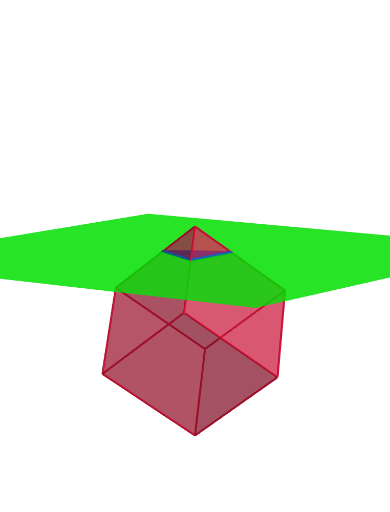
①This GeoGebra example demonstrates how a plane cuts through a cube, producing a polygonal cross-section whose shape changes as the plane is rotated or translated in 3D space. ②Core mathematical concepts include solid geometry, intersection of a plane with polyhedra, symmetry, and combinatorial possibilities for the number of sides of the cross-section (triangle, quadrilateral, pentagon, hexagon). ③Construction highlights: the Cube command builds the cube; Intersect and IntersectPath compute intersection points and the section path; Rotate and Translate control the cutting plane's orientation and position; Point marks vertices (I, J, K, L, M, N) of the section. ④Suitable for high school or early college students learning spatial geometry, and for teachers demonstrating dynamic cross-sections with slider-based exploration.
GeoGebra Commands & Parameters
Intersect(zAxis, xOyPlane) → APoint(xAxis) → BPoint(Circle[B, Distance[A, B], Segment[A, B]]) → CCube(A, B, C) → a, D, faceCDHG, faceEFGH, edgeAD, edgeAB, edgeBC, edgeCD, edgeAE, edgeDH, edgeEH, edgeEF, E, edgeBF, edgeFG, edgeCG, edgeGH, F, G, H, faceABCD, faceADHE, faceABFE, faceBCGFRotate(a, π / 4, xAxis) → a'Rotate(a', (-atand(1 / sqrt(2))), yAxis) → a''Translate(a'', Vector[((-2.7755575615628914E-17), 0, 2)]) → a'''Translate(a''', Vector[(0, 0, (-n))]) → bIntersectPath(f, b) → poly1, I, j, k, l, J, K, L, M, N, g, h, i
AI Drawing Prompt Reference
Draw a cube and cut it with a plane to produce a polygonal cross-section. First, construct the cube, then rotate and translate the plane to observe the changes in the cross-section shape. Finally, mark the vertices I, J, K, L, M, and N of the section.
The prompt above was compiled from the original drawing commands and is for reference only.