
Rainbow Cubes Dance: Rotating and Scaling Colorful Cubes
Loading the math board and drawing, please wait…
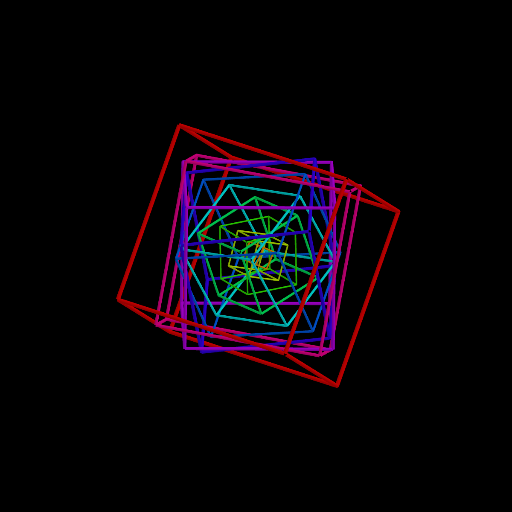
This GeoGebra example demonstrates a dynamic animation of multiple colored cubes rotating and scaling (dilating) in 3D space, creating a visually engaging 'dance' effect. The core mathematical concepts involve 3D geometric transformations including rotation and scaling, the structure of cubes (vertices, edges, faces), and the use of parameters to control animation. The construction uses GeoGebra commands such as Cube to create the cubes, Zip and Rotate to apply rotations to vertices or the whole cube, and sliders (e.g., t, f) along with a button (button1) to control rotation angles and scale factors. Key objects include vertices (A1-A8), faces (faceAA2A4A3, etc.), edges (edgeAA3, etc.), and auxiliary points like O and n. This is suitable for high school or early college students learning 3D geometric transformations, and also for teachers creating dynamic visualizations or mathematical art.
GeoGebra Commands & Parameters
Cube(A3, A4, A2) → c1, A, faceAA2DE, faceBCDE, edgeAA3, edgeA3A4, edgeA2A4, edgeAA2, edgeA3B, edgeAE, edgeBE, edgeBC, B, edgeA4C, edgeCD, edgeA2D, edgeDE, C, D, E, faceAA2A4A3, faceAA3BE, faceA3A4CB, faceA2A4CDZip("cube" + (k), k, Ln) → LnameRotate(Rotate[Dilate[c1, 1], f, O, Line[O, (1; f; f + ((1 * 2) * π / n))]], f, O, Line[O, (1; f; f + ((1 * 2) * π / n))]) → cube1Rotate(Rotate[Dilate[c1, 2], f, O, Line[O, (1; f; f + ((2 * 2) * π / n))]], f, O, Line[O, (1; f; f + ((2 * 2) * π / n))]) → cube2Rotate(Rotate[Dilate[c1, 3], f, O, Line[O, (1; f; f + ((3 * 2) * π / n))]], f, O, Line[O, (1; f; f + ((3 * 2) * π / n))]) → cube3Rotate(Rotate[Dilate[c1, 4], f, O, Line[O, (1; f; f + ((4 * 2) * π / n))]], f, O, Line[O, (1; f; f + ((4 * 2) * π / n))]) → cube4Rotate(Rotate[Dilate[c1, 5], f, O, Line[O, (1; f; f + ((5 * 2) * π / n))]], f, O, Line[O, (1; f; f + ((5 * 2) * π / n))]) → cube5Rotate(Rotate[Dilate[c1, 6], f, O, Line[O, (1; f; f + ((6 * 2) * π / n))]], f, O, Line[O, (1; f; f + ((6 * 2) * π / n))]) → cube6Rotate(Rotate[Dilate[c1, 7], f, O, Line[O, (1; f; f + ((7 * 2) * π / n))]], f, O, Line[O, (1; f; f + ((7 * 2) * π / n))]) → cube7Rotate(Rotate[Dilate[c1, 8], f, O, Line[O, (1; f; f + ((8 * 2) * π / n))]], f, O, Line[O, (1; f; f + ((8 * 2) * π / n))]) → cube8Rotate(Rotate[Dilate[c1, 9], f, O, Line[O, (1; f; f + ((9 * 2) * π / n))]], f, O, Line[O, (1; f; f + ((9 * 2) * π / n))]) → cube9Rotate(Rotate[Dilate[c1, 10], f, O, Line[O, (1; f; f + ((10 * 2) * π / n))]], f, O, Line[O, (1; f; f + ((10 * 2) * π / n))]) → cube10
AI Drawing Prompt Reference
Draw multiple colorful cubes in 3D space that rotate and scale dynamically, creating a dancing effect. Each cube consists of vertices, faces, and edges with varying colors. Parameters such as rotation angles and scaling factors control the motion. Construct by first creating cubes, then applying transformations, resulting in a lively visual.
The prompt above was compiled from the original drawing commands and is for reference only.