
Pyramid Volume Construction Demonstration
Loading the math board and drawing, please wait…
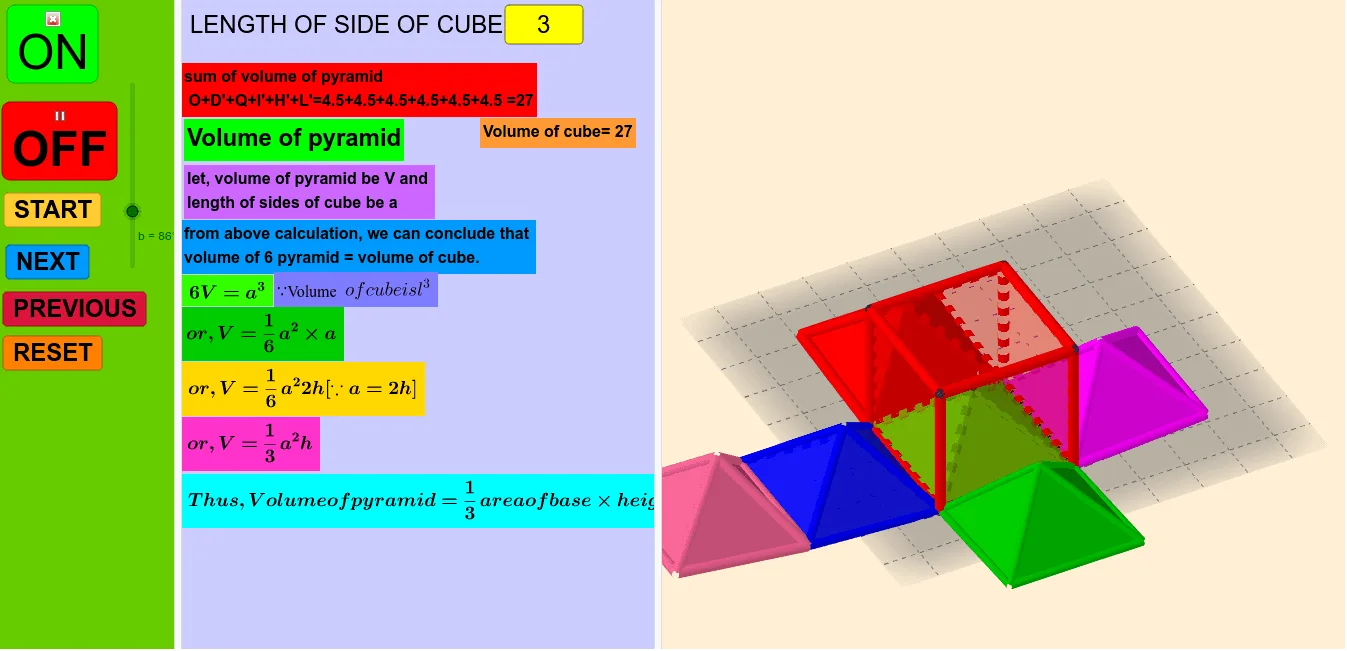
① This example constructs a pyramid in three‑dimensional space and dynamically computes its volume using GeoGebra. ② It illustrates the formula V = (1/3)·BaseArea·Height, shows how to obtain the base area via vectors, and explains how to locate vertices with coordinate geometry. ③ The construction uses commands such as Cube, Segment, Midpoint, Pyramid, Rotate, Translate, Vector and the Volume command; objects like points a, A, B, C, D, E, F, G, H, faces and edges are created step‑by‑step. ④ Designed for high‑school or early‑university students studying solid geometry, spatial vectors, and mathematical modeling.
GeoGebra Commands & Parameters
Cube(B, C, A) → c, D, faceADHG_1, faceEFGH_1, edgeBD_1, edgeBC_1, edgeAC_1, edgeAD_1, edgeBE_1, edgeDH_1, edgeEH_1, edgeEF_1, E, edgeCF_1, edgeFG_1, edgeAG_1, edgeGH_1, F, G, H, faceACBD_1, faceBDHE_1, faceBCFE_1, faceACFG_1Segment(B, G) → fMidpoint(B, G) → IPyramid(B, C, F, E, I) → d, faceBCFE, edgeBI_1, edgeCI_1, edgeFI_1, edgeEI_1, faceBCI_1, faceCFI_1, faceEFI_1, faceBEI_1, edgeBC_2, edgeCF_2, edgeEF_2, edgeBE_2Segment(B, C) → gRotate(d, b, g) → d'Pyramid(C, A, G, F, I) → e, faceACFG_2, edgeCI_2, edgeAI_1, edgeGI_1, edgeFI_2, faceACI_1, faceAGI_1, faceFGI_1, faceCFI_2, edgeAC_2, edgeAG_2, edgeFG_2, edgeCF_3Pyramid(A, D, H, G, I) → i, faceADHG, edgeAI_2, edgeDI_1, edgeHI_1, edgeGI_2, faceADI_1, faceDHI_1, faceGHI_1, faceAGI_2, edgeAD_2, edgeDH_2, edgeGH_2, edgeAG_3Segment(A, D) → jRotate(i, b, j) → i'Pyramid(C, A, G, F, I) → h, faceACFG, edgeCI_3, edgeAI_3, edgeGI_3, edgeFI_3, faceACI_2, faceAGI, faceFGI_2, faceCFI, edgeAC_3, edgeAG, edgeFG_3, edgeCFSegment(C, A) → kRotate(h, b, k) → h'Pyramid(D, B, E, H, I) → l, faceBDHE, edgeDI_2, edgeBI_2, edgeEI_2, edgeHI_2, faceBDI_1, faceBEI, faceEHI_1, faceDHI, edgeBD_2, edgeBE, edgeEH_2, edgeDHSegment(D, B) → mRotate(l, b, m) → l'Pyramid(H, G, F, E, I) → n, faceEFGH, edgeHI, edgeGI, edgeFI, edgeEI, faceGHI, faceFGI, faceEFI, faceEHI, edgeGH, edgeFG, edgeEF, edgeEHSegment(E, F) → pPyramid(B, C, A, D, I) → q, faceACBD, edgeBI, edgeCI, edgeAI, edgeDI, faceBCI, faceACI, faceADI, faceBDI, edgeBC, edgeAC, edgeAD, edgeBDSegment(E, F) → rPointIn(d') → JVector(F, J) → uTranslate(Rotate[n, (2 * b), r], u) → oVolume(i') → volumei'PointIn(i') → Pointi'Volume(l') → volumel'PointIn(l') → Pointl'Volume(d') → volumed'PointIn(d') → Pointd'Volume(o) → volumeoPointIn(o) → PointoVolume(c) → volumecPointIn(c) → Pointc_1Volume(h') → volumeh'PointIn(h') → Pointh'Volume(q) → volumeqPointIn(q) → PointqVolume(c) → sPointIn(c) → PointcTextfield(a) → InputBox1
AI Drawing Prompt Reference
Draw a three-dimensional solid figure containing multiple pyramids and pyramids. The figure is defined by points A, B, C, D, E, F, G, H. Show how to locate vertices using vectors and coordinate geometry, and calculate volume. The construction order: first create a cube, then create multiple pyramids using rotation and translation, and finally calculate volume.
The prompt above was compiled from the original drawing commands and is for reference only.