
Constructing a Pyramid in GeoGebra: Faces, Midpoints, and Angles
Loading the math board and drawing, please wait…
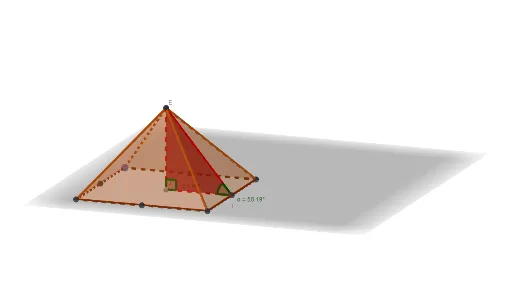
This example demonstrates how to build a pyramid (solid) in GeoGebra and structure its side faces using geometric constructions. It highlights relationships between key points, face polygons, and measured angles within the 3D figure. The core mathematical ideas include solid geometry (Pyramid), planar polygon modeling of faces (Polygon), intersection-based constructions (Intersect), midpoint computation on segments (Midpoint), and angle measurement (Angle). Construction workflow: Intersect is used to generate essential vertices where edges/faces meet; Point and Segment define the supporting geometry; Polygon is used to define each pyramid face (the face… objects); Pyramid creates the full 3D solid; Midpoint supports locating midpoints of edges for subsequent angle/structure analysis; Angle labels or computes the relevant angles. Suitable for upper middle school to early university students, and for lessons or workshops on 3D geometry, geometric construction, and angle analysis in pyramid models.
GeoGebra Commands & Parameters
Intersect(xAxis, yAxis) → APoint(Circle[A, a]) → BSegment(A, B) → fPolygon(A, B, 4) → poly1, g, h, i, j, C, DPyramid(poly1, b) → c, E, faceABE, faceBCE, faceCDE, faceADE, edgeAE, edgeBE, edgeCE, edgeDEMidpoint(B, C) → FMidpoint(A, B) → GMidpoint(C, D) → HMidpoint(D, A) → IMidpoint(B, D) → JSegment(J, E) → kSegment(E, I) → lPolygon(E, I, J) → t1, j_1, e, i_1Angle(J, I, E) → αAngle(I, J, E) → γ
AI Drawing Prompt Reference
Create a square-based pyramid with its apex above the center of the base; the four triangular faces form the solid. Mark the midpoints of each base edge, then draw segments from the apex to the midpoints of two adjacent edges, forming a triangle with the apex and those two midpoints. Indicate the two base angles of this triangle and label them clearly.
The prompt above was compiled from the original drawing commands and is for reference only.