
Geometric Visualization of Fraction Addition Using LCM
Loading the math board and drawing, please wait…
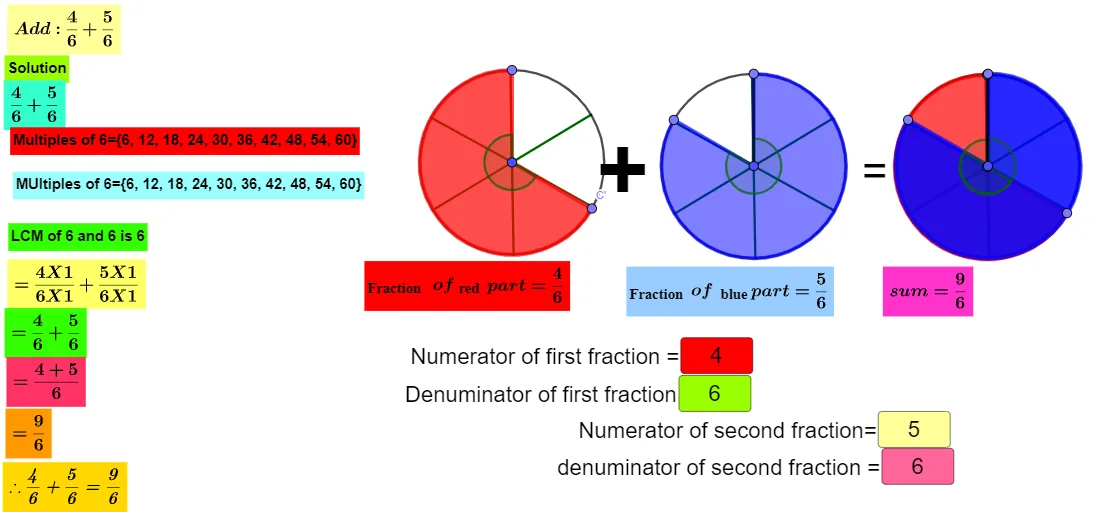
This example visually demonstrates how to add fractions by first converting them to a common denominator using the least common multiple (LCM). It represents the fraction-addition process with geometry—using angles and circle sectors to encode proportional quantities—so learners can see the “common denominator” idea directly on the diagram. Key concepts include fraction addition, LCM-based common-denominator conversion, and interpreting numeric ratios through geometric constructions. Construction highlights: Circle and Point create the base circle and key points; Segment connects points to form structural lines; Sequence supports repeated construction steps; Rotate repositions parts to match corresponding angular relationships; Angle defines the required angle measures; CircleSector links those angles to sector regions; LCM computes the least common multiple used in the algebraic step; and Textfield (with labeled text objects such as text1–text4, text9, F) displays denominators, LCM values, and the computed result. Suitable for middle-school math classes, math enrichment, and number–geometry connections.
GeoGebra Commands & Parameters
Circle(A, 2) → cCircle(B, 2) → dPoint(c) → CSegment(A, C) → fPoint(d) → DSegment(B, D) → gSequence(Segment[A, Rotate[C, f°, A]], f, (360°) / b, 360, 360 / b) → l1Sequence(Segment[B, Rotate[D, f°, B]], f, (360°) / n, 360, 360 / n) → l2Circle(E, 2) → eRotate(C, (360° * a / b), A) → C'Angle(C, A, C') → αRotate(D, (-((360° * m / n))), B) → D'Angle(D', B, D) → βCircleSector(A, C, C') → hCircleSector(B, D', D) → kLCM(b, n) → iTextfield(a) → InputBox1Textfield(b) → InputBox2Textfield(m) → InputBox3Textfield(n) → InputBox4Point(e) → FSegment(E, F) → tSequence(Segment[E, Rotate[F, t°, E]], t, (360°) / b, 360, 360 / b) → l3Circle(G, 2) → c_1Point(c_1) → HSegment(G, H) → f_1Sequence(Segment[G, Rotate[H, f°, G]], f, (360°) / n, 360, 360 / n) → l4Rotate(F, (360° * a / b), E) → F'Angle(F, E, F') → γRotate(H, (-((360° * m / n))), G) → H'Angle(H', G, H) → δCircleSector(E, F, F') → d_1CircleSector(G, H', H) → e_1LCM(as, ak) → vSequence((as * i), i, 1, 10) → l5Sequence((ak * i), i, 1, 10) → l6
AI Drawing Prompt Reference
This is a geometric visualization of fraction addition. The figure includes two concentric circles and several points, along with line segments connecting them. By rotating and defining angles, the circles are divided into multiple sector regions to represent different fraction proportions. Text boxes are also included to display denominators, the least common multiple, and the final result. The construction order is to draw circles and points first, then connect line segments, followed by rotating and defining angles for sectors, and finally adding text boxes.
The prompt above was compiled from the original drawing commands and is for reference only.