
Group 5: Building Shapes by Rotation
Loading the math board and drawing, please wait…
In collections
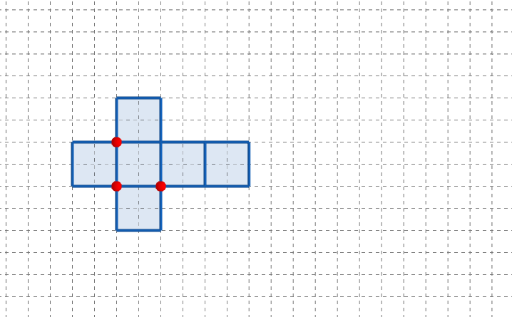
長方體有多少個摺紙圖樣?
This example demonstrates how to generate a new geometric configuration by combining key points, polygonal outlines, and a rotation transformation—useful for visualizing symmetry, correspondence, and the “solid-like” structure formed under rotation. The central math concepts include geometric transformations (rotation), angle-dependent reasoning, and parameter-driven construction that links before/after positions of the same features. Construction highlights: Point is used to create essential vertices (e.g., A, B, C and related points); Polygon connects these vertices to form faces/contours; Rotate applies a rotation to the relevant objects to produce the transformed shape. The construction summary references parameter sets and variables such as q1, q2, q5, q6, length/width/height parameters (l, w, h), and a parameter t (including corresponding primed parameters like q2', q5', q6'_1), plus interactive controls (button1, button2) to manage the steps or update the configuration. Suitable for high-school advanced geometry through early university geometry/interactive math labs.
GeoGebra Commands & Parameters
Point(Ray[(1, 0), (3, 0)]) → APoint(Ray[A + (1, 0), A + (2, 0)]) → CPoint(Ray[A + (0, 1), A + (0, 2)]) → BPolygon({(0, 0), A, B, (0, y(B))}) → q1Polygon({A, C, (x(C), y(B)), B}) → q2Polygon({C, C + (l, 0), C + (l, w), C + (0, w)}) → q5Polygon({C + (l, 0), C + (l + h, 0), C + (l + h, w), C + (l, w)}) → q6Rotate(q2, (90° * t), Line[B, A]) → q2'Rotate(Rotate[q5, (90° * t), Line[C + (0, w), C]], (90° * t), Line[B, A]) → q5'Rotate(Rotate[Rotate[q6, (90° * t), Line[C + (l, w), C + (l, 0)]], (90° * t), Line[C + (0, w), C]], (90° * t), Line[B, A]) → q6'_{1}Polygon({A, C, C + (0, (-l)), A + (0, (-l))}) → q3Rotate(Rotate[q3, (90° * t), Line[C, A]], (90° * t), Line[B, A]) → q3'Polygon({B, B + (h, 0), B + (h, l), B + (0, l)}) → q4Rotate(Rotate[q4, (90° * t), Line[B, B + (h, 0)]], (90° * t), Line[B, A]) → q4'
AI Drawing Prompt Reference
Create a planar, rotation-based “solid-like” diagram. First place key points: choose a starting point A on a horizontal ray, then construct C from A by moving along the x direction, and construct B from A by moving along the y direction. Build polygon faces: form one outline using A, B, and a point vertically determined from B; then form a second outline using A, C, B, and the point at the intersection of C’s x-level with B’s y-level. Using C as a base, draw two rectangular polygon sides: one defined by length l and width w, and another defined by extending that rectangle with height h. Then introduce a rotation parameter t: rotate the second face outline around the line through B and A by angles of (90°·t), producing its transformed copy; repeat the same type of rotation for the two C-based faces to obtain their rotated copies. Add two additional faces constructed from A (including a downward offset) and from B (using h, l offsets), and rotate each of these around the line through B and A by (90°·t) to get their corresponding transformed outlines, yielding a symmetric, multi-face configuration under rotation.
The prompt above was compiled from the original drawing commands and is for reference only.