
Unfolding and Folding a Prism Net
Loading the math board and drawing, please wait…
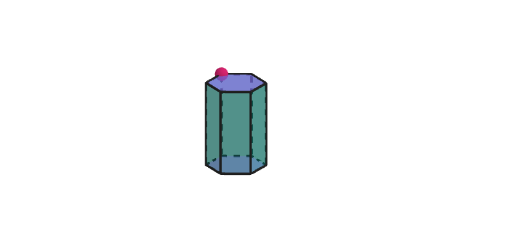
This GeoGebra example demonstrates how to unfold a prism into a 2D net and then fold the net back into a 3D solid, while allowing students to change prism dimensions to observe how the geometry and the net adjust. Key concepts include nets of prisms (face-to-face adjacency), relationships between edges and faces, and how varying the base dimensions changes the required pattern. Construction highlights: it uses Point, Segment, Polygon to create and place faces and edges; Prism and Net to represent the solid and its unfolding pattern; Surface to render faces; Rotate and Intersect to orient and connect the unfolded pieces; and auxiliary commands such as Circle, Ray, Sequence, and OrthogonalLine for geometric scaffolding and visualization. It is intended for grades 6–8, supporting skill development in identifying prism/pyramid/cylinder/cone nets and for guided classroom exploration.
GeoGebra Commands & Parameters
Point(yAxis) → CAPoint(yAxis) → CBCircle(CA, CB) → cCilPoint(cCil) → CRay(A, (x(A), y(A), 40)) → hPoint(yAxis) → BSequence(Rotate[C, ((t * 2) * pi / n), A], t, 1, n) → vertPolygon(vert) → polyOrthogonalLine(C, xOyPlane) → fSegment(HC, (x(C), y(C), 4)) → gPoint(g) → EPrism(poly, Segment[C, E]) → a, F, face3, face4, face5, face6, face2, face13, face15, faceFGHIJK, edge1, edge2, G, edge3, edge4, edge5, edge6, edge13, edge16, edgeFG, edgeGH, edgeHI, edgeIJ, H, edgeJK, edgeFK, edge14, edge17, I, J, K, L, M, face1Point(Segment[(0, 0, 0.1), (0, 0, 4)]) → CDPyramid(poly, CD) → b, face7, edge8, edge9, edge10, edge11, edge12, edge15, edge18, face9, face10, face11, face12, face8, face14, face16, edge7Net(a, (-open)) → prismNet, N, W, Z, A_1, B_1, C_1, D_1, E_1, F_1, G_1, H_1, O, I_1, J_1, K_1, L_1, M_1, N_1, O_1, P_1, Q_1, R_1, P, S_1, face17, face18, face19, face20, face21, face22, face23, face24, face34, Q, face35, edge19, edge20, edge21, edge22, edge23, edge24, edge25, edge26, edge27, R, edge28, edge29, edge30, edge31, edge32, edge33, edge34, edge35, edge36, edge37, S, edge38, edge39, edge40, edge41, edge42, edge43, edge44, edge45, edge70, edge71, T, edge72, edge73, edge74, edge75, edge76, edge77, edge78, edge79, edge80, edge81, U, VNet(b, (-open)) → pyrNet, T_1, E_2, F_2, G_2, H_2, I_2, J_2, K_2, face25, face26, face27, U_1, face28, face29, face30, face31, face32, face33, edge46, edge47, edge48, edge49, V_1, edge50, edge51, edge52, edge53, edge54, edge55, edge56, edge57, edge58, edge59, W_1, edge60, edge61, edge62, edge63, edge64, edge65, edge66, edge67, edge68, edge69, Z_1, A_2, B_2, C_2, D_2Random(3, 8) → nRandCircle(CA, CB) → dCylinder(cCil, 3) → bCil, eCil, fCilLine(CC, xAxis) → aCilOrthogonalLine(CD, xOyPlane) → gCilCircle(gCil, CC) → kCilRotate(Rotate[eCil, ϕCil, aCil], ϕCil, xAxis) → eeCilRotate(Rotate[eCil, ϕCil, aCil], ϕCil, xAxis) → dCilCircle(CA, CB) → hCilIf(abs(tCil) < 1, ((rCil * sin((-θCil))), ((rCil * (1 - cos((-θCil)))) * cos(ϕCil)) - (3 * sin(ϕCil)), (3 * cos(ϕCil)) + ((rCil * (1 - cos((-θCil)))) * sin(ϕCil))), ((-pi), (-3 * sin(ϕCil)), (3 * cos(ϕCil)))) → CEIf(abs(tCil) < 1, ((rCil * sin(θCil)), ((rCil * (1 - cos(θCil))) * cos(ϕCil)) - (3 * sin(ϕCil)), (3 * cos(ϕCil)) + ((rCil * (1 - cos(θCil))) * sin(ϕCil))), (pi, (-3 * sin(ϕCil)), (3 * cos(ϕCil)))) → CFIf(abs(tCil) < 1, ((rCil * sin((-θCil))), ((rCil * (1 - cos((-θCil)))) * cos(ϕCil)), ((rCil * (1 - cos((-θCil)))) * sin(ϕCil))), ((-pi), 0, 0)) → CGIf(abs(tCil) < 1, ((rCil * sin(θCil)), ((rCil * (1 - cos(θCil))) * cos(ϕCil)), ((rCil * (1 - cos(θCil))) * sin(ϕCil))), (pi, 0, 0)) → CHSegment(CE, CG) → mCilSegment(CF, CH) → nCilLine((0, 1, 0), zAxis) → pCilCircle(pCil, CB) → qCilCircle(pCil, CB) → sCilOrthogonalLine((1, 0, 0), xOyPlane) → aConCircle(aCon, (0, 0, 0)) → cConPoint(aCon) → KAIntersect(xAxis, aCon) → KBCone(KB, KA, 1) → bCon, dCon, eConIntersect(yAxis, xAxis) → KCSegment(KC, KA) → lConDistance(KB, KC) → rConAngle(KA, KC, KB) → αRotate(KA, (abs(tCil) * α), yAxis) → KAAOrthogonalLine(KAA, xOyPlane) → fConIntersect(fCon, xOyPlane) → KBBRotate(KC, bet / 2, fCon) → KCCRotate(KC, ((-bet)) / 2, fCon) → KCRCircumcircleArc(KCC, KC, KCR) → gConDistance(KAA, KBB) → hConDistance(KBB, KCC) → rcConSurface(((kCon - ((v * rcCon) * cos((u * bet / 2)))) * cos(ϕCon)) - (((1 - v) * hCon) * sin(ϕCon)), ((v * rcCon) * sin((u * bet / 2))), (((1 - v) * hCon) * cos(ϕCon)) + ((kCon - ((v * rcCon) * cos((u * bet / 2)))) * sin(ϕCon)), u, -1, 1, v, 0, 1) → jConCurveCartesian(((kCon - (rcCon * cos((u * bet / 2)))) * cos(ϕCon)), (rcCon * sin((u * bet / 2))), ((kCon - (rcCon * cos((u * bet / 2)))) * sin(ϕCon)), u, -1, 1) → mConSegment(KE, KF) → nConSegment(KD, KF) → pConIf(abs(tCil) < 1, CurveCartesian[(rCil * sin((u * θCil))), ((rCil * (1 - cos((u * θCil)))) * cos(ϕCil)) - (3 * sin(ϕCil)), (3 * cos(ϕCil)) + ((rCil * (1 - cos((u * θCil)))) * sin(ϕCil)), u, -1, 1], CurveCartesian[(pi * u), (-3 * sin(ϕCil)), (3 * cos(ϕCil)), u, -1, 1]) → jCilIf(abs(tCil) < 1, CurveCartesian[(rCil * sin((u * θCil))), ((rCil * (1 - cos((u * θCil)))) * cos(ϕCil)), ((rCil * (1 - cos((u * θCil)))) * sin(ϕCil)), u, -1, 1], CurveCartesian[(pi * u), 0, 0, u, -1, 1]) → lCilIf(abs(tCil) < 1, Surface[(rCil * sin((u * θCil))), ((rCil * (1 - cos((u * θCil)))) * cos(ϕCil)) - (v * sin(ϕCil)), (v * cos(ϕCil)) + ((rCil * (1 - cos((u * θCil)))) * sin(ϕCil)), u, -1, 1, v, 0, 3], Surface[(pi * u), ((-v) * sin(ϕCil)), (v * cos(ϕCil)), u, -1, 1, v, 0, 3]) → iCilSegment(R_1, V) → missingSide
AI Drawing Prompt Reference
Create a geometry picture showing how to unfold and fold a prism: first determine the prism’s base polygon from a drawn circle, then construct a 3D prism with its faces and edges, using a reference plane for orientation and a visible surface rendering. Next, unfold the prism into a 2D net: represent each face as a separate polygon region and arrange them so that faces share the correct common edges, connected consistently by rotations and edge-to-edge placement. Include a corresponding unfolded net for a related pyramid for comparison. Keep the construction parameterized so changing the prism base dimensions updates both the solid and its net.
The prompt above was compiled from the original drawing commands and is for reference only.