
Constructing Hilbert’s Cube with 3D Symmetry
Loading the math board and drawing, please wait…
In collections
Use Cases of GeoGebra
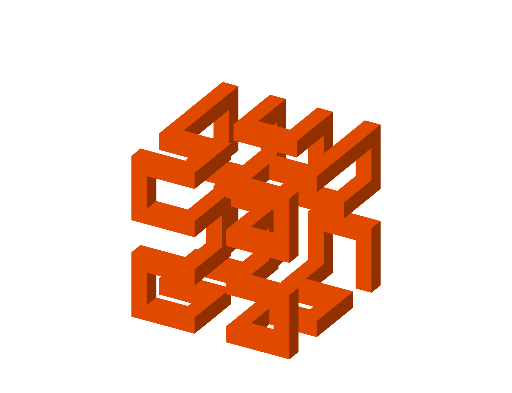
This GeoGebra example demonstrates how to build a Hilbert’s-cube-related 3D geometric configuration by applying a sequence of symmetry and placement operations. It highlights how local geometric constraints generate a larger spatial structure. The key mathematics includes solid geometry (cube/prism-like composition), spatial intersection of objects, and transformation geometry using translations, rotations, and reflections to systematically reproduce congruent parts. Construction-wise, the workflow leverages commands from the provided construct summary: Segment and Line to define structural edges and directions; Sphere to create a 3D constraint surface; Intersect to compute intersection points that anchor key vertices (e.g., A, B, C, …); Polygon and Prism to form faces and solid bodies; Vector together with Translate, Rotate, and Mirror to control movement and orientation; Midpoint to establish scale and reference; and Point/PointIn to define points and check their placement within the intended geometric objects. Suitable for advanced secondary school and early university learning, especially for lessons on 3D constructions and transformation-based reasoning.
GeoGebra Commands & Parameters
Segment(C, E) → fSegment(E, F) → iSegment(F, D) → jSegment(D, C) → lSegment(H, G) → mSegment(G, A) → nSegment(A, B) → pSegment(B, E) → qSegment(C, A) → rSegment(D, G) → sSegment(F, H) → gSphere(F, 1) → aIntersect(i, a, 1) → JIntersect(j, a, 1) → KIntersect(g, a, 1) → LSphere(F, 4) → bIntersect(j, b, 1) → MIntersect(g, b, 1) → NIntersect(i, b, 1) → OLine(L, m) → kLine(M, g) → tIntersect(t, k) → PLine(L, i) → cLine(J, g) → dIntersect(c, d) → QPolygon(Q, J, F, L) → q1, q_1, j_1, f_1, l_1Prism(q1, 4) → o, V, edgeQV, edgeJW, edgeFZ, edge1, edgeVW, edgeWZ, edge3, edge2, W, Z, A_1, faceJQVW, faceFJWZ, face1, face2, face3Sphere(O, 1) → eIntersect(i, e) → R, SVector(F, S) → uTranslate(o, u) → o'_{1}Sphere(Z, 1) → vIntersect(j, v) → T, ULine(T, t) → g_1Midpoint(W, T) → B_1Line(B_1, t) → h_1Rotate(o, 90°, h_1) → o'Point(c) → C_1Sphere(C_1, 1) → wSphere(S, 1) → b_1PointIn(b_1) → D_1Midpoint(D_1, C_1) → E_1Segment(B, H) → hLine(E_1, h) → i_1Rotate(o'_{1}, -90°, i_1) → c_1Line(N, c) → k_1Line(S, d) → m_1Intersect(k_1, m_1) → ILine(I, p) → n_1Sphere(I, 1) → d_1Intersect(n_1, d_1) → F_1, G_1Intersect(m_1, d_1, 1) → H_1Intersect(k_1, d_1, 1) → J_1Midpoint(H_1, J_1) → I_1Line(I_1, j) → p_1Rotate(c_1, 90°, p_1) → e_1Intersect(d, k_1) → K_1Line(H_1, k_1) → r_1Intersect(g, r_1) → L_1Midpoint(L_1, K_1) → M_1Line(M_1, j) → s_1Rotate(e_1, -90°, s_1) → o_1Sphere(N, 3) → t_1Intersect(g, t_1) → N_1, O_1Line(O_1, h) → f_2Intersect(f_2, d) → P_1Mirror(c_1, eq1) → u_1Mirror(e_1, eq1) → v_1Mirror(o', eq1) → o''Sphere(H, 1) → w_1Intersect(g, w_1) → Q_1,Vector(O_1, H) → u_2Translate(v_1, u_2) → a_2Mirror(o, eq1) → o'_{2}Intersect(t, m) → R_1Line(R_1, n) → g_2Sphere(R_1, 4) → b_2Intersect(g_2, b_2) → S_1, T_1Line(T_1, p) → h_2Intersect(h, h_2) → U_1Intersect(f_2, h_2) → V_1Sphere(T_1, 1) → c_2Intersect(h_2, c_2) → W_1, Z_1Vector(U_1, Z_1) → v_2Translate(u_1, v_2) → d_2Line(T_1, r) → i_2Sphere(T_1, 4) → e_2Intersect(i_2, e_2) → A_2, B_2Intersect(t, e_2) → C_2, D_2Sphere(A_2, 1) → j_2Intersect(i_2, j_2) → E_2, F_2Line(A_2, g_2) → k_2Intersect(k_2, j_2) → G_2, H_2Line(F_2, k_2) → l_2Point(k_2) → I_2Line(I_2, i_2) → m_2Intersect(m_2, l_2) → J_2Polygon(A_2, I_2, J_2, F_2) → q2, n_2, p_2, q_2, r_2Prism(q2, 3) → s_2, O_2, edge12, edge14, edge15, edge13, edge16, edge18, edge19, edge17, P_2, Q_2, R_2, face10, face12, face11, face9, face13Vector(J_2, Q_2) → w_2Translate(d_2, w_2) → o_2Line(O_2, s) → t_2Intersect(h_2, t_2) → K_2Line(K_2, n) → f_3Sphere(K_2, 1) → a_3Intersect(f_3, a_3) → L_2, M_2Intersect(t_2, a_3) → N_2, S_2Midpoint(N_2, L_2) → T_2Line(T_2, p) → g_3Rotate(o_2, -90°, g_3) → b_3Vector(C_2, G) → u_3Translate(o'_{2}, u_3) → c_3Translate(o'', u_3) → o'''Translate(d_2, u_3) → d_3Intersect(m, w_1) → U_2,Vector(U_2, G) → v_3Translate(v_1, v_3) → e_3Translate(o_1, v_3) → h_3Sphere(D, 3) → i_3Intersect(s, i_3) → V_2,Vector(V_2, D) → w_3Translate(h_3, w_3) → j_3Intersect(k, t_2) → W_2Intersect(s, k) → Z_2Vector(G, Z_2) → k_3Translate(c_3, k_3) → l_3Intersect(j, i_3) → A_3,Vector(D, A_3) → m_3Translate(j_3, m_3) → n_3Intersect(s_1, t_2) → B_3Point(s_1) → C_3Vector(D_3, C_3) → p_3Translate(e_1, p_3) → o_3Translate(c_1, p_3) → q_3Translate(o'_{1}, p_3) → r_3Intersect(l, i_3) → E_3,Vector(D, E_3) → s_3Translate(j_3, s_3) → t_3Translate(o', u) → o''_{1}Translate(o''_{1}, p_3) → a_4Translate(a_4, u_2) → b_4Mirror(t_3, f_4) → c_4Mirror(d_3, f_4) → d_4Mirror(e_3, f_4) → e_4Mirror(o''', f_4) → g_4Mirror(r_3, f_4) → h_4Mirror(q_3, f_4) → i_4Mirror(n_3, f_4) → j_4Mirror(o_3, f_4) → k_4Mirror(l_3, f_4) → l_4Mirror(j_3, f_4) → m_4Mirror(h_3, f_4) → n_4Mirror(e_3, f_4) → o_4Mirror(d_3, f_4) → p_4Mirror(o''', f_4) → q_4Mirror(c_3, f_4) → r_4Mirror(b_3, f_4) → s_4Mirror(o_2, f_4) → t_4Mirror(d_2, f_4) → u_4Mirror(o'', f_4) → o'''_{1}Mirror(o'_{2}, f_4) → v_4Mirror(a_2, f_4) → w_4Mirror(u_1, f_4) → a_5Mirror(v_1, f_4) → b_5Mirror(o_1, f_4) → c_5Mirror(e_1, f_4) → d_5Mirror(c_1, f_4) → e_5Mirror(o'_{1}, f_4) → f_5Mirror(o', f_4) → o''_{2}Mirror(o, f_4) → o'_{3}Mirror(u_1, f_4) → g_5Mirror(s_2, f_4) → h_5
AI Drawing Prompt Reference
Draw a 3D geometric configuration demonstrating the construction of a Hilbert's cube-related structure through symmetry and placement operations. Begin by defining a series of line segments to form the basic framework, then use intersections between spheres and lines to determine key vertices. Form faces and solid bodies using polygons and prisms. Systematically replicate congruent parts by applying vectors combined with translation, rotation, and reflection, resulting in a complex spatial structure with 3D symmetry.
The prompt above was compiled from the original drawing commands and is for reference only.