
Spinning Cube and the Belt Trick (Belt Trick) Visualization
Loading the math board and drawing, please wait…
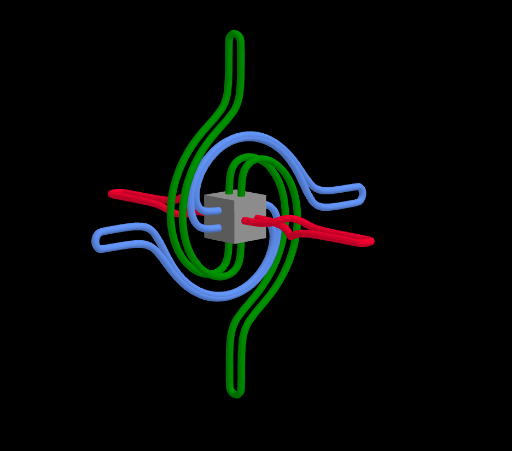
This example demonstrates the “Belt Trick” phenomenon by animating a spinning cube in 3D: even after an apparent nontrivial twist, a carefully chosen continuous motion can return the object to its initial orientation without abrupt discontinuities. Key ideas include rigid-body rotations in space, transformation-driven motion, and parameterized curves/paths used to visualize how the rotation evolves over time. Construction relies on GeoGebra commands CurveCartesian and Rotate: CurveCartesian is used to create Cartesian curves that serve as motion-related trajectories/auxiliary loci, while Rotate applies a continuous rotation by an angle α to the cube. Intermediate objects such as speed and setup parameters, together with computed vector/point components (e.g., CrossX/CrossY/CrossZ, KX/KY/KZ, and coordinate differences like PMinusKX/PMinusKY/PMinusKZ), organize the rotation axis and update positions. Dot helps mark key points corresponding to important configurations. The result is a clear interactive geometric demonstration for understanding continuous spatial transformations. Suitable for upper secondary school through introductory university courses on solid geometry, transformation geometry, and math visualization.
GeoGebra Commands & Parameters
CurveCartesian(RX(cos(((2 * pi) * t)) + (20 * tanh((9 * cos(((2 * pi) * t))))), sin(((2 * pi) * t)), 0), RY(cos(((2 * pi) * t)) + (20 * tanh((9 * cos(((2 * pi) * t))))), sin(((2 * pi) * t)), 0), RZ(cos(((2 * pi) * t)) + (20 * tanh((9 * cos(((2 * pi) * t))))), sin(((2 * pi) * t)), 0), t, 0, 1) → c1CurveCartesian(RX(0, cos(((2 * pi) * t)) + (20 * tanh((9 * cos(((2 * pi) * t))))), sin(((2 * pi) * t))), RY(0, cos(((2 * pi) * t)) + (20 * tanh((9 * cos(((2 * pi) * t))))), sin(((2 * pi) * t))), RZ(0, cos(((2 * pi) * t)) + (20 * tanh((9 * cos(((2 * pi) * t))))), sin(((2 * pi) * t))), t, 0, 1) → c2CurveCartesian(RX(sin(((2 * pi) * t)), 0, cos(((2 * pi) * t)) + (20 * tanh((9 * cos(((2 * pi) * t)))))), RY(sin(((2 * pi) * t)), 0, cos(((2 * pi) * t)) + (20 * tanh((9 * cos(((2 * pi) * t)))))), RZ(sin(((2 * pi) * t)), 0, cos(((2 * pi) * t)) + (20 * tanh((9 * cos(((2 * pi) * t)))))), t, 0, 1) → c3Rotate(Cube[A1, A2, A3], (2 * α), zAxis) → cube
AI Drawing Prompt Reference
Draw a 3D spinning cube animation to demonstrate the Belt Trick phenomenon. The cube should be continuously rotated to show how it returns to its initial orientation. Key points like the rotation axis and position changes should be clearly visible. The animation should show continuous motion without abrupt changes. Use parameterized curves to describe the rotation path and mark important configuration points to help understand continuous spatial transformations.
The prompt above was compiled from the original drawing commands and is for reference only.