
Leg Press Geometry: A Trigonometry Challenge from the Weight Room
Loading the math board and drawing, please wait…
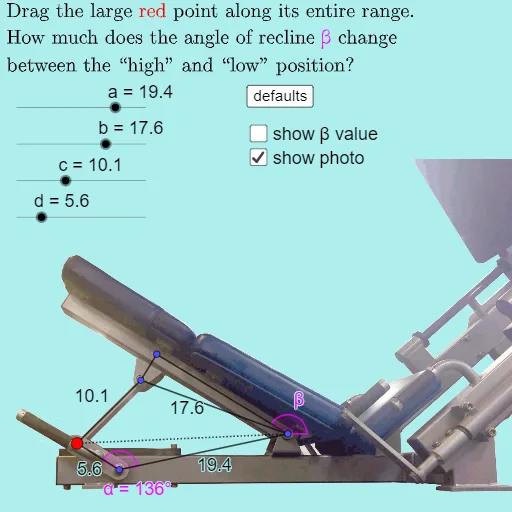
This GeoGebra example models a leg press machine from a gym as a geometric configuration, demonstrating how trigonometric functions and geometric constructions can solve spatial or mechanical relationships at different angles. The core math concepts include the cosine rule, angle measurement, intersections of lines and segments, circular arcs, and volume (possibly representing the range of motion or force region). Construction highlights: using GeoGebra commands such as Intersect, CircleArc, Point, Segment, Angle, and Corner, the model builds multiple angle ranges (anglerange1/2), key points (P1-P7), arcs (arcP1, arcP4, arcP2P3), segments (seg_a to seg_f), and variables α, β, β2, with sliders and buttons for dynamic interaction. Suitable for high school or early college students learning trigonometry, geometric modeling, and dynamic geometry software, as well as for sports science applications in movement analysis.
GeoGebra Commands & Parameters
Intersect(xAxis, yAxis) → P1CircleArc(P1, P1 + ((d * cos(anglerange1)), (d * sin(anglerange1))), P1 + ((d * cos(anglerange2)), (d * sin(anglerange2)))) → arcP1Point(arcP1) → P4CircleArc(P4, P4 + (c, 0), P4 - (c, 0)) → arcP4Point(Circle[P1, a]) → P2CircleArc(P2, P2 + (b, 0), P2 - (b, 0)) → arcP2Intersect(arcP4, arcP2) → P3, A, ,Segment(P1, P2) → seg_aSegment(P2, P3) → seg_bSegment(P3, P4) → seg_cSegment(P4, P1) → seg_dPoint(Line[P6, xAxis]) → P7Angle(P1 + (1, 0), P1, P4) → angleCircleArc((P2 + P3) / 2, P2, P3) → arcP2P3Point(arcP2P3, 0.875) → P5Segment(P2, P5) → seg_eSegment(P5, P3) → seg_fAngle(P2 + (10, 0), P2, P5) → βSegment(P2, P4) → fAngle(P2, P1, P4) → αAngle(P2 + (10, 0), P2, P5) → β2Corner(5) → dims
AI Drawing Prompt Reference
Draw a geometric model of a gym leg press machine to demonstrate how trigonometric functions and geometric constructions solve spatial or mechanical relationships at different angles. Include multiple angle ranges, key points, and circular arcs. Start by plotting the intersection of coordinate axes, then draw two arcs centered at this point to represent angle ranges. Next, draw another arc using a point on one of the arcs as the center, find the intersection points of the arcs, and connect these points to form a polygon. Add some helper lines and angle markings to make the diagram clearer.
The prompt above was compiled from the original drawing commands and is for reference only.