
Cube Sides: Flapping and Sliding
Loading the math board and drawing, please wait…
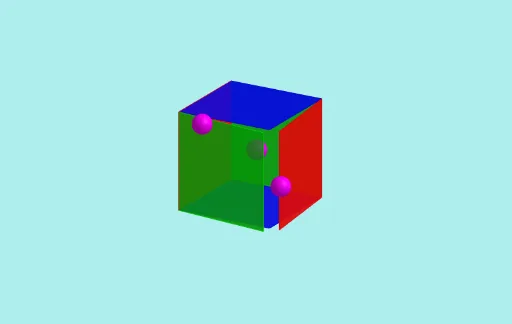
This GeoGebra example demonstrates the dynamic behavior of cube sides, including flapping and sliding motions, illustrating transformations in three-dimensional geometry. Core mathematical concepts involved include solid geometry, surface properties, numbers, expected value, conditional probability, prisms, and congruence. The construction utilizes commands such as CurveCartesian for parametric curves, Rotate for rotational transformations, and Sphere for spherical objects. Key objects include pathscale for path scaling, coordinate variables X and Y, parameters like angle, phase, and speed, and animation controls. It is suitable for high school or introductory college students studying geometry and probability.
GeoGebra Commands & Parameters
CurveCartesian((s * X(t)), (s * Y(t)), 0, t, 0, (2 * π)) → aCurveCartesian(0, (s * X(t)), (s * Y(t)), t, 0, (2 * π)) → bCurveCartesian((s * Y(t)), 0, (s * X(t)), t, 0, (2 * π)) → cRotate(Rotate[Polygon[A, B, F, E], f(n - π / 4) - f(n - (5 * π / 4)), If[x(P_a) ≥ 0, B, A], zAxis], f(n - π / 12) - f(n - (19 * π / 12)), If[z(P_b) ≥ 0, E, A], xAxis) → q1Rotate(Rotate[Polygon[C, D, H, G], (-f(n - (3 * π / 4))) + f(n - (7 * π / 4)), If[x(P_a) ≥ 0, C, D], zAxis], f(n - (7 * π / 12)) - f(n - (13 * π / 12)), If[z(P_b) ≥ 0, G, C], xAxis) → q2Rotate(Rotate[Polygon[A, B, C, D], (-f(n - (7 * π / 12))) + f(n - (19 * π / 12)), If[y(P_b) ≥ 0, C, A], xAxis], (-f(n - (11 * π / 12))) + f(n - (17 * π / 12)), If[x(P_c) ≥ 0, B, A], yAxis) → q3Rotate(Rotate[Polygon[E, F, G, H], (-f(n - π / 12)) + f(n - (13 * π / 12)), If[y(P_b) ≥ 0, G, E], xAxis], (-f(n - (5 * π / 12))) + f(n - (23 * π / 12)), If[x(P_c) ≥ 0, G, E], yAxis) → q4Rotate(Rotate[Polygon[A, D, H, E], f(n - (11 * π / 12)) - f(n - (23 * π / 12)), If[z(P_c) ≥ 0, E, A], yAxis], (-f(n - (3 * π / 12))) + f(n - (9 * π / 12)), If[y(P_a) ≥ 0, D, A], zAxis) → q5Rotate(Rotate[Polygon[B, C, G, F], f(n - (5 * π / 12)) - f(n - (17 * π / 12)), If[z(P_c) ≥ 0, F, B], yAxis], f(n - (15 * π / 12)) - f(n - (21 * π / 12)), If[y(P_a) ≥ 0, C, B], zAxis) → q6Sphere(P_a, radius) → sphere_aSphere(P_b, radius) → sphere_bSphere(P_c, radius) → sphere_c
AI Drawing Prompt Reference
A cube whose six faces flap and slide along three mutually perpendicular parametric curves lying in the XY, YZ, and XZ planes, each scaled by a factor. Each face undergoes two successive rotations: first about the Z or X axis, then about the X or Y axis, with angles given by a sinusoidal phase function. The rotation centers switch between opposite vertices depending on the sign of the coordinates of three control points, which are marked by equal‑radius spheres. The construction combines solid geometry with animated transformations.
The prompt above was compiled from the original drawing commands and is for reference only.