
Partitioning Composite Solids and Distributing Volumes (with Random Choice)
Loading the math board and drawing, please wait…
In collections
Rauminhalt zusammengesetzter Körper - Quader und Würfel
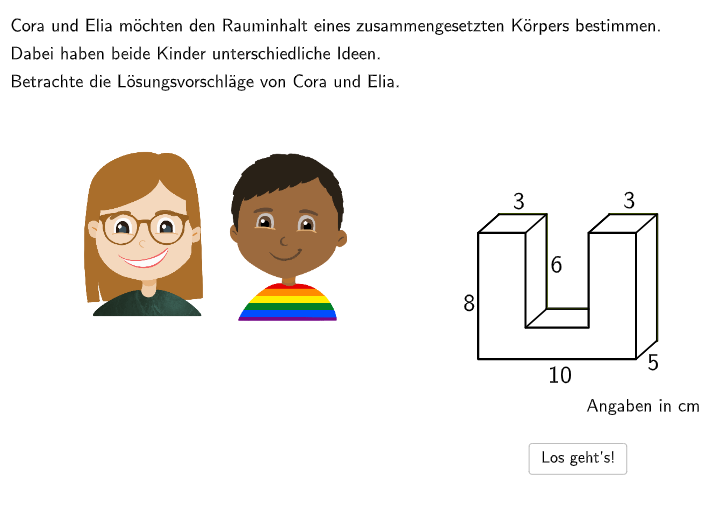
This example demonstrates how to split a composite solid (e.g., a body formed by combining orthogonal rectangular solids) into smaller geometric parts and use volume relationships to reason about how the total volume is distributed among the sub-solids. Key mathematical concepts include solid geometry, volume (Volumen), power-function ideas related to volume/measure scaling, and tangent-related geometric intuition (Tangente) to connect local geometric behavior with function understanding. It also incorporates probability via random variables (Zufallsvariablen or Zufallsgrößen) to randomize the selection of split options or practice steps. Construction and interaction highlights from the provided GeoGebra “construct summary”: Textfield for user inputs; Sum for aggregating sub-volume quantities; Shuffle and Element to randomly select from candidate elements/parameters; U and LaTeX for units and formula rendering; Segment and PolyLine to build the outlines/edges of parts; Translate and Dilate to move and scale parts consistently; If for conditional checking of answers; and listSteps plus counters such as attemptCountInputBox*, questionCount, and correctCount to manage step-by-step practice and validation. The workflow is supported by validate, showanswer, showsolution, and buttons like btnValidate/btnTryAgain/btnNew to guide learning and feedback. Suitable for late secondary school through early undergraduate levels, especially for teaching volume partitioning, measure scaling, and randomized practice/self-assessment.
GeoGebra Commands & Parameters
Textfield(input1) → InputBox1Textfield(input2) → InputBox2Sum({attemptCountInputBox1, attemptCountInputBox2, attemptCountInputBox3, attemptCountInputBox4, attemptCountInputBox5}) → attemptCountShuffle(Sequence[Random[0, 10], i, 1, 100]) → randomNosForX, {7, 3, 10, 7, 4, 4, 6, 8, 5, 5, 2, 3, 3, 3, 4, 4, 9, 1, 0, 8, 6, 4, 8, 6, 7, 0, 7, 9, 1, 5, 8, 8, 3, 4, 7, 2, 0, 9, 4, 1, 9, 0, 10, 0, 6, 3, 6, 0, 0, 8, 10, 0, 4, 8, 5, 9, 6, 10, 2, 0, 3, 1, 1, 0, 2, 2, 4, 9, 5, 0, 7, 2, 3, 1, 7, 4, 0, 2, 2, 3, 2, 5, 9, 6, 5, 8, 6, 9, 0, 1, 10, 0, 5, 10, 4, 6, 5, 5, 10, 8}Element(randomNosForX, Mod[questionCount, 100] + 1) → numXU(A, pointVec) → l1, l2, C, D, E, F, G, H, l0BG1, l4Kontur, l2Mantel, l4lines, l4linesManual, l5FG1, l5FG2, BLaTeX(step, true, true) → Text1Segment(pointOption1, F) → segmentOption1Segment(F, pointOption2) → segmentOption2Segment(E, pointOption3) → segmentOption3Segment(E, pointOption4) → segmentOption4Translate(C, pointVec) → C'Translate(pointOption4, pointVec) → pointOption4'Translate(F, pointVec) → F'Translate(G, pointVec) → G'Translate(H, pointVec) → H'If(option1, A, pointOption1) → pointObject11If(option1, pointOption2, F) → pointObject12Translate(D, pointVec) → D'Segment(pointOption4, pointOption4') → segmentOption41Translate(B, pointVec) → B'If(¬option4, pointOption4', B') → pointObject31If(¬option4, pointOption4, B) → pointObject32If(¬option4, E, pointOption3) → pointObject33If(option2 ∧ option4, 1, option1 ∧ option4, 2, option1 ∧ option3, 3, 4) → typSegment(G', D') → segmentFilled1Segment(G, D) → segmentFilled2Segment(pointOption1, F) → segmentCutted1Segment(E, pointOption4) → segmentCutted2Segment(pointOption4, pointOption4') → segmentCutted3Segment(B', C') → fSegment(C', D') → gSegment(D', D) → hSegment(E', F') → iSegment(F', G') → jSegment(G', H') → kSegment(H', H) → lIf(step ∈ {4, 5}, (-23.75, 32.5), (-23.75, 35)) → speechbubble12If(step ∈ {4, 5}, (0, 32.5), (3.75, 35)) → speechbubble13If(step ∈ {4, 5}, (0, 40.3), (3.75, 39.5)) → speechbubble14If(step ∈ {4, 5}, (-23.75, 40.3), (-23.75, 39.5)) → speechbubble15Textfield(input3) → InputBox3Textfield(input4) → InputBox4Textfield(input71) → InputBox71Textfield(input72) → InputBox72Textfield(input73) → InputBox73Textfield(input74) → InputBox74Textfield(input75) → InputBox75If((¬option1) ∧ (¬option2), input72 ≟ ((3 * 5) * 2), true) → correct72If((¬option3) ∧ (¬option4), input74 ≟ ((3 * 5) * 2), true) → correct74Dilate(Translate[l5FG2, (-10, 0)], step6Scalefactor, CenterOfDilation) → l3Dilate(Translate[listObject1, translationVector], step6Scalefactor, CenterOfDilation) → listObject1'Dilate(Translate[listObjectFilledLeftBottom, translationVector], step6Scalefactor, CenterOfDilation) → listObjectFilledLeftBottom'Dilate(Translate[listObjectFilledRightBottom, translationVector], step6Scalefactor, CenterOfDilation) → listObjectFilledRightBottom'Dilate(Segment[Translate[F, translationVector], Translate[pointOption2, translationVector]], step6Scalefactor, CenterOfDilation) → segmentOption2'Dilate(Segment[Translate[E, translationVector], Translate[pointOption3, translationVector]], step6Scalefactor, CenterOfDilation) → segmentOption3'Dilate(Segment[Translate[pointOption1, translationVector], Translate[F, translationVector]], step6Scalefactor, CenterOfDilation) → segmentOption1'Dilate(Translate[listObject3, translationVector], step6Scalefactor, CenterOfDilation) → listObject3'Dilate(Translate[listObject2, translationVector], step6Scalefactor, CenterOfDilation) → listObject2'Dilate(Translate[l0BG1, translationVector], step6Scalefactor, CenterOfDilation) → step6l0BG1'Dilate(Translate[l2Mantel, translationVector], step6Scalefactor, CenterOfDilation) → step6l2Mantel'Dilate(Translate[l4Kontur, translationVector], step6Scalefactor, CenterOfDilation) → step6l4Kontur'Dilate(Translate[l4linesManual, translationVector], step6Scalefactor, CenterOfDilation) → step6l4linesManual'Dilate(Translate[l5FG1, translationVector], step6Scalefactor, CenterOfDilation) → step6l5FG1'Dilate(Translate[l5FG2, translationVector], step6Scalefactor, CenterOfDilation) → step6l5FG2'Dilate(Segment[Translate[pointOption4, translationVector], Translate[pointOption4', translationVector]], step6Scalefactor, CenterOfDilation) → segmentOption41'Dilate(Translate[listObjectFilledRightBottom, translationVector], step6Scalefactor, CenterOfDilation) → listObjectFilledRightBottomBG'PolyLine(Dilate[B, step6Scalefactor, CenterOfDilation], Dilate[B', step6Scalefactor, CenterOfDilation], Dilate[A, step6Scalefactor, CenterOfDilation], Dilate[C', step6Scalefactor, CenterOfDilation], Dilate[D', step6Scalefactor, CenterOfDilation], Dilate[D, step6Scalefactor, CenterOfDilation], Dilate[E', step6Scalefactor, CenterOfDilation], Dilate[F', step6Scalefactor, CenterOfDilation], Dilate[G', step6Scalefactor, CenterOfDilation], Dilate[H', step6Scalefactor, CenterOfDilation], Dilate[H, step6Scalefactor, CenterOfDilation]) → mPolyLine(Translate[E, translationVector], Translate[pointOption4, translationVector], Translate[I', translationVector]) → nDilate(PolyLine[Translate[E, translationVector], Translate[pointOption4, translationVector], Translate[I', translationVector]], step6Scalefactor, CenterOfDilation) → segmentOption4'Translate(cora, (7, 0)) → cora'Textfield(input31) → InputBox31Textfield(input32) → InputBox32Translate(elia, (30.434007263501044, -17.511741828561323)) → elia'Translate(Mirror[speechbubble2, x = -18], (0.5, -20)) → speechbubble3Textfield(input2a) → InputBox2aTextfield(input3a) → InputBox3aTextfield(input1a) → InputBox1aTextfield(input1b) → InputBox1b
AI Drawing Prompt Reference
Draw a composite solid formed by combining several orthogonal rectangular prisms, then split it into smaller sub-solids and show how the total volume is distributed among them. Include multiple input boxes for user-entered values, and use line segments and polylines to outline the faces of the solid. Apply translation and scaling to display the separated parts. Add a random selection mechanism to pick parameters from a set, and show step hints, answer validation buttons, and attempt counters. Arrange text fields, buttons, and counters to guide the user through the volume partitioning and distribution exercise.
The prompt above was compiled from the original drawing commands and is for reference only.