
Geometric Construction for Piecewise Functions and Poisson Visualization
Loading the math board and drawing, please wait…
In collections
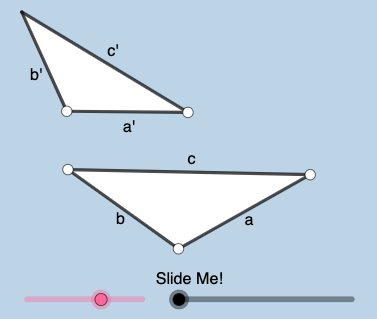
Exploration: Similar Triangles
This GeoGebra example demonstrates, through a geometric construction workflow, how a piecewise/power-function style shape and a Poisson distribution–related discrete probability pattern can be visualized and compared within one coordinated diagram. The key math ideas are piecewise functions, power-function behavior for shaping curves/segments, correlation as a conceptual bridge for comparing relationships, and Poisson distribution as a probability model over discrete counts. Construction is performed by building and controlling geometric primitives: Segment, Ray, Line, and Polygon define the backbone geometry; Point, Intersect, and OrthogonalLine capture key derived points and perpendicular constraints; Circle, CircleArc, and CircleSector provide arc-based components, while Min and Angle impose limiting/angle conditions. Finally, Rotate, Translate, Dilate, and Vector are used to transform and assemble parts into the full dynamic structure. Suitable for high school advanced math through early university courses, especially for function graphing, probability & statistics intuition, and GeoGebra geometry–algebra linkage activities.
GeoGebra Commands & Parameters
Segment(A, B) → aRotate(B, (a_{2} * pi / 180), A) → B'Ray(A, B') → fPoint(f) → CSegment(A, C) → bOrthogonalLine(C, b) → rCircle(C, 1) → tIntersect(t, r, 2) → KOrthogonalLine(K, r) → i_1Point(i_1) → WRotate(E, (a_{2} * pi / 180), D) → E'Ray(D, E') → jSegment(D, E) → a'Circle(D, (a' / a * b)) → dIntersect(d, j, 1) → FSegment(D, F) → b'Line(K, b') → k_1Point(k_1) → ULine(K, a') → j_1Point(j_1) → VCircle(B, 1) → sOrthogonalLine(B, a) → qPoint(q) → MIntersect(s, q, 1) → JOrthogonalLine(J, q) → h_1Point(h_1) → PPolygon(A, B, C) → t1, c_{2}, a_1, b_{1}Polygon(D, F, E) → t2, e, d_1, f_1Min({a, a', b, b'}) → gCircle(A, (0.35 * g)) → hIntersect(h, a, 1) → GIntersect(h, b, 1) → HCircleSector(A, G, H) → kLine(A, a') → iDilate(A, If[-1 < l ≤ 0, (-l), 0], D) → A'Vector(A, A') → uTranslate(k, u) → k'Point(i) → IAngle(I, A, B) → αCircleArc(A, G, H) → pDilate(D, If[1 < l ≤ 2, 2 - l, 0], J) → D'Vector(D, D') → vTranslate(D, v) → D'_{1}Translate(E, v) → E'_{1}Segment(D'_{1}, E'_{1}) → a''Line(J, a') → g_1Point(g_1) → LAngle(P, J, L) → βRotate(D'_{1}, If[1 < l ≤ 2, ((l - 1) * β), β], D'_{1}) → NRotate(E'_{1}, If[1 < l ≤ 2, ((-(l - 1)) * β), (-β)], D'_{1}) → OSegment(N, O) → a'''Dilate(D, If[2 < l ≤ 3, 3 - l, 0], K) → D'_{2}Vector(D, D'_{2}) → wTranslate(D, w) → D'_{3}Translate(E, w) → E'_{2}Point(j_1) → QPoint(i_1) → RAngle(W, K, U) → γRotate(D'_{3}, If[2 < l ≤ 3, ((l - 2) * γ), γ], D'_{3}) → SRotate(E'_{2}, If[2 < l ≤ 3, ((l - 2) * γ), γ], D'_{3}) → TTranslate(D, w) → D'_{4}Translate(F, w) → F'Segment(D'_{4}, F') → b''Rotate(D'_{4}, If[2 < l ≤ 3, ((-(l - 2)) * γ), (-γ)], K) → ZRotate(F', If[2 < l ≤ 3, ((-(l - 2)) * γ), (-γ)], K) → F''Segment(Z, F'') → b'''Angle(A, C, B) → δIntersect(t, b, 1) → A_1Rotate(A_1, If[-3 < l ≤ -2, ((l + 3) * δ), δ], C) → B_1CircleSector(C, A_1, B_1) → e_1Dilate(C, If[-1 < l ≤ 0, (-l), 0], F) → C'Vector(C, C') → u_1Translate(e_1, u_1) → p_1Line(C, b') → l_1Point(l_1) → C_1Angle(C_1, C, A) → εSegment(F, E) → m_1Segment(B, C) → cOrthogonalLine(B, c) → r_1Circle(B, 1) → s_1Intersect(s_1, r_1, 1) → D_1Dilate(E, If[3 < l ≤ 4, 4 - l, 0], D_1) → E'_{3}Vector(E, E'_{3}) → v_1Translate(F, v_1) → F'_{1}Translate(E, v_1) → E'_{4}Segment(F'_{1}, E'_{4}) → t_1Line(E, c) → f_2Point(f_2) → E_1Angle(F, E, E_1) → ζRotate(F'_{1}, If[3 < l ≤ 4, ((l - 3) * ζ), ζ], E'_{3}) → F_1Rotate(E'_{4}, If[3 < l ≤ 4, ((l - 3) * ζ), ζ], E'_{3}) → G_1Segment(F_1, G_1) → g_2Angle(B, A, C) → ηRotate(G, If[-3 < l ≤ -2, ((l + 3) * η), η], A) → G'CircleSector(A, G, G') → d_2CircleArc(C, A_1, B_1) → e_2Rotate(p_1, If[-1 < l ≤ 0, ((-(l + 1)) * ε), (-ε)], C') → q_1Rotate(k', If[-1 < l ≤ 0, ((-(l + 1)) * α), (-α)], A') → k''
AI Drawing Prompt Reference
Create a geometric diagram combining piecewise function shapes and Poisson distribution visualization. Start with two rays from distinct points, rotated by an angle. Place points on rays, draw perpendiculars, circles, and intersections. Connect key points with polygons, add circular arcs and sectors, then apply translation and scaling to replicate parts. Include angle markers and length constraints to show relationships between continuous curves and discrete probability points.
The prompt above was compiled from the original drawing commands and is for reference only.