
Interactive Log & Exp Functions in GeoGebra
Loading the math board and drawing, please wait…
In collections
The GeoGebra's Toolbox for Teachers and Students
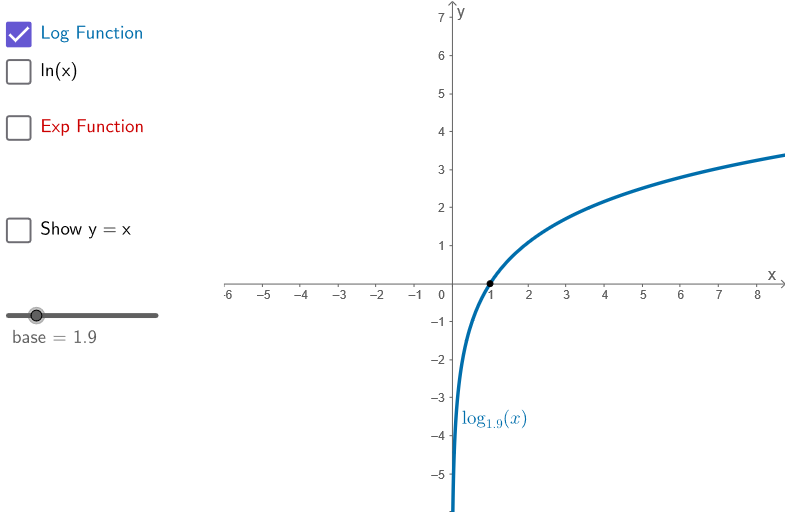
This GeoGebra example interactively demonstrates the relationship between exponential and logarithmic functions by combining function graphs with geometric constructions. It helps learners visualize how log and exp shapes correspond (including their inverse behavior), and how selected points, segments, and mirrored configurations lead to interpretable graphical features such as marked intervals/regions (e.g., confidence-interval style area visualization). Key math topics include exponential functions, logarithms and logarithmic functions, inverse-function intuition, and graph transformation ideas like mirroring and constructing polygonal regions on top of the coordinate plane. Construction is carried out using GeoGebra commands such as Point, Segment, Mirror, and Polygon, with objects including base, f, g, multiple labeled points (A, B, C, D, E, F, G, etc.) and parameter-like variables (a, b, c, d, e, i, p) plus auxiliary/test points (testo2, testo3, peep) to drive the interactive layout. Suitable for classroom demonstration and self-study from advanced high school through early undergraduate courses, focusing on function graphing and conceptual linking between algebraic expressions and visual interval regions.
GeoGebra Commands & Parameters
Point(f) → APoint(g) → BPoint(f) → ESegment(E, F) → kSegment(O, F) → lMirror(E, a) → E'Segment(E', G) → mSegment(G, O) → nPolygon({(-6, y(Corner[1])), Corner[2], Corner[3], (-6, y(Corner[3]))}) → peep
AI Drawing Prompt Reference
Draw exponential and logarithmic function graphs in a coordinate system to demonstrate their inverse relationship. Create auxiliary shapes using points, segments, reflections, and polygons, including marked intervals and regions, to visualize function correspondence and symmetry, and construct features resembling confidence intervals.
The prompt above was compiled from the original drawing commands and is for reference only.