
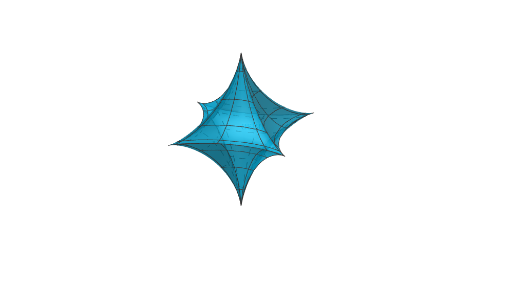
Astroidal Ellipsoid: Parametric Surface in 3D
Loading the math board and drawing, please wait…
In collections
Surfaces
This example demonstrates how to construct and visualize an astroidal ellipsoid—a distinctive 3D surface—using parametric representation. It highlights the geometric phenomenon that emerges from sweeping/parameter-driven mapping together with rotation-like construction and clear symmetry properties. The key math ideas include parametric curves/surfaces, coordinate-geometry modeling in 3D, and how geometric constraints related to circle-like or circumscribed concepts guide the surface’s shape. Construction focuses on GeoGebra’s Surface tool with LaTeX-based labeling: parameters and variables (a, u, v, b, c) are used to define the parametric surface, while the “astro” object represents the target surface and text1 provides supporting annotation/notation. Suitable for secondary-to-university learners, it is a strong visualization aid for solid geometry, analytic geometry, and STEM-focused math exploration.
GeoGebra Commands & Parameters
Surface(((a * (cos(u))^(3)) * (cos(v))^(3)), ((b * (sin(u))^(3)) * (cos(v))^(3)), (c * (sin(v))^(3)), u, ((-pi)) / 2, pi / 2, v, (-pi), pi) → astroLaTeX(astro, false, true) → text1
AI Drawing Prompt Reference
Draw a 3D parametric surface in a coordinate space using parameters u in [−π/2, π/2] and v in [−π, π]. Define the surface by the equations x = a·(cos u)^3·(cos v)^3, y = b·(sin u)^3·(cos v)^3, and z = c·(sin v)^3. Add a mathematical label/annotation tied to the surface’s name to present the key notation, and visually emphasize the surface’s symmetry properties generated by this parameter-driven mapping.
The prompt above was compiled from the original drawing commands and is for reference only.