
Intersection of Three Cylinders (Solid Overlap Visualization)
Loading the math board and drawing, please wait…
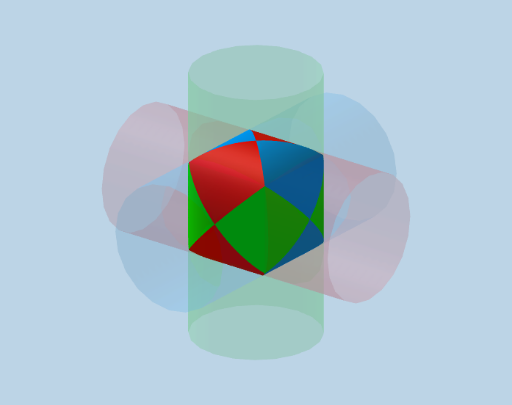
This example demonstrates how to construct and visualize the 3D overlap (intersection) region formed by three cylindrical solids in GeoGebra. It highlights key ideas from solid geometry, including parametric description of cylinder surfaces, the geometry of intersection boundaries, and the use of spatial transformations (rotation and mirroring) to orient congruent cylinders in different directions. Construction relies on generating cylinder surfaces with Surface, building related coordinate curves via CurveCartesian, then applying Rotate and Mirror to reposition and symmetrize the solids. Sequence is used to control parameters or the order of construction, while Cube provides a spatial reference/frame for organizing the scene and emphasizing the intersection volume. The model uses coordinate frames, parameters (e.g., radius/offset-like variables such as b, r, p, h), and constructed key points, along with polygonal face patches (e.g., caraABCD, caraADHE, caraABFE, caraBCGF, caraCDHG) to render the solid structure and its visible surfaces. Suitable for upper-secondary to early university geometry/analytic geometry lessons, as well as for visualization and modeling practice.
GeoGebra Commands & Parameters
Surface((r * cos(u)), v, (r * sin(u)), u, 0, (2 * π), v, ((-p) * r), (p * r)) → cilySurface(v, (r * cos(u)), (r * sin(u)), u, 0, (2 * π), v, ((-p) * r), (p * r)) → cilxCurveCartesian((r * cos(t)), (r * cos(t)), (r * sin(t)), t, π / 4, π / 2) → hSurface((r * cos(u)), (r * sin(u)), v, u, 0, (2 * π), v, ((-p) * r), (p * r)) → cilzRotate(h, (-(90°)), zAxis) → h'Surface((h(t) * k) + (h'(t) * (1 - k)), k, 0, 1, t, π / 4, π / 2) → kMirror(k, Plane[x = 0]) → k'Sequence(Rotate[l1, (i * 90°), yAxis], i, 0, 3) → l2Rotate(l2, 90°, zAxis) → l2'Rotate(l2, 90°, xAxis) → l2'_1Cube(A, B, C) → c, D, caraCDHG, caraEFGH, aristaAD, aristaAB, aristaBC, aristaCD, aristaAE, aristaDH, aristaEH, aristaEF, E, aristaBF, aristaFG, aristaCG, aristaGH, F, G, H, caraABCD, caraADHE, caraABFE, caraBCGF
AI Drawing Prompt Reference
Draw the intersection region of three cylinders. First, create the surfaces of three cylinders, then adjust them to different orientations using rotation and mirroring. Use parameters to control the radius and offset of the cylinders, generate key points and patches for the intersection region, and finally use a cube as a reference frame to showcase the intersection volume.
The prompt above was compiled from the original drawing commands and is for reference only.