
Caterpillar Chase: Dynamic Geometry with Random Motion
Loading the math board and drawing, please wait…
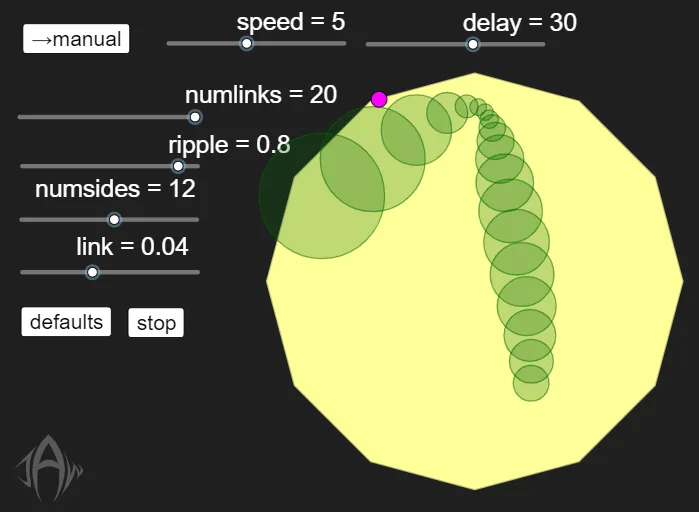
① This example demonstrates a caterpillar-like figure made of circles whose head chases a draggable point, or moves to random locations in auto mode, creating a chasing animation. ② Core math concepts include coordinate geometry, sequence generation, polygon and polyline construction, and the use of random numbers in dynamic simulations, along with distance calculations and reflection (e.g., boundary bouncing). ③ Construction highlights: Using GeoGebra commands such as Sequence, PolyLine, Point, Segment, Intersect, Polygon, Circle, Distance, and Corner, it builds multiple circles (c1 to c10), a polyline (polyline1), a polygon (poly1), and random points (RandP, RandP1, RandP2), with sliders (speedn) and a button (button1) to control auto mode and speed. ④ Suitable for middle or high school math classes to intuitively understand coordinate tracking, sequence construction, and random motion, and as an introductory example of programmatic geometric construction.
GeoGebra Commands & Parameters
Sequence(((board * cos(((2 * π / numsides) * t))), (board * sin(((2 * π / numsides) * t)))), t, 0, numsides) → l1PolyLine(l1) → polyline1Point(polyline1, rand1) → RandP1Segment(RandP2, RandP1) → randsegPoint(randseg, sin((π / 2 * m))^(2)) → RandPIntersect(xAxis, yAxis) → OriginPolygon(l1) → poly1Circle(P0, P1) → c1Circle(P1, P2) → c2Circle(P2, P3) → c3Circle(P3, P4) → c4Circle(P4, P5) → c5Circle(P5, P6) → c6Circle(P6, P7) → c7Circle(P7, P8) → c8Circle(P8, P9) → c9Circle(P9, P10) → c10Distance(P0, P1) → dist1Distance(P1, P2) → dist2Distance(P2, P3) → dist3Distance(P3, P4) → dist4Distance(P4, P5) → dist5Distance(P5, P6) → dist6Distance(P6, P7) → dist7Distance(P7, P8) → dist8Distance(P8, P9) → dist9Distance(P9, P10) → dist10Distance(P10, P11) → dist11Distance(P11, P12) → dist12Distance(P12, P13) → dist13Distance(P13, P14) → dist14Distance(P14, P15) → dist15Distance(P15, P16) → dist16Distance(P16, P17) → dist17Distance(P17, P18) → dist18Distance(P18, P19) → dist19Distance(P19, P20) → dist20Circle(P10, P11) → c11Circle(P11, P12) → c12Circle(P12, P13) → c13Circle(P13, P14) → c14Circle(P14, P15) → c15Circle(P15, P16) → c16Circle(P16, P17) → c17Circle(P17, P18) → c18Circle(P18, P19) → c19Circle(P19, P20) → c20Sequence("If(dist" + (Text[t]) + ">link, SetValue(P" + (Text[t]) + ", P" + (Text[t]) + "+ If(link>ripple dist" + (Text[t]) + ", (dist" + (Text[t]) + "-link)vec" + (Text[t]) + ", (1-ripple) (P" + (Text[t - 1]) + "-P" + (Text[t]) + "))))", t, 1, numlinks) → stepfwdCorner(5) → dims
AI Drawing Prompt Reference
Draw a caterpillar-like figure made of 10 circles, where each circle's center moves along a circular path. Drag a point to make the caterpillar's head chase this point. Alternatively, set a random mode to make the head move randomly along the circular path. Use a slider to adjust the movement speed.
The prompt above was compiled from the original drawing commands and is for reference only.