
Rainbow Pendulum: Multi-Ball Swing Simulation
Loading the math board and drawing, please wait…
In collections
Pendulum simulations
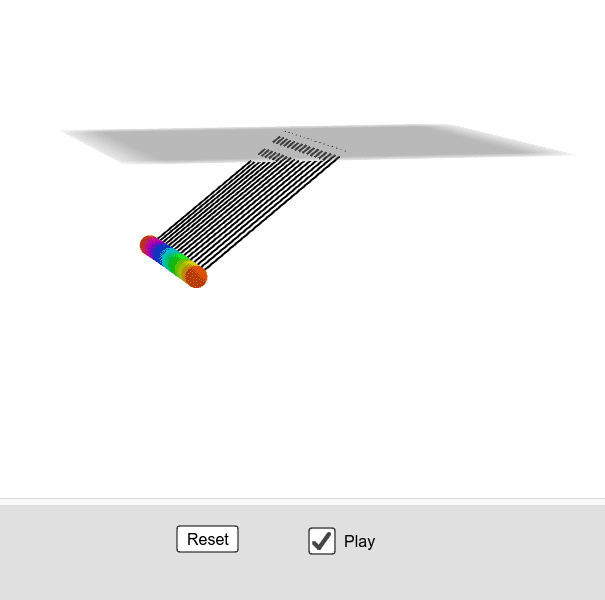
① This GeoGebra example demonstrates a pendulum system with multiple colored balls swinging under gravity and damping, creating a rainbow-like visual effect. ② Core mathematical concepts include simple harmonic motion, numerical integration of differential equations, vector decomposition, iterative updates of angle and angular velocity, and the effect of damping on amplitude. ③ Construction highlights: using commands such as Rotate, Translate, Segment to create pendulum arms and spheres, Sequence and Zip to generate multiple pendulums in batch, Slider to control initial angle, damping, and time step, and objects like Length, Sphere, angleV, force, speed, damping, along with lists of angles (angle1 to angle16) and angular velocities (angleV1, etc.). ④ Suitable for high school physics or math classes teaching vibration, periodic motion, and introductory numerical simulation, as well as university physics demonstrations to help students intuitively understand discrete solutions to differential equations.
GeoGebra Commands & Parameters
Rotate(Segment[O, (posx, posy)], π / 2, xAxis) → sRotate((posx, posy), π / 2, xAxis) → PSphere(P, 1) → sphZip("angle" + (Text[k]), k, Ln) → LnamAngZip("angleV" + (Text[k]), k, Ln) → LnamAngVZip("angleA" + (Text[k]), k, Ln) → LnamAngASequence(k, k, 0, 0.15, 0.01) → Ldiff, {0, 0.01, 0.02, 0.03, 0.04, 0.05, 0.060000000000000005, 0.07, 0.08, 0.09, 0.09999999999999999, 0.10999999999999999, 0.11999999999999998, 0.12999999999999998, 0.13999999999999999, 0.15}Length(Ldiff) → sizeTranslate(Rotate[((L * sin(angle1)), (L * cos(angle1))), π / 2, xAxis], Vector[(0, 1, 0)]) → P1Translate(Rotate[((L * sin(angle2)), (L * cos(angle2))), π / 2, xAxis], Vector[(0, 2, 0)]) → P2Translate(Rotate[((L * sin(angle3)), (L * cos(angle3))), π / 2, xAxis], Vector[(0, 3, 0)]) → P3Translate(Rotate[((L * sin(angle4)), (L * cos(angle4))), π / 2, xAxis], Vector[(0, 4, 0)]) → P4Translate(Rotate[((L * sin(angle5)), (L * cos(angle5))), π / 2, xAxis], Vector[(0, 5, 0)]) → P5Translate(Rotate[((L * sin(angle6)), (L * cos(angle6))), π / 2, xAxis], Vector[(0, 6, 0)]) → P6Translate(Rotate[((L * sin(angle7)), (L * cos(angle7))), π / 2, xAxis], Vector[(0, 7, 0)]) → P7Translate(Rotate[((L * sin(angle8)), (L * cos(angle8))), π / 2, xAxis], Vector[(0, 8, 0)]) → P8Translate(Rotate[((L * sin(angle9)), (L * cos(angle9))), π / 2, xAxis], Vector[(0, 9, 0)]) → P9Translate(Rotate[((L * sin(angle10)), (L * cos(angle10))), π / 2, xAxis], Vector[(0, 10, 0)]) → P10Translate(Rotate[((L * sin(angle11)), (L * cos(angle11))), π / 2, xAxis], Vector[(0, 11, 0)]) → P11Translate(Rotate[((L * sin(angle12)), (L * cos(angle12))), π / 2, xAxis], Vector[(0, 12, 0)]) → P12Translate(Rotate[((L * sin(angle13)), (L * cos(angle13))), π / 2, xAxis], Vector[(0, 13, 0)]) → P13Translate(Rotate[((L * sin(angle14)), (L * cos(angle14))), π / 2, xAxis], Vector[(0, 14, 0)]) → P14Translate(Rotate[((L * sin(angle15)), (L * cos(angle15))), π / 2, xAxis], Vector[(0, 15, 0)]) → P15Translate(Rotate[((L * sin(angle16)), (L * cos(angle16))), π / 2, xAxis], Vector[(0, 16, 0)]) → P16Zip(Vector[(0, 0, 0), (0, k, 0)], k, Ln) → LvZip(Translate[O, Vector[v]], Vector[v], Lv) → TOSegment((0, 1, 0), P1) → segment1Segment((0, 2, 0), P2) → segment2Segment((0, 3, 0), P3) → segment3Segment((0, 4, 0), P4) → segment4Segment((0, 5, 0), P5) → segment5Segment((0, 6, 0), P6) → segment6Segment((0, 7, 0), P7) → segment7Segment((0, 8, 0), P8) → segment8Segment((0, 9, 0), P9) → segment9Segment((0, 10, 0), P10) → segment10Segment((0, 11, 0), P11) → segment11Segment((0, 12, 0), P12) → segment12Segment((0, 13, 0), P13) → segment13Segment((0, 14, 0), P14) → segment14Segment((0, 15, 0), P15) → segment15Segment((0, 16, 0), P16) → segment16
AI Drawing Prompt Reference
Describe a multi-ball pendulum simulation with multiple colored balls swinging under gravity and damping, creating a rainbow effect. Balls are connected by pendulum arms, with arms of possibly equal length and balls at different heights. The simulation uses numerical integration to update angles and angular velocities iteratively. Construction order: first create pendulum arms and ball centers, then create arms, then simulate the swing.
The prompt above was compiled from the original drawing commands and is for reference only.