
Graphing Parametric Equations (2): Visualizing Parametric Curves with Symmetry a
Loading the math board and drawing, please wait…
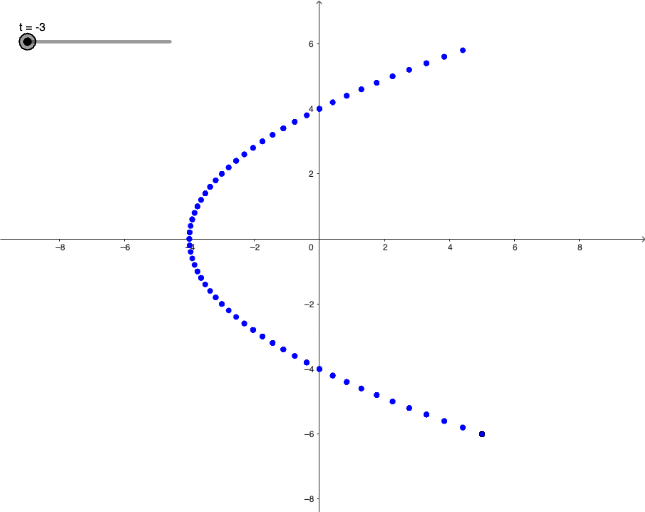
This example demonstrates how to graph a parametric curve defined by expressions x(t) and y(t), allowing you to visualize the geometric behavior of the resulting locus as the parameter t varies. It focuses on key ideas such as parametric equations, graphing, and locus interpretation, with additional attention to the effects of fractional (rational) forms on shape and domain. Construction-wise, GeoGebra objects f and g represent the coordinate functions (e.g., x(t) and y(t)), while the parameter t drives the curve generation. An auxiliary object A is used to organize intermediate geometry (for instance, defining a point/relationship that ties the parameter values to the drawn curve and supports translation or symmetry-based comparisons). Suitable for upper secondary students and early university learners interested in function graphing, coordinate geometry, and the geometric meaning of parameterized expressions.
GeoGebra Commands & Parameters
f(x) = x^(2) - 4g(x) = (2 * x)Numeric t(-3)(f(t), g(t))
AI Drawing Prompt Reference
Plot a parametric curve with x(t) = t^2 - 4 and y(t) = 2t. Observe how the curve changes as the parameter t varies. Pay attention to the curve's symmetry and shape.
The prompt above was compiled from the original drawing commands and is for reference only.