
Polyline Approximation of an Intersection Curve via Rotation and Scripting
Loading the math board and drawing, please wait…
In collections
intersection: surface-surface, curve-curve
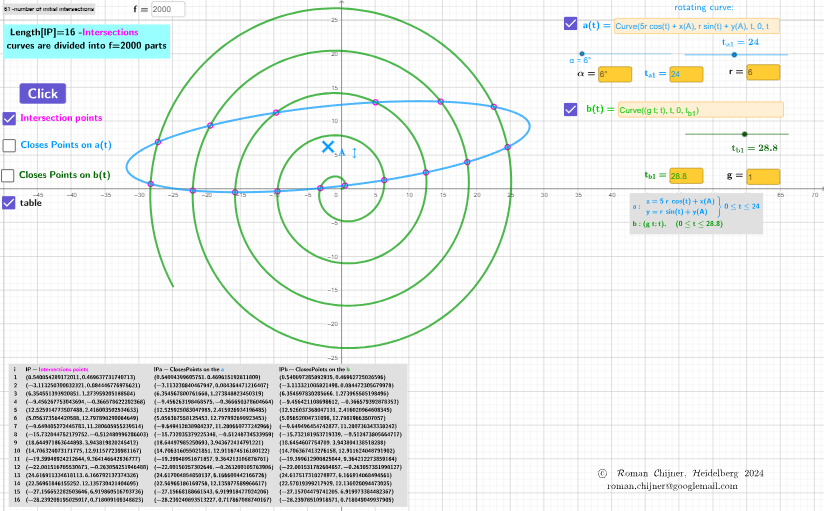
This example demonstrates how the intersection between two parameterized curves can be traced and visualized as an “intersection curve” (a locus-like shape). It uses a polyline (piecewise linear) approximation to discretize the construction and employs a rotating transformation to study how the intersection geometry evolves. The key mathematical concepts include curve intersection, parameterized geometry, polyline/discrete approximation ideas, and plane rotation (a rigid transformation) combined with scripted construction. Construction highlights drawn from the GeoGebra setup: CurveCartesian is used to define curves in Cartesian coordinates; Textfield, TableText, and LaTeX are used to display parameter values and results; Rotate performs the rotation of the relevant curve/objects around a specified center; InputBox controls parameters (e.g., n1, n2, lP, lPa1, lPb1, a, b, c, d, α) and buttons (button1, button2, etc.) trigger updates. The workflow builds intermediate variables (such as t_{a1}, t_{b1}, r, r1, r2, and auxiliary computed points) and then samples/discretizes the intersection-related curve for rendering. Suitable for advanced high school, early university, and teaching modules on coordinate geometry, parametric curves, and construction-by-script.
GeoGebra Commands & Parameters
CurveCartesian(((5 * r) * cos(t)) + x(A), (r * sin(t)) + y(A), t, 0, t_{a1}) → aa1CurveCartesian(((g * t); t), t, 0, t_{b1}) → b1Textfield(h) → InputBox1Textfield(aa1) → InputBox2Textfield(b1) → InputBox3Textfield(g) → InputBox4Textfield(r) → InputBox5Textfield(f) → InputBox6Rotate(aa1, α, A) → a1LaTeX(aa1, false, false) → txtaLaTeX(b1, false, false) → txtbTextfield(α) → InputBox7Textfield(t_{a1}) → InputBox8Textfield(t_{b1}) → InputBox9TableText(Append["i", 1…Length[lP]], Append["lP- \fgcolor{magenta}{Intersections\;points}", lP], Append["lPa-ClosesPoints \;on\; the\; \fgcolor{#0099FF}{a} ", lPa1], Append["lPb-ClosesPoints \;on\; the\;\fgcolor{#009900}{b}", lPb1], "v") → text5
AI Drawing Prompt Reference
Draw two parametric curves: one is a rotated circular-like curve, the other a spiral. They intersect, forming an intersection curve approximated by a polyline. Show discrete intersection points. Place input boxes to adjust rotation angle, curve parameters, and sampling ranges. Display a table listing intersection coordinates and nearest points, with distinct colors for the two curves and their nearest points. Illustrate the geometry of curve intersection, rotation, and discrete approximation.
The prompt above was compiled from the original drawing commands and is for reference only.