
Rainbow Pendulum Waves
Loading the math board and drawing, please wait…
In collections
Pendulum simulations
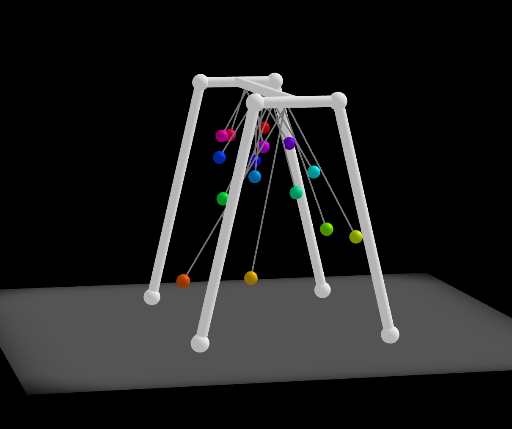
This example demonstrates a wave-like motion generated by multiple pendulums with varying lengths, creating a rainbow-colored wave pattern through phase differences. The core mathematical concepts include simple harmonic motion, the relationship between period and the square root of length, phase difference, and wave superposition. Construction highlights: using GeoGebra commands such as Rotate, Sphere, Zip, Sequence, Length, Translate, and Segment, the model builds 16 pendulum objects (L1 to L16), each controlled by an angle variable (angle1 to angle16). A button (button1) and sliders drive the animation, enabling dynamic simulation of the swinging motion. Suitable for middle school physics or mathematics classes to illustrate simple harmonic motion, wave phenomena, and parametric animation design, as well as for university-level physics demonstrations. By adjusting pendulum lengths and initial angles, students can intuitively observe wave formation and propagation.
GeoGebra Commands & Parameters
Rotate(Segment[O, (posx, posy)], π / 2, xAxis) → sRotate((posx, posy), π / 2, xAxis) → PSphere(P, 1) → sphZip("angle" + (Text[k]), k, Ln) → LnamAngZip("angleV" + (Text[k]), k, Ln) → LnamAngVZip("angleA" + (Text[k]), k, Ln) → LnamAngASequence(k, k, 0, 0.15, 0.01) → Ldiff, {0, 0.01, 0.02, 0.03, 0.04, 0.05, 0.060000000000000005, 0.07, 0.08, 0.09, 0.09999999999999999, 0.10999999999999999, 0.11999999999999998, 0.12999999999999998, 0.13999999999999999, 0.15}Length(Ldiff) → sizeTranslate(Rotate[((L1 * sin(angle1)), ((-L1) * cos(angle1))), π / 2, xAxis], Vector[(0, 1, 0)]) → P1Zip(Vector[(0, 0, 0), (0, k, 0)], k, Ln) → LvZip(Translate[O, Vector[v]], Vector[v], Lv) → TOSegment((0, 1, 0), P1) → segment1Translate(Rotate[((L2 * sin(angle2)), ((-L2) * cos(angle2))), π / 2, xAxis], Vector[(0, 2, 0)]) → P2Segment((0, 2, 0), P2) → segment2Translate(Rotate[((L3 * sin(angle3)), ((-L3) * cos(angle3))), π / 2, xAxis], Vector[(0, 3, 0)]) → P3Segment((0, 3, 0), P3) → segment3Translate(Rotate[((L4 * sin(angle4)), ((-L4) * cos(angle4))), π / 2, xAxis], Vector[(0, 4, 0)]) → P4Segment((0, 4, 0), P4) → segment4Translate(Rotate[((L5 * sin(angle5)), ((-L5) * cos(angle5))), π / 2, xAxis], Vector[(0, 5, 0)]) → P5Segment((0, 5, 0), P5) → segment5Translate(Rotate[((L6 * sin(angle6)), ((-L6) * cos(angle6))), π / 2, xAxis], Vector[(0, 6, 0)]) → P6Segment((0, 6, 0), P6) → segment6Translate(Rotate[((L7 * sin(angle7)), ((-L7) * cos(angle7))), π / 2, xAxis], Vector[(0, 7, 0)]) → P7Segment((0, 7, 0), P7) → segment7Translate(Rotate[((L8 * sin(angle8)), ((-L8) * cos(angle8))), π / 2, xAxis], Vector[(0, 8, 0)]) → P8Segment((0, 8, 0), P8) → segment8Translate(Rotate[((L9 * sin(angle9)), ((-L9) * cos(angle9))), π / 2, xAxis], Vector[(0, 9, 0)]) → P9Segment((0, 9, 0), P9) → segment9Translate(Rotate[((L10 * sin(angle10)), ((-L10) * cos(angle10))), π / 2, xAxis], Vector[(0, 10, 0)]) → P10Segment((0, 10, 0), P10) → segment10Translate(Rotate[((L11 * sin(angle11)), ((-L11) * cos(angle11))), π / 2, xAxis], Vector[(0, 11, 0)]) → P11Segment((0, 11, 0), P11) → segment11Translate(Rotate[((L12 * sin(angle12)), ((-L12) * cos(angle12))), π / 2, xAxis], Vector[(0, 12, 0)]) → P12Segment((0, 12, 0), P12) → segment12Translate(Rotate[((L13 * sin(angle13)), ((-L13) * cos(angle13))), π / 2, xAxis], Vector[(0, 13, 0)]) → P13Segment((0, 13, 0), P13) → segment13Translate(Rotate[((L14 * sin(angle14)), ((-L14) * cos(angle14))), π / 2, xAxis], Vector[(0, 14, 0)]) → P14Segment((0, 14, 0), P14) → segment14Translate(Rotate[((L15 * sin(angle15)), ((-L15) * cos(angle15))), π / 2, xAxis], Vector[(0, 15, 0)]) → P15Segment((0, 15, 0), P15) → segment15Translate(Rotate[((L16 * sin(angle16)), ((-L16) * cos(angle16))), π / 2, xAxis], Vector[(0, 16, 0)]) → P16Segment((0, 16, 0), P16) → segment16Zip((9.81 * (120 / (((2 * π) * (13.44 + k + 1))))^(2)), k, Ln) → LlengthSphere(P1, 0.5) → S1Sphere(P2, 0.5) → S2Sphere(P3, 0.5) → S3Sphere(P4, 0.5) → S4Sphere(P5, 0.5) → S5Sphere(P6, 0.5) → S6Sphere(P7, 0.5) → S7Sphere(P8, 0.5) → S8Sphere(P9, 0.5) → S9Sphere(P10, 0.5) → S10Sphere(P11, 0.5) → S11Sphere(P12, 0.5) → S12Sphere(P13, 0.5) → S13Sphere(P14, 0.5) → S14Sphere(P15, 0.5) → S15Sphere(P16, 0.5) → S16Segment(Q0, Q1) → topSegment(Q0', Q0'') → top'Segment(Q1', Q1'') → top''Segment(Q1', Q3) → leg1Segment(Q1'', Q4) → leg2Segment(Q0', Q5) → leg3Segment(Q0'', Q6) → leg4
AI Drawing Prompt Reference
Create a rainbow wave pattern with 16 pendulums of different lengths, where the length of each pendulum is determined by its position, with initial angles angle1 to angle16. The motion of the pendulums is achieved through rotation and translation, with spheres of radius 0.5 representing the pendulum ends. The length of each pendulum is calculated using the formula 9.81 * (120 / (2π * (13.44 + k + 1)))^2, where k ranges from 0 to 0.15 with a step of 0.01. The motion of the pendulums is controlled by angles angle1 to angle16.
The prompt above was compiled from the original drawing commands and is for reference only.