
Fractal Tree via Iteration: Change Color and Thickness in GeoGebra
Loading the math board and drawing, please wait…
In collections
How to make a fractal tree?
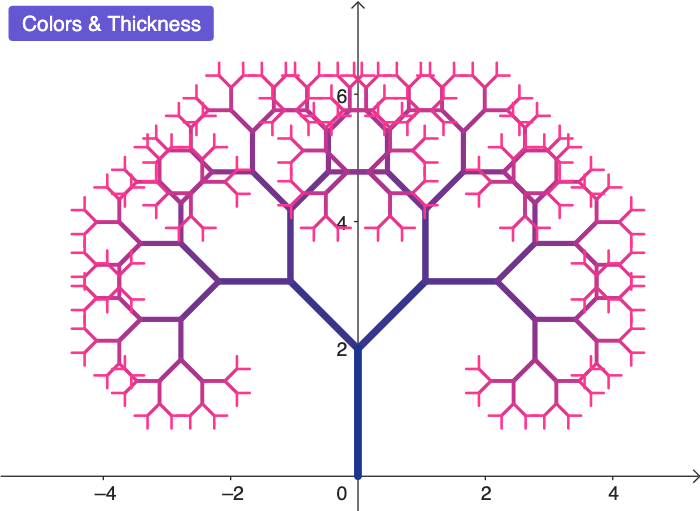
This example demonstrates how to construct a fractal tree using iterative geometry and how to emphasize its branching depth by changing color and line thickness across iterations. The key mathematical ideas include fractal geometry, iterative (recursive) construction, self-similarity, and geometric transformation—especially scaling (dilation). Construction in GeoGebra uses Segment to build the initial trunk, Point to define key endpoints, Dilate to create scaled child branches, and Iteration to repeatedly apply the transformation layer by layer to generate the fractal structure. The workflow is organized with objects such as Setup, a control button (button1), list outputs (ListOutPut), per-step/level references (L1–L9), and parameters like n and Ln that drive both the geometry generation and the visual styling. Suitable for upper secondary students through introductory university coursework, particularly for math visualization, modeling, and geometry construction lessons.
GeoGebra Commands & Parameters
Segment((0, 0), (0, 2)) → fPoint(f, 0) → APoint(f, 1) → BDilate(Rotate[A, pi + pi / 4, B], 0.75, B) → CDilate(Rotate[A, pi - pi / 4, B], 0.75, B) → DIteration(Flatten[Zip[Grow[s], s, level]], level, {{f}}, 1) → L2Iteration(Flatten[Zip[Grow[s], s, level]], level, {{f}}, 2) → L3Iteration(Flatten[Zip[Grow[s], s, level]], level, {{f}}, 3) → L4Iteration(Flatten[Zip[Grow[s], s, level]], level, {{f}}, 4) → L5Iteration(Flatten[Zip[Grow[s], s, level]], level, {{f}}, 5) → L6Iteration(Flatten[Zip[Grow[s], s, level]], level, {{f}}, 6) → L7Iteration(Flatten[Zip[Grow[s], s, level]], level, {{f}}, 7) → L8Iteration(Flatten[Zip[Grow[s], s, level]], level, {{f}}, 8) → L9
AI Drawing Prompt Reference
Draw a fractal tree starting with a trunk of length 2, then recursively generate branches by rotating and scaling, creating two branches at the first level and doubling the number of branches at each subsequent level while reducing length and thickness proportionally. Gradually change the color to emphasize depth, with each layer becoming darker, showcasing self-similarity and the iterative construction process. Highlight the branching pattern and the visual effect of scaling and color changes across levels.
The prompt above was compiled from the original drawing commands and is for reference only.