
Spiral in A4: Building a Spiral via Iterated Geometry
Loading the math board and drawing, please wait…
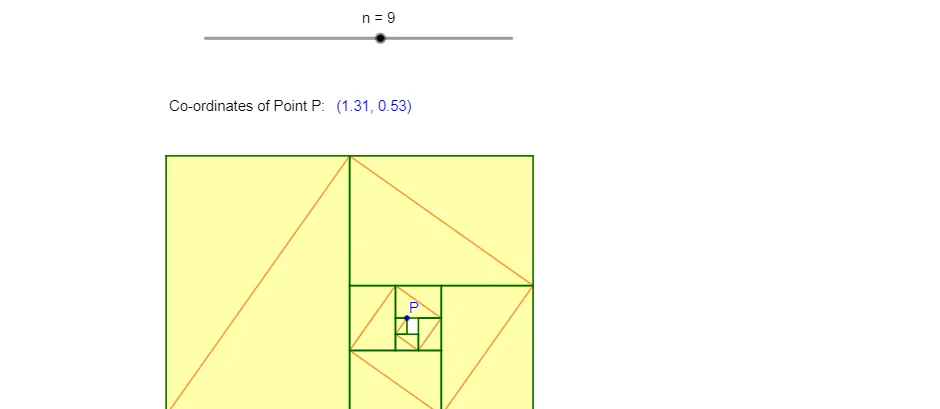
This example demonstrates how to generate a spiral curve within an A4 layout by iterating construction steps and plotting successive key points. The construction highlights core ideas such as sequences created by iteration (IterationList, Sequence), coordinate-based point generation, and geometric relationships expressed through angles/directions (e.g., difference and slope-type reasoning). Geometrically, the spiral emerges by combining iterative steps with transformations, then connecting consecutive points to form a piecewise approximation of the spiral. In GeoGebra, IterationList and Sequence produce the iterative sets of objects; Element selects specific items from those sets; Segment draws the connecting segments; and Text labels key parameters and intermediate results. Typical objects include base points/lines/centers (e.g., W, L, C) and multiple parameters (n, m1–m4, l1–l7, P, A) that control step size and transformation scales, with function-like mappings (f, g, h, i, a) supporting the parameterization. Suitable for middle/high school instruction on sequences and geometric construction, and for learners who want an intuitive view of how iterated rules generate complex curves.
GeoGebra Commands & Parameters
IterationList({Element[v, 1] + 1, If[Mod[Element[v, 1] + 1, 2] ≟ 1, Element[v, 2] / 2, Element[v, 2]], If[Mod[Element[v, 1] + 1, 2] ≟ 0, Element[v, 3] / 2, Element[v, 3]]}, v, {{1, W, L}}, n) → m2IterationList({Element[v, 1] + 1, Element[v, 2] + Element[m2, Element[v, 1] + 1, 2]}, v, {{0, x(A)}}, n) → m1IterationList({Element[v, 1] + 1, If[1 ≤ Mod[Element[v, 1] + 1, 4] ≤ 2, Element[v, 2] + Element[m2, Element[v, 1] + 1, 2], Element[v, 2] - Element[m2, Element[v, 1] + 1, 2]]}, v, {{0, x(A)}}, n) → m3IterationList({Element[v, 1] + 1, If[1 ≤ Mod[Element[v, 1] + 1, 4] ≤ 2, Element[v, 2] + Element[m2, Element[v, 1] + 1, 2], Element[v, 2] - Element[m2, Element[v, 1] + 1, 2]], If[2 ≤ Mod[Element[v, 1] + 1, 4] ≤ 3, Element[v, 3] - Element[m2, Element[v, 1] + 1, 3], Element[v, 3] + Element[m2, Element[v, 1] + 1, 3]]}, v, {{0, x(A), y(A)}}, n) → m4Sequence(Point[{Element[m4, i, 2], Element[m4, i, 3]}], i, 1, n - 1) → l1Sequence(Point[{Element[m4, i, 2], Element[m4, i, 3]}], i, 2, n) → l2Sequence(Point[{Element[m4, i, 2], Element[m4, i + 1, 3]}], i, 1, n - 1) → l3Sequence(Point[{Element[m4, i + 1, 2], Element[m4, i, 3]}], i, 1, n - 1) → l4Sequence(Segment[Element[l1, i], Element[l2, i]], i, 1, n - 1) → l5Sequence(Polygon[Element[l1, i], Element[l3, i], Element[l2, i], Element[l4, i]], i, 1, n - 1) → l6Sequence({Segment[Element[l1, i], Element[l3, i]], Segment[Element[l1, i], Element[l4, i]], Segment[Element[l2, i], Element[l3, i]], Segment[Element[l2, i], Element[l4, i]]}, i, 1, n - 1) → l7Element(l2, C) → PText("Co-ordinates of Point P: ") → text1Text(P) → text2Segment(B, E) → fSegment(D, F) → gSegment(I, H) → hSegment(J, G) → i
AI Drawing Prompt Reference
Create a spiral curve within an A4 layout by iterating geometric construction steps and plotting successive key points. Generate points using iteration lists and sequences based on coordinate calculations and angular relationships. Connect these points to form a piecewise approximation of a spiral. The design includes multiple parameters controlling step size and transformation scales, along with base geometric elements. The final result is a spiral structure composed of interconnected quadrilaterals, with key point coordinates labeled.
The prompt above was compiled from the original drawing commands and is for reference only.