
Cylinder & Sine Wave Area Calculation
Loading the math board and drawing, please wait…
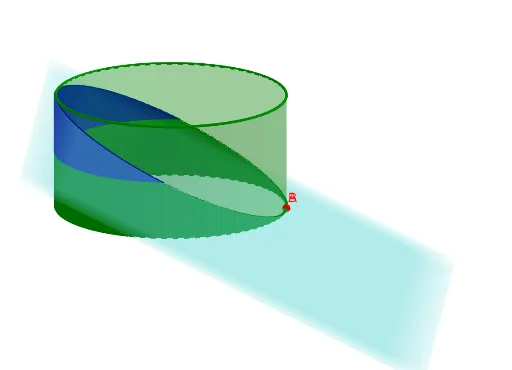
This example demonstrates how to calculate the surface area formed by a cylinder and a sine wave. It involves core mathematical concepts such as integration, solid geometry, trigonometry, and parametric equations. The construction uses GeoGebra commands and objects like If, Segment, Plane, Integral, Text, and Cylinder. Suitable for high school and above students learning complex geometry and calculus applications.
GeoGebra Commands & Parameters
If(theta ≤ π / 2, π / 2, If[theta ≥ (3 * π / 2), (3 * π / 2), theta]) → theta_{cond}Segment(A, B) → iPlane(PlaneRef, PlaneRef2, PlaneRef2 + (0, 1, 0)) → pSegment(A_{2D}, B_{2D}) → gIntegral(IntFun, 0, theta) → Area_{Peel}Text("Area of Peel: " + Area_{Peel}) → text1Integral(IntFun_{Sliced}, π / 2, theta_{cond}) → Area_{SlicedPeel}Segment(A_{2DSliced}, B_{2DSliced}) → jText("Area of Sliced Peel: " + Area_{SlicedPeel}) → text2Cylinder((0, 0, (-(R / 2))), (0, 0, R / 2), R) → C, C_{2}, C_{3}, C_{4}Segment(A, B + (0, 0, R / 2)) → h
AI Drawing Prompt Reference
Draw a vertical cylinder with radius R and height R. On its unwrapped lateral surface, place a sine wave curve. Compute the area under this curve from the start to an angle theta, and also compute the area of a sliced portion from pi/2 to a conditional angle. Show the cylinder, the unwrapped surface with the sine wave, the sliced region, and label both computed areas with text. Use line segments to indicate the cylinder's generatrix and the corresponding edges on the unwrapped plane.
The prompt above was compiled from the original drawing commands and is for reference only.