
Cylinder Cross-Section from Middle of the Base
Loading the math board and drawing, please wait…
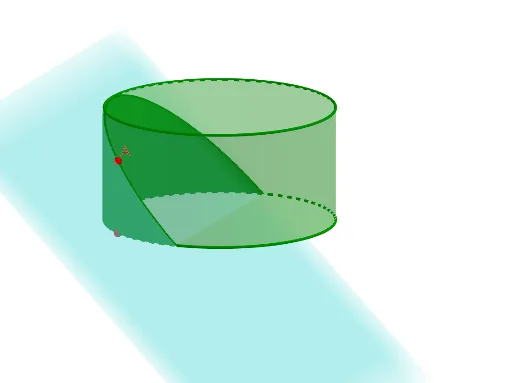
This GeoGebra example demonstrates the cross-section of a cylinder when cut by a plane passing through the middle of its base, and further shows how to compute the area of this cross-section using integration. The core mathematical concepts involve solid geometry (cylinder, plane slicing, conic sections) and calculus (definite integrals for area calculation). The construction uses GeoGebra commands such as Segment, Plane, Integral, Text, and Cylinder. Key objects include points (theta, R, B, α, A), planes (PlaneRef, PlaneRef2), functions (f, g, IntFun, IntFun_{Sliced}), and 2D projections (A_{2D}, B_{2D}) to visualize the section in a plane. The example is suitable for high school or early college students to explore the interplay between 3D geometry and integration, and to dynamically observe how the cross-section shape and area change with the cutting plane's position.
GeoGebra Commands & Parameters
Segment(A, B) → iPlane(PlaneRef, PlaneRef2, PlaneRef2 + (0, 1, 0)) → pSegment(A_{2D}, B_{2D}) → gIntegral(IntFun, 0, theta) → Area_{Peel}Text("Area of Peel: " + Area_{Peel}) → text1Cylinder((0, 0, (-(R / 2))), (0, 0, R / 2), R) → C, C_{2}, C_{3}, C_{4}
AI Drawing Prompt Reference
Draw a cylinder and cut it through the middle of its base. Show the cross-section and calculate its area. First, draw the cylinder, then draw a plane passing through the base center, followed by the intersection line between the plane and the cylinder. Finally, calculate and display the area of the section.
The prompt above was compiled from the original drawing commands and is for reference only.