
Sine Surface (Seno superficie) Dynamic Construction
Loading the math board and drawing, please wait…
In collections
geometriadinamica.es
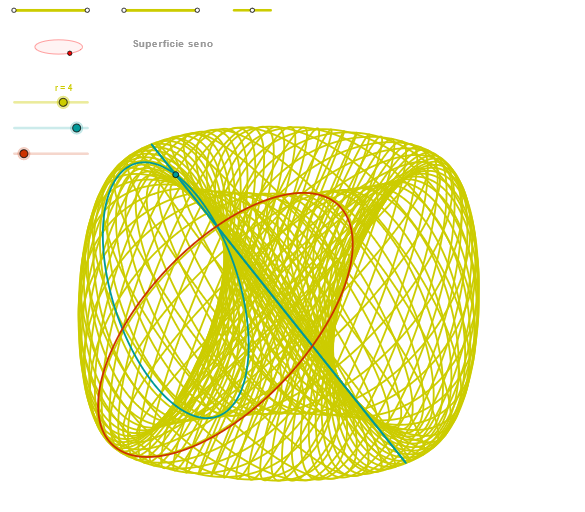
① This GeoGebra example constructs a three-dimensional sine surface (Seno superficie), visually demonstrating the variation of the sine function across a surface. ② Core mathematical concepts include the sine function, parametric surfaces, spatial geometry, and the interaction between curves and surfaces, involving trigonometry and parametric equations. ③ Construction highlights: using commands such as Segment, Point, OrthogonalLine, Circle, Intersect, Ellipse, Angle, CurveCartesian, and Sequence, it creates auxiliary points (e.g., P1, Q1), vectors (u1, v1), and ellipse objects, generating dynamic trajectories via sequences to form the sine surface. ④ Suitable for high school to undergraduate students, this example helps understand the spatial extension of sine functions and parametric surface construction, and serves as a visual teaching tool in mathematics.
GeoGebra Commands & Parameters
Segment(Q5, Q6) → p5Point(p5) → P5Segment(Q3, Q4) → p2Point(p2) → P3Segment(P3, Q4) → p4Point(p4) → P4Segment(Q1, Q2) → p1Point(p1) → P1Segment(P1, Q2) → p3Point(p3) → P2OrthogonalLine(C, xAxis) → zz2Circle(C, 0.62) → zz0Intersect(zz0, zz2, 1) → ZZ4Intersect(zz0, zz2, 2) → ZZ3Ellipse(ZZ3, ZZ4, 0.65) → zElipse2Point(zElipse2) → ZIntersect(zElipse2, zz2) → ZZ7, ZZ8Angle(ZZ8, C, Z) → zAngIncOrthogonalLine(C, yAxis) → zz1Intersect(zz0, zz1, 2) → ZZ2Intersect(zz0, zz1, 1) → ZZ1Ellipse(ZZ1, ZZ2, 0.65) → zElipse1Point(zElipse1) → XYIntersect(zElipse1, zz1) → ZZ5, ZZ6Angle(ZZ6, C, XY) → zAngRotSegment(ZZ5, ZZ6) → zz4Segment(ZZ7, ZZ8) → zz3Intersect(zElipse2, zElipse1, 1) → zPunto1Intersect(zElipse2, zElipse1, 4) → zPunto2Segment(zPunto1, zPunto2) → zSeg2CurveCartesian((r * ((sin(v) * sin(zAngRot)) + (sin(α) * cos(zAngRot)))), (r * ((((-sin(v)) * cos(zAngRot)) * sin(zAngInc)) + ((sin(α) * sin(zAngRot)) * sin(zAngInc)) + (sin(v + α) * cos(zAngInc)))), v, v1, v2) → curva2CurveCartesian(((r * sin(u)) * cos(zAngRot)), (r * (((sin(u) * sin(zAngRot)) * sin(zAngInc)) + (sin(3.14159 + u) * cos(zAngInc)))), u, u1, u2) → curva1CurveCartesian((r * ((sin(β) * sin(zAngRot)) + (sin(u) * cos(zAngRot)))), (r * ((((-sin(β)) * cos(zAngRot)) * sin(zAngInc)) + ((sin(u) * sin(zAngRot)) * sin(zAngInc)) + (sin(β + u) * cos(zAngInc)))), u, u1, u2) → a1Sequence(CurveCartesian[(r * ((sin(v) * sin(zAngRot)) + (sin(u) * cos(zAngRot)))), (r * ((((-sin(v)) * cos(zAngRot)) * sin(zAngInc)) + ((sin(u) * sin(zAngRot)) * sin(zAngInc)) + (sin(v + u) * cos(zAngInc)))), u, u1, u2], v, v1, v2, (2 * paso)) → list3Sequence(CurveCartesian[(r * ((sin(v) * sin(zAngRot)) + (sin(u) * cos(zAngRot)))), (r * ((((-sin(v)) * cos(zAngRot)) * sin(zAngInc)) + ((sin(u) * sin(zAngRot)) * sin(zAngInc)) + (sin(v + u) * cos(zAngInc)))), v, v1, v2], u, u1, u2, paso) → list1
AI Drawing Prompt Reference
Create a dynamic 3D sine surface. Set up two perpendicular reference axes, then build auxiliary geometry from a circle and two ellipses associated with those axes to obtain intersection points that determine rotation and inclination directions. Define the needed angles from these directions. Use parametric curve equations with trigonometric sine expressions to generate spatial curve trajectories, then sample them over two parameter ranges using sequences, so the resulting family of curves forms a sine-like surface. Keep the main intersection points, angle relationships, and the auxiliary ellipses as visible geometric references to emphasize how the sine variation extends across the surface.
The prompt above was compiled from the original drawing commands and is for reference only.