
Properties and Identification of Isosceles Trapezium
Loading the math board and drawing, please wait…
In collections
Trapez - Eigenschaften und Konstruktionen
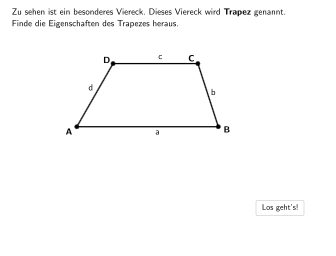
This example demonstrates the trapezoid and its properties, including the special properties of isosceles trapezium. It uses multiple-choice and open questions to help students understand the definition, properties, and identification of trapezoids. GeoGebra commands used include Polygon, PointIn, Segment, Point, Angle, Textfield, Sequence, Midpoint, Element, Intersect, Text, If, OrthogonalLine, Rotate. Suitable for 5-6 grade students to learn about the properties and identification of geometric shapes.
GeoGebra Commands & Parameters
Polygon((-3, -1), (6, -1), (6, -3), (-3, -3)) → RegionBox1, j, k, l, mPointIn(RegionBox1) → A_1Polygon((x(A_1) + 1.5, 2.02), (8.56, 2.02), (8.56, 0.04), (x(A_1) + 1.5, 0.02)) → RegionBox2, c, d, e, f_1SelectedIndex(drop5) → index5SelectedIndex(drop2) → index2SelectedIndex(drop1) → index1SelectedIndex(drop3) → index3SelectedIndex(drop4) → index4Polygon((-3, 2), (7, 2), (7, 0.02), (-3, 0.02)) → RegionBox, f, g, h, iPointIn(RegionBox1) → BSegment(F, B - (0.5, 0)) → bfPointIn(RegionBox) → DSegment(D + (0.5, 0), E) → dePoint(de) → CSegment(D, C) → cdPoint(bf) → ASegment(D, A) → adSegment(A, B) → abSegment(C, B) → bcAngle(B, A, D) → αAngle(C, B, A) → βAngle(D, C, B) → γAngle(A, D, C) → δTextfield(input1) → InputBox1Textfield(input2) → InputBox2PointIn(RegionBox2) → C_1Segment(A_1, B_1) → ab_1Segment(B_1, C_1) → bc_1Segment(C_1, D_1) → cd_1Segment(A_1, D_1) → ad_1Angle(B_1, A_1, D_1) → εAngle(C_1, B_1, A_1) → ζAngle(D_1, C_1, B_1) → ηAngle(A_1, D_1, C_1) → θSegment(D_1, B_1) → diag1Segment(A_1, C_1) → diag2Sequence((0, y(D_1) + 0.5) + (i, 0), i, x(D_1) - 1, x(C_1) + 1, (lengthAB * 0.04)) → pointsSequence((0, y(A_1) - 0.5) + (i, 0), i, x(D_1) - 1, x(C_1) + 1, (lengthAB * 0.04)) → points2Midpoint(A_1, B_1) → VMidpoint(D_1, C_1) → G_1Sequence((x(V) + ((lengthAB * j)) / 10, y(G_1) + 0.5), j, -5, 5) → punkteObenPoint(punkteOben) → Psym1Sequence((x(V) + ((lengthAB * j)) / 10, y(V) - 0.5), j, -5, 5) → punkteUntenPoint(punkteUnten) → Psym2Segment(Psym1, Psym2) → sym_{1}Element(points, sym) → CorrSymSegment(K, N) → nSegment(N, M) → pSegment(M, L) → qSegment(L, K) → rSegment(G, J) → sSegment(J, I) → tSegment(I, H) → aSegment(H, G) → bSegment((Midpoint[D, C] - 0.2, y(D) - 0.2), (Midpoint[D, C] + 0.2, y(D) + 0.2)) → parallel1Segment(N, L) → g_1Segment(M, K) → h_1Intersect(diag1, diag2) → OMidpoint(O, A_1) → mitteText(text21, Midpoint[O, B_1] + v, true, true, 0, 0) → text9Angle(I, H, G) → ιAngle(H, G, J) → κAngle(J, I, H) → λAngle(G, J, I) → μAngle(L, K, N) → νAngle(N, M, L) → ξAngle(M, L, K) → οAngle(K, N, M) → ρIf(x(A) ≠ -0.72 ∨ x(B) ≠ 6 ∨ x(C) ≠ 5.03 ∨ x(D) ≠ 1, true, false) → movedIf(x(A_1) ≠ 0 ∨ x(C_1) ≠ 5 ∨ x(D_1) ≠ 1 ∨ x(B_1) ≠ 6, true, false) → moved2OrthogonalLine(D, ab) → j_1Segment(D, P) → k_1OrthogonalLine(D_1, ab_1) → l_1Intersect(l_1, ab_1) → QSegment(D_1, Q) → m_1Angle(B_1, Q, D_1) → τText(text20, Midpoint[O, A_1] + u, true, true, 1, 1) → text8Angle(B + (10, 0), P, D) → σSegment(B, P) → n_1SelectedIndex(drop7) → index7Point(t) → WOrthogonalLine(W, b) → p_1Intersect(p_1, b) → ZSegment(W, Z) → q_1Angle(H, Z, W) → υSegment(G, I) → r_1Segment(H, J) → s_1Point(p) → E_1OrthogonalLine(E_1, p) → t_1Intersect(t_1, r) → F_1Angle(L, F_1, E_1) → ϕSegment(E_1, F_1) → a_1Segment(Midpoint[K, L] + (0, -0.5), Midpoint[M, N] + (0, 0.5)) → i_1Segment(D + (0, 0.25), D + (0, lengthArrow)) → arrow1Segment(C_1 + (0, 0.25), C_1 + (0, lengthArrow)) → arrow2Rotate(arrow2, 270°, C_1) → arrow2'Rotate(arrow2, 90°, C_1) → arrow2'_{1}Rotate(arrow2, 180°, C_1) → arrow2'_{2}Segment(A_1 + (1, -0.13), A_1 + (1, 0.13)) → b_1Segment(A_1 + (1.1, -0.13), A_1 + (1.1, 0.13)) → c_1Segment(D_1 + (1, -0.13), D_1 + (1, 0.13)) → d_1Segment(D_1 + (1.1, -0.13), D_1 + (1.1, 0.13)) → e_1Segment(Psym1 + (0.25, 0), Psym1 + (lengthArrow, 0)) → f_2Segment(Psym1 + (-0.25, 0), Psym1 + ((-lengthArrow), 0)) → g_2Segment(D + (0, 0.25), D + (0, lengthArrow)) → arrow1_{neu}Rotate(arrow1_{neu}, 270°, D) → arrow1'Rotate(arrow1_{neu}, 90°, D) → arrow1'_{1}Rotate(arrow1_{neu}, 180°, D) → arrow1'_{2}SelectedIndex(drop9) → index9SelectedIndex(drop6) → index6Segment(K + (3, -0.15), K + (3, 0.15)) → h_2Segment(K + (3.1, -0.15), K + (3.1, 0.15)) → i_2Segment(N + (2.3, -0.15), N + (2.3, 0.15)) → j_2Segment(N + (2.4, -0.15), N + (2.4, 0.15)) → k_2
AI Drawing Prompt Reference
Draw a trapezoid in the coordinate plane with horizontal bases and vertical sides at x=-3 and x=6: use a region-like trapezoid with top and bottom edges parallel to the x-axis. Choose a point on the first region as A, and choose another point in a second, narrower region to set the opposite pair of vertices, forming a trapezoid with vertices A, B, C, D. Connect the vertices to get its four sides and draw both diagonals AC and BD. Mark four angles around the trapezoid: angle at A between BA and AD, angle at B between AB and BD, angle at C between BC and CA, and angle at D between DC and DA. Compute the midpoint of AB and the midpoint of DC, then use points above and below the midpoint of DC to draw a short segment indicating a symmetry line.
The prompt above was compiled from the original drawing commands and is for reference only.