
Area Model Fraction Multiplier
Loading the math board and drawing, please wait…
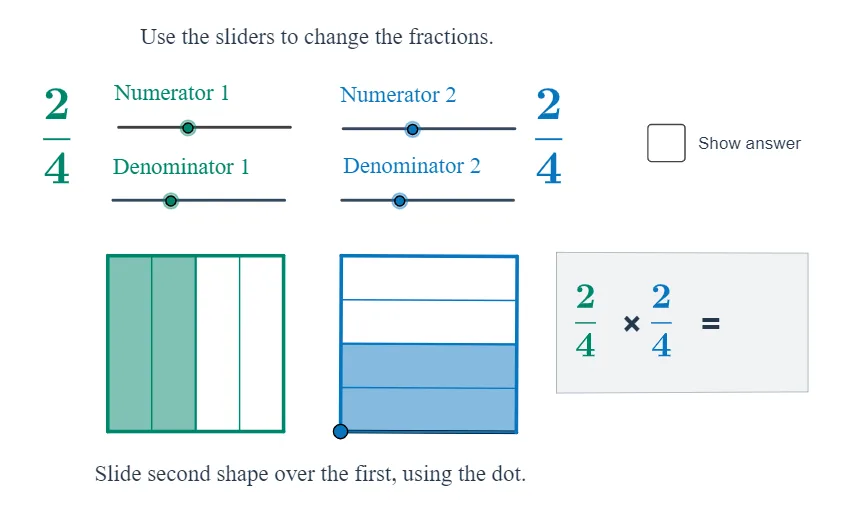
This example visually demonstrates how a fractional multiplier can be applied to an area model: a geometric region is transformed so that its image area follows a predictable fraction-based scaling relationship. It centers on core ideas of geometric similarity and dilation, where scaling factors determine area ratios, and on representing those factors using numerator/denominator quantities. The construction uses GeoGebra commands reflected in the provided command list: Point, Polygon, Line, and Segment to build the original polygonal region and its key edges; Dilate to perform the fraction-controlled scaling (linked to objects like num_1/den_1 and num_2/den_2); Translate to reposition parts consistently; and Intersect to compute precise boundary intersection points. Sequence and If support stepwise/conditional generation of auxiliary elements and labels (e.g., text objects) to keep the correspondence clear. Suitable for secondary to early college geometry and transformation lessons, especially for students learning area models, proportional reasoning, and the geometric meaning of fractional multipliers.
GeoGebra Commands & Parameters
Point(Circle[A, 5]) → BPolygon(A, B, 4) → poly1, b, c, d, e, C, DLine(A, B) → fPoint(f) → ESegment(A, E) → gPoint(g) → FPoint(Circle[F, 5]) → GSegment(F, G) → hPolygon(F, G, 4) → poly2, i, j_1, k_1, l, H, IDilate(B, 1 / den_1, A) → B_1Sequence(Segment[Translate[D, Vector[(i * Vector[A, B_1])]], Translate[A, Vector[(i * Vector[A, B_1])]]], i, 1, den_1 - 1) → list1Dilate(H, 1 / den_2, G) → H_1Sequence(Segment[Translate[F, Vector[(i * Vector[G, H_1])]], Translate[G, Vector[(i * Vector[G, H_1])]]], i, 1, den_2 - 1) → list2Translate(A, Vector[(num_1 * Vector[A, B_1])]) → B_2Translate(B_2, Vector[A, D]) → C_2Translate(G, Vector[(num_2 * Vector[G, H_1])]) → H_2Translate(H_2, Vector[G, F]) → I_2Polygon(A, B_2, C_2, D) → poly3, a_1, b_2, c_2, d_1Polygon(F, G, H_2, I_2) → poly4, f_1, g_1, h_2, i_2Line(B_2, C_2) → jLine(I_2, H_2) → kIntersect(j, k) → SPolygon(A, B_2, S, I_2) → poly5, a_2, b_1, s, i_1If(Distance[A, F] < 0.01, true, false) → overSegment(J, K) → mPoint(Circle[N, 6.333215521509234]) → OPolygon(N, O, P, Q) → q1, n_1, o, p, qPolygon(R, T, U, V) → q2, r, t, u, v
AI Drawing Prompt Reference
Draw an area model with two squares. The first square has its bottom-left corner fixed, and its base is divided into equal parts according to a denominator, with vertical lines drawn at each division. The second square is similar but oriented differentlycars. From the bottom-left corner of the first square, mark a point along the base at a distance equal to the numerator times one division, then translate that point upward to form a rectangle. Do the same for the second square using its own numerator and denominator. The two rectangles overlap, and the overlapping region is shaded to represent the product of the two fractions. The whole figure illustrates how fractional multiplication corresponds to area.
The prompt above was compiled from the original drawing commands and is for reference only.