
Kite Construction
Loading the math board and drawing, please wait…
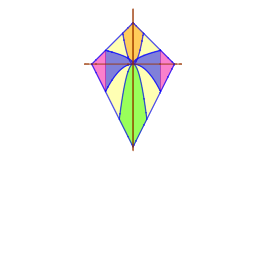
This example demonstrates how to construct a kite using GeoGebra, focusing on its geometric properties. Key math concepts include polygons, angles, rotation, and integral functions. The construction utilizes commands like IntegralBetween, Point, Intersect, and Rotate. Suitable for high school mathematics education to understand plane geometry constructions and transformations.
GeoGebra Commands & Parameters
IntegralBetween(g, h, -4, 0) → eIntegralBetween(f, h, 0, 4) → iIntegralBetween(b, k, -1.5, 0) → mIntegralBetween(a, k, 0, 1.5) → lIntegralBetween(j, d, -2, 0) → nIntegralBetween(j, c, 0, 2) → oIntegralBetween(b, d, -6, -4) → pIntegralBetween(a, c, 4, 6) → qIntegralBetween(b, d, -4, 0) → rPoint(yAxis) → APoint(yAxis) → DIntegralBetween(a, c, 0, 4) → vIntersect(f, g, (0, 0)) → ERotate(s, 90°, E) → s_{1}
AI Drawing Prompt Reference
Draw a kite shape, start by creating two points A and D on the y-axis as the endpoints of the diagonals. Then use the rotation command to rotate one of the segments 90 degrees to form another part of the kite. Next, use the integral function to draw the kite's edges. Finally, find the intersection point E using the intersection command.
The prompt above was compiled from the original drawing commands and is for reference only.