
Integer Addition Demonstration by R SANKARA NARAYANA REDDY
Loading the math board and drawing, please wait…
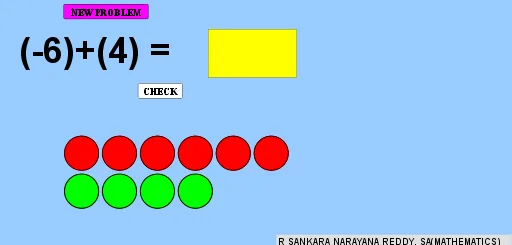
This example dynamically demonstrates the geometric meaning of integer addition, visually showing the process and result of addition operations. It involves core math concepts like integers, addition, geometric representation, and dynamic visualization. Key GeoGebra commands and objects used include Random, If, Sequence, Min, Point, Textfield, Circle, Rotate, Angle, CircleSector to achieve random integer generation, dynamic graphical transformations, and interactive operations. Suitable for middle school and above mathematics education to help students understand abstract integer addition operations.
GeoGebra Commands & Parameters
Random(-10, 10) → aRandom(-10, 10) → bIf(a < 0, (-a), a) → p1If(b < 0, (-b), b) → p2Sequence(Circle[A + ((2 * i) + 1, 0), 0.9], i, 0, p1 - 1) → l1Sequence(Circle[(0, -1) + ((2 * i) + 1, 0), 0.9], i, 0, p2 - 1) → l2Min(p1, p2) → dPoint(yAxis) → BPoint(yAxis) → ESequence(Polygon[B + ((2 * i), 0), C + ((2 * i), 0), D + ((2 * i), 0), E + ((2 * i), 0)], i, 0, d - 1) → l5Textfield(text1) → InputBox1If(text1 ≟ text2, "Excellent", "Try again") → text3Circle(F, 2) → ePoint(e) → GRotate(G, α, F) → G'Angle(G, F, G') → βCircleSector(F, G, G') → f
AI Drawing Prompt Reference
Create a dynamic demonstration of integer addition, featuring two adjustable sliders a and b representing two integers. Use circles and segments to show the absolute values of a and b, and arcs and sectors to represent the addition result. First, generate the absolute values of a and b, then draw a series of circles for the absolute value of a and another series for b. Next, draw segments based on the smaller value of a and b, and finally use arcs and sectors to represent the addition result.
The prompt above was compiled from the original drawing commands and is for reference only.