
Dynamic Exploration of Linear Systems and Coefficient–Solution Links
Loading the math board and drawing, please wait…
In collections
Arithmetic and Algebra
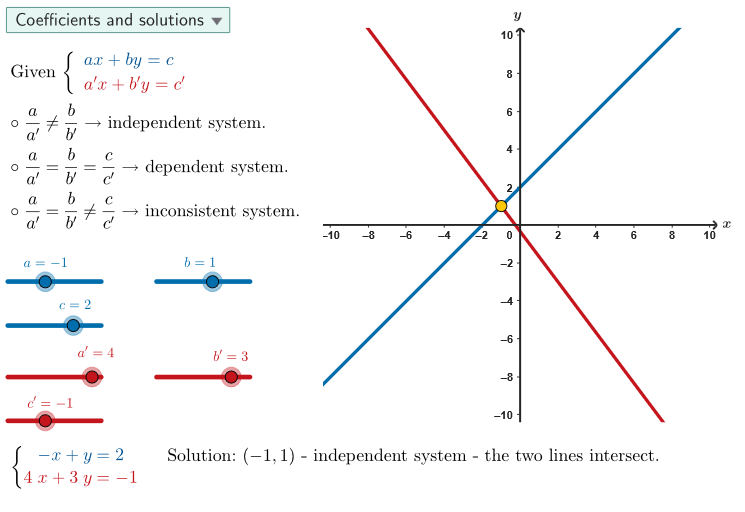
This GeoGebra example dynamically visualizes how changing coefficients affects the solutions of a system of linear equations by showing the interaction between two lines—intersection, parallelism, or coincidence—and the corresponding algebraic solution behavior. Key math concepts include systems of linear equations, linear (two-variable) equations, line graphs in the coordinate plane, intersection-point interpretation, and the relationship between coefficients and the number/location of solutions, with proficiency checked via both the interactive app and algebraic techniques. Construction and interactivity are driven by commands and objects from the prototype: Shuffle/Sequence to generate or iterate cases (allCaseNum, caseNum, countQuestion), Element and SelectedIndex to select the active problem instance (ddMenu, btnNew/textQuestion/textAllIn), Polygon/Segment/Intersect and PointIn to build geometric entities and determine intersection/contact conditions, Polynomial to represent the analytic form of relationships, Join to link related objects, and UI/visual controls like sliders and animation objects (aSli/bSli/cSli, btnAnim, aniSli, scriptResetApp, pulsing) along with coordinate/frame settings (xMin/xMax, yMin/yMax, xGrid/yGrid, GRMIN/GRMAX, labelX/labelY). It is intended for middle and high school through early undergraduate learners for classroom demonstrations and structured practice.
GeoGebra Commands & Parameters
Shuffle({1, 2, 3}) → allCaseNum, {2, 1, 3}Element(allCaseNum, Mod[countQuestion, Length[allCaseNum]] + 1) → caseNumPolygon(GRMIN + ((-offX), (-offY)), (x(GRMAX), y(GRMIN)) + (offX, (-offY)), GRMAX + (offX, offY), (x(GRMIN), y(GRMAX)) + ((-offX), offY)) → peep, f, g, h, iSelectedIndex(ddMenu) → isSequence((k, 0), k, -10, 10, 1) → xGridJoin(Sequence[Sequence[(j, k), j, -10, 10, 1], k, -1, 17, 1]) → bigGridSequence((0, k), k, 1, 16, 1) → yGridPointIn(peep) → ONBPTcirclePixels(ONBPT, 7 + (7 * pulsing), (xMin, yMin), (xMax, yMax), (PXwidth, PXheight)) → pulsingObjectSegment((x(GRMIN) - offX, 0), (x(GRMAX) + offX, 0)) → fakeXSegment((0, y(GRMIN) - offY), (0, y(GRMAX) + offY)) → fakeYPolynomial((aSli * x) + (bSli * y)) → sist1Polynomial((apSli * x) + (bpSli * y)) → sist2Intersect(lin1, lin2) → S
AI Drawing Prompt Reference
Draw a dynamic system that shows the relationship between coefficients and solutions of a system of linear equations. The system consists of two line segments that can intersect, be parallel, or coincide. The slopes of the line segments are controlled by two sliders, and the solutions of the equation are determined by the intersection points of the line segments. Draw a coordinate system with two sliders, two line segments, an intersection point, and a grid.
The prompt above was compiled from the original drawing commands and is for reference only.