
Geometric Visualization of Linear Interpolation
Loading the math board and drawing, please wait…
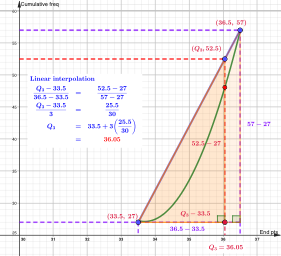
This example demonstrates how to perform linear interpolation between two known points using a straight-line model, making the intermediate values visually clear on a geometric diagram. It centers on the mathematical ideas of linear interpolation, segment-wise linear approximation, and fitting/constructing a function model from points. The construction relies on GeoGebra commands including FitPoly (to fit a polynomial/linear model from selected points), Segment and Line (to define connecting segments and the interpolation line), Intersect (to compute key intersection points that represent interpolated results), and Point and Polygon (to place and organize the constructed points and highlight relevant regions). Objects such as A, B, f and multiple point pairs (A1/B1 through A5/B5) represent the input samples and the interpolation/fit outputs, while text1 and text2 label the components. Suitable for middle school to early high school learners studying functions, graphing, and basic data modeling, as well as for anyone wanting an intuitive understanding of interpolation in a dynamic geometry environment.
GeoGebra Commands & Parameters
FitPoly({A, B}, 2) → fFitPoly({A, H, I, J, K, L, M, B}, 2) → gSegment(A, B) → hSegment(N, B) → jSegment(A, O) → kSegment(N, P) → lLine(A, B) → mSegment(Q, R) → nSegment(R, S) → qSegment((30, 27), N) → iSegment(T, B) → rIntersect(q, i) → UPoint(q) → VPoint(i) → ZPolygon(U, V, W, Z) → q1, u, v, w, z_1Point(j) → A_1Point(i) → C_1Point(j) → D_1Polygon(A_1, B_1, C_1, D_1) → q2, a_1, b_1, c_1, d_1Polygon(A, N, B) → t1, b, a_2, n_1Intersect(p, q, (36.05, 48.07360021608565)) → E_1Polygon(A, F_1, R) → t2, r_1, a_3, f_1
AI Drawing Prompt Reference
Draw a straight line between points A and B, then insert 5 points A1 to A5 and B1 to B5 in between. Use these points to draw a smooth curve. Connect these points with segments and lines, and mark key intersection points U, V, W, and Z. Highlight these points with polygons.
The prompt above was compiled from the original drawing commands and is for reference only.