
Quadratic Function and Geometric Construction (2)
Loading the math board and drawing, please wait…
In collections
geometriadinamica.es
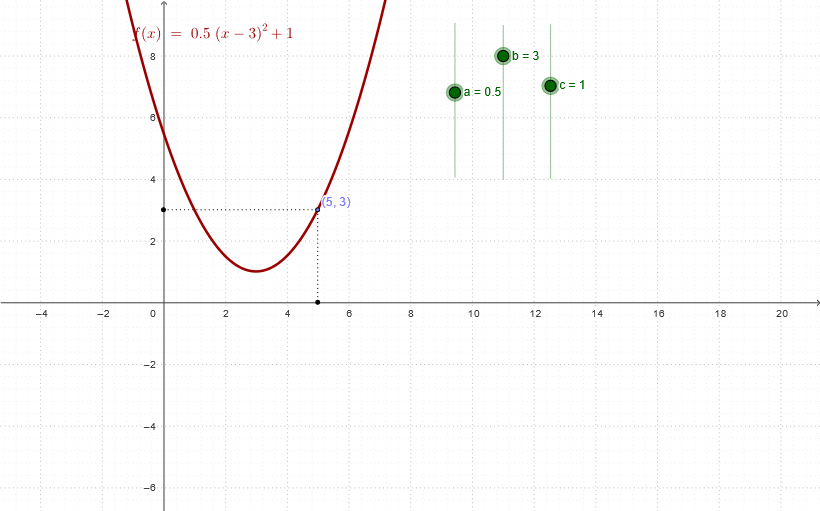
This example demonstrates the construction of a quadratic function graph along with associated geometric elements, using points and segments to build the curve and auxiliary figures. The core mathematical concepts include the standard form of quadratic functions, the direction of the parabola's opening, the vertex position, and the intersections with coordinate axes. The construction highlights the use of GeoGebra commands such as Point to create key points (A, B, C) and Segment to draw lines (d, e), while defining the function f with parameters a, b, c, and constructing triangles T1, T3, T4 for analysis. It is suitable for middle school or high school students learning quadratic function properties, graph transformations, and the integration of geometry with algebra, and can be used for teacher demonstrations or student exploration of parabolic geometric features.
GeoGebra Commands & Parameters
Point(f) → ASegment(C, A) → dSegment(A, B) → e
AI Drawing Prompt Reference
Create a basic diagram for a quadratic-function geometric construction. Place a key point A on the plane, with its position determined by the function setting for the curve. Add a line segment connecting point C to point A as the first auxiliary geometric segment. Then specify another key point B and draw a second line segment connecting point A to point B. The figure should emphasize using the curve’s key point(s) to build a simple geometric structure through two segments originating from the same point.
The prompt above was compiled from the original drawing commands and is for reference only.