
Linking Linear Equation Systems with Vectors via Geometric Intersection
Loading the math board and drawing, please wait…
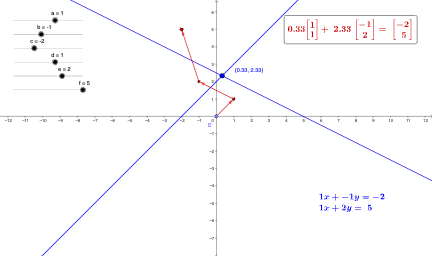
This GeoGebra example demonstrates how solutions of a system of linear equations can be visualized through geometric intersection (e.g., where corresponding lines/graphical objects meet), and how these relationships connect naturally to vector representations. The key math ideas include the geometric interpretation of linear systems, the use of vectors to encode direction/translation and algebraic relationships, and the identification of intersection points as the system’s solution set. Construction highlights from the provided summary: it uses the GeoGebra commands Intersect to compute intersection objects, Vector to create and display vector entities, and Point to define critical points such as intersection locations. Typical objects used include multiple points (a, b, c, d, e, f, A, B, C, D), vector objects (v, u, w), and equation-graph elements (eq1, eq2), along with text/numerical labels (text1/text2, n1/n2) to explicitly connect the algebraic equations with the geometric elements. Suitable for high school through early university contexts—especially lessons on linear algebra foundations, analytic geometry, and the transition from symbolic solving to geometric reasoning.
GeoGebra Commands & Parameters
Intersect(eq1, eq2) → AVector(B, C) → vPoint(xAxis) → EVector(E, B) → uVector(C, D) → w
AI Drawing Prompt Reference
In a coordinate plane, draw two intersecting lines representing a system of linear equations. Mark their intersection point, which represents the solution to the system. Take a point on the x-axis and draw vectors from it to points on the lines, as well as vectors connecting points on the lines, creating a vector network that illustrates the connection between the algebraic system and its geometric representation.
The prompt above was compiled from the original drawing commands and is for reference only.