
Hot Air Balloon Model
Loading the math board and drawing, please wait…
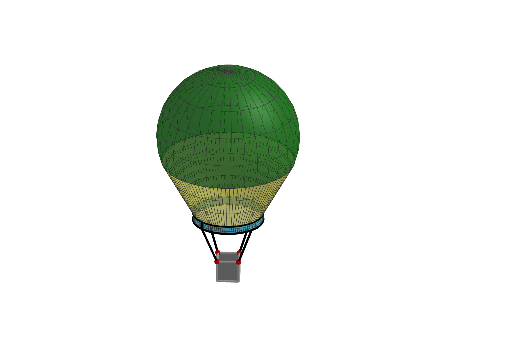
This example demonstrates a 3D model of a hot air balloon, involving spheres, scalene triangles, and optimization problems. Using GeoGebra commands such as Point, Surface, Sphere, etc., the various parts of the hot air balloon can be constructed. Suitable for high school students learning solid geometry and optimization problems.
GeoGebra Commands & Parameters
Point(zAxis) → ASurface(x(A) + (cos(u) * sin(v)), y(A) + (sin(u) * sin(v)), z(A) + cos(v), u, 0, (2 * π), v, 0, q) → aPoint(zAxis) → BSphere(A, 1) → bOrthogonalPlane(B, zAxis) → pIntersectPath(p, b) → cPoint(c) → CPoint(yAxis) → DPoint(c) → ESegment(E, D) → fIntersect(zAxis, yAxis) → FCircle(F, D, xOyPlane) → ePoint(Circle[G, Distance[H, G], Segment[H, G]]) → KCube(H, G, K) → g, L, faceKLPO, faceMNOP, edgeHL, edgeGH, edgeGK, edgeKL, edgeHM, edgeLP, edgeMP, edgeMN, M, edgeGN, edgeNO, edgeKO, edgeOP, N, O, P, faceGHLK, faceHLPM, faceGHMN, faceGKONRotate(D, -45°, zAxis) → D'Rotate(D', 90°, F) → D''Rotate(D'', 90°, F) → D'''Segment(D', N) → hSurface(f, 360°, zAxis) → dPoint(zAxis) → JDistance(F, D) → mCircle(J, 0.49, zAxis) → rLine(D''', zAxis) → nPoint(r) → RSegment(D''', R) → sSurface(s, 360°, zAxis) → oRotate(R, -90°, zAxis) → R'Rotate(R', -90°, zAxis) → R''Rotate(R'', -90°, zAxis) → R'''Segment(R', O) → iSegment(R, P) → jSegment(R''', M) → kSegment(R'', N) → l
AI Drawing Prompt Reference
Draw a 3D model of a hot air balloon, including a sphere and a surface. The sphere represents the balloon's envelope, while the surface forms the basket part. Start by creating a sphere, then use rotation and intersection to form the basket, which consists of several triangles and cubes. Finally, add some line segments and circular elements to complete the model.
The prompt above was compiled from the original drawing commands and is for reference only.