
Creating Distances in 3 Space: Quick Formative Assessment with Basic Feedback
Loading the math board and drawing, please wait…
In collections
Creating Distances in 3 Space
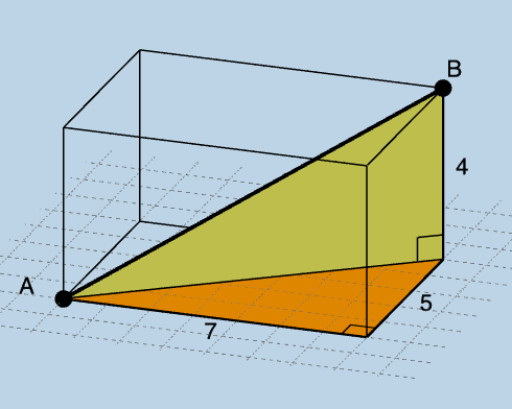
This example demonstrates creating distances in three-dimensional space with basic feedback for formative assessment. It involves core mathematical concepts like solid geometry, distance calculation, and geometric construction. Key GeoGebra commands and objects used include Segment, Angle, Polygon, Prism, Length, Mode, RandomElement, CountIf, and If. Suitable for high school students to understand distance calculations in solid geometry and formative assessments.
GeoGebra Commands & Parameters
Segment(A, B) → fSegment(A, C) → gSegment(C, D) → hSegment(D, B) → iSegment(D, A) → jAngle(D, C, A) → αAngle(B, D, A) → βPolygon(A, C, D, E) → q1, a, c, d, ePrism(D, C, A, E, B) → b, F, edgeCD, edgeAC, edgeAE, edgeDE, edgeBD, edgeCF, edgeAG, edgeEH, edgeBF, edgeFG, G, edgeGH, edgeBH, H, faceACDE, faceBDCF, faceACFG, faceAEHG, faceBDEH, faceBFGHPolygon(D, C, A) → t1, a_1, d_1, c_1Polygon(D, B, A) → t2, l, m, nLength(l1) → oMode(l1) → l2RandomElement(l1) → pCountIf(x ≟ p, l1) → qIf(q ≟ 1, "1 unique", q ≟ 2, "2 unique", q ≟ 3, "3 unique") → text3If(q ≟ 1, "possibility exists.", "possibilities exist.") → text4
AI Drawing Prompt Reference
Draw a geometric figure in 3D space involving multiple segments and angles, start by constructing a quadrilateral, then create a prism based on it, label the lengths and relationships of key edges and faces, randomly select an edge and calculate its uniqueness count, finally display different feedback texts based on the count.
The prompt above was compiled from the original drawing commands and is for reference only.