
Volumes of Prisms and Cylinders: From Construction to 3D Modeling
Loading the math board and drawing, please wait…
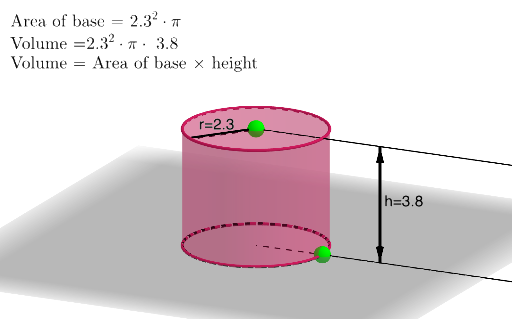
This example demonstrates how to construct prisms and cylinders in GeoGebra and visualize the geometric setup behind their volume relationships. It centers on solid-geometry ideas such as the volume of a prism/cylinder, identifying relevant elements (base and height), and using orthogonality/line direction to establish the correct spatial configuration for volume modeling. The construction uses GeoGebra commands including Point and Segment to define key points and edges, Circle and Intersect to build circular base features and their intersection points, Cylinder to generate the 3D cylinder solid, OrthogonalLine to create perpendicular (height/normal) directions, and Vector together with Ray/Segment for orientation and auxiliary constructions. Named objects (e.g., A–H and others) and text labels (text1) support the step-by-step build from planar geometry to 3D solids. Suitable for middle/high school geometry instruction, review of volume formulas, and classroom demonstrations of geometric construction and spatial reasoning.
GeoGebra Commands & Parameters
Point(xAxis) → ACircle(zAxis, A) → cPoint(zAxis) → BIntersect(yAxis, zAxis) → CCylinder(C, B, x(A)) → a, d, e, bOrthogonalLine(A, xOyPlane) → fIntersect(f, e, 1) → DRay(B, D) → gRay(C, A) → hPoint(h) → EOrthogonalLine(E, xOyPlane) → iIntersect(i, g) → FVector(E, F) → uVector(F, E) → vSegment(F, E) → jPoint(e) → GSegment(B, G) → k
AI Drawing Prompt Reference
Create a 3D scene showing a cylinder with geometric aids for volume modeling. Start by placing a center point in the base plane and drawing the corresponding circle; choose an additional spatial reference point related to the cylinder’s axis and use intersections of the given axes/plane lines to obtain key points in space. Construct the cylinder from the circle as the base, using the reference height direction through the axis point. Build an orthogonal (perpendicular) direction from the axis/base center to the base plane, then find the relevant intersection point on the cylinder structure using that perpendicular line. Add rays that indicate orientation from the axis point toward the auxiliary point, then draw direction vectors formed by the main auxiliary points and include a connecting segment to highlight the base–height relationship for prism/cylinder volume setup.
The prompt above was compiled from the original drawing commands and is for reference only.