
Line Segments and Polygon Construction
Loading the math board and drawing, please wait…
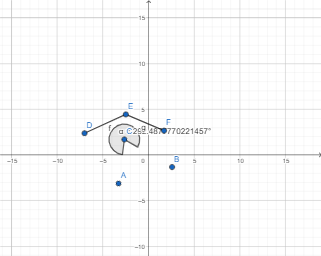
This example demonstrates how to construct basic geometric figures such as line segments, angles, and polygons using GeoGebra. The core mathematical concepts involved include line segments, area, optimization problems, trapezoids, solid geometry, and vectors. The construction highlights the use of GeoGebra commands like Angle and Segment. Suitable for high school students learning geometric constructions, solid geometry, and optimization problems.
GeoGebra Commands & Parameters
Angle(B, C, A) → αSegment(D, E) → fSegment(E, F) → g
AI Drawing Prompt Reference
In the plane, choose three points B, C, and A so that an angle is formed with B as the vertex, using the directions toward C and toward A; label this angle. Then draw a line segment defined by points D and E. Finally, select a point F connected to E and draw the segment between E and F, so the two segments share the common point E and are adjacent.
The prompt above was compiled from the original drawing commands and is for reference only.