
Geometric Construction of a Cube’s Surface Area and Volume
Loading the math board and drawing, please wait…
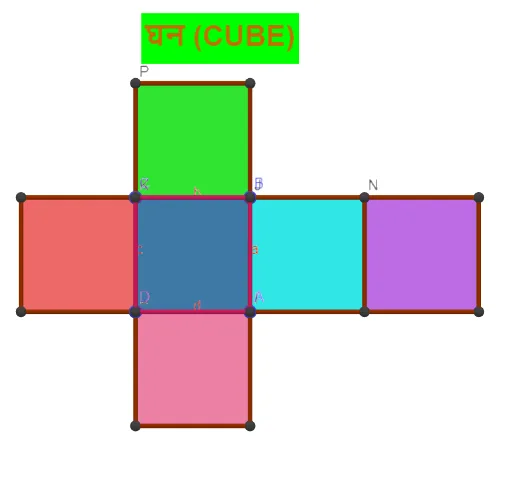
This example demonstrates how to construct a cube in GeoGebra and connect its surface area and volume through an explicit 3D model and its net (unfolded faces). It highlights the key idea that surface area comes from summing the areas of the cube’s square faces, while volume corresponds to the cube’s overall interior measure, both driven by the same edge length parameter. The main mathematical concepts are solid geometry for a cube, relationships between edge length, face areas, and volume, and how the cube’s faces and edges are organized geometrically. Construction-wise, it uses Polygon, Prism, and Net to build the cube’s solid and its unfolded layout; Distance is used to measure or define the cube’s edge length; Midpoint helps position auxiliary points for consistent geometry. The objects include cube vertices (e.g., A, B, C, D), face groups (e.g., faceABJI, faceBCKJ, faceCDLK, faceADLI), and edge entities (e.g., edgeAI, edgeBJ, edgeCK, edgeDL, edgeIJ, edgeJK, edgeKL, edgeIL) to link each face to the surface-area computation. Suitable for middle and high school learners and classroom demonstrations on surface area vs. volume for prisms/cubes.
GeoGebra Commands & Parameters
Polygon(A, B, C, D) → q1, a, b, c, dPrism(q1, f) → g, I, edgeAI, edgeBJ, edgeCK, edgeDL, edgeIJ, edgeJK, edgeKL, edgeIL, J, K, L, faceABJI, faceBCKJ, faceCDLK, faceADLI, faceIJKLNet(g, e) → h, E, R, S, T, U, V, faceEFGH, faceEFNM, faceFGPO, faceGHRQ, faceEHST, F, faceMNUV, edgeEF, edgeFG, edgeGH, edgeEH, edgeEM, edgeMN, edgeFN, edgeFO, edgeOP, G, edgeGP, edgeGQ, edgeQR, edgeHR, edgeHS, edgeST, edgeET, edgeNU, edgeUV, edgeMV, H, M, N, O, P, QDistance(N, P) → distanceNPMidpoint(N, P) →Distance(N, B) → distanceNBMidpoint(N, B) →Distance(C, B) → distanceCBMidpoint(C, B) →Distance(C, P) → distanceCPMidpoint(C, P) →Distance(A, B) → distanceABMidpoint(A, B) →Distance(B, C) → distanceBCMidpoint(B, C) →Distance(D, C) → distanceDCMidpoint(D, C) →Distance(D, A) → distanceDAMidpoint(D, A) →
AI Drawing Prompt Reference
Draw a 3D cube model and its net. The cube consists of four square faces connected by edges. The net shows all faces laid out flat, while the 3D model displays the overall shape. Ensure the drawing is clear and labels key points like vertices A, B, C, D and edge lengths.
The prompt above was compiled from the original drawing commands and is for reference only.