
Geometric Construction for a Median Question
Loading the math board and drawing, please wait…
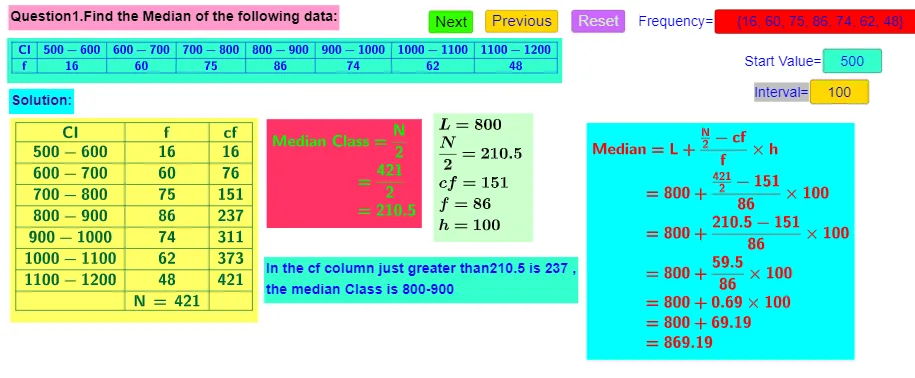
This example demonstrates how a “median” question can be transformed into an interactive, visual computation by constructing many related elements and assembling their values into an organized table. It highlights the median (Median) idea together with function-based evaluation: the underlying relationships use polynomial functions and can incorporate trigonometry, along with geometry flavors related to conic sections and planar constraints. The construction emphasizes controlled selection and aggregation of discrete data. In GeoGebra, it is built using Element, Sum, TableText, If, and Textfield: Element is used to reference constructed objects and their values; If selects different cases according to index/conditions; Sum aggregates selected terms; TableText formats the computed results as table entries; and Textfield provides input or dynamic text output. The setup involves many indexed objects (e.g., A1..A17, B1..B17, C10..C17) and a function f, enabling a step-by-step median computation workflow. Suitable for middle/high school learners and early undergraduate students who want to connect statistics (median) with function evaluation, trigonometric/conic relations, and GeoGebra-driven visualization.
GeoGebra Commands & Parameters
Element(f, 1) → B11Element(f, 2) → B12Element(f, 3) → B13Element(f, 4) → B14Element(f, 5) → B15Element(f, 6) → B16Element(f, 7) → B17Sum(B11:B17) → B20TableText({{A10, A11, A12, A13, A14, A15, A16, A17}, {B10, B11, B12, B13, B14, B15, B16, B17}}, "|_cccccccc") → text2TableText({{A10, B10, C10}, {A11, B11, C11}, {A12, B12, C12}, {A13, B13, C13}, {A14, B14, C14}, {A15, B15, C15}, {A16, B16, C16}, {A17, B17, C17}, {A18, B18, C18}}, "|_ccc") → text3If(0 ≤ mp ≤ C11, 0, If[C11 < mp ≤ C12, C11, If[C12 < mp ≤ C13, C12, If[C13 < mp ≤ C14, C13, If[C14 < mp ≤ C15, C14, If[C15 < mp ≤ C16, C15, If[C16 < mp ≤ C17, C16]]]]]]) → cfIf(0 ≤ mp ≤ C11, B11, If[C11 < mp ≤ C12, B12, If[C12 < mp ≤ C13, B13, If[C13 < mp ≤ C14, B14, If[C14 < mp ≤ C15, B15, If[C15 < mp ≤ C16, B16, If[C16 < mp ≤ C17, B17]]]]]]) → FIf(0 ≤ mp ≤ C11, A11, If[C11 < mp ≤ C12, A12, If[C12 < mp ≤ C13, A13, If[C13 < mp ≤ C14, A14, If[C14 < mp ≤ C15, A15, If[C15 < mp ≤ C16, A16, If[C16 < mp ≤ C17, A17]]]]]]) → CIIf(0 ≤ mp ≤ C11, A2, If[C11 < mp ≤ C12, A3, If[C12 < mp ≤ C13, A4, If[C13 < mp ≤ C14, A5, If[C14 < mp ≤ C15, A6, If[C15 < mp ≤ C16, A7, If[C16 < mp ≤ C17, A8]]]]]]) → LTextfield(f) → InputBox1Textfield(m) → InputBox2Textfield(h) → InputBox3If(0 ≤ mp ≤ C11, C11, If[C11 < mp ≤ C12, C12, If[C12 < mp ≤ C13, C13, If[C13 < mp ≤ C14, C14, If[C14 < mp ≤ C15, C15, If[C15 < mp ≤ C16, C16, If[C16 < mp ≤ C17, C17]]]]]]) → q
AI Drawing Prompt Reference
Create a geometric construction visualizing the median calculation by building multiple related elements and organizing their values into a table. Include polynomial and trigonometric functions, along with geometric relationships involving conic sections and planar constraints. Highlight the process using element references, conditional selection, summation, table formatting, and dynamic text inputs to demonstrate the median computation workflow.
The prompt above was compiled from the original drawing commands and is for reference only.