
Geometric Construction of a Cylinder’s Surface Area via Parameters
Loading the math board and drawing, please wait…
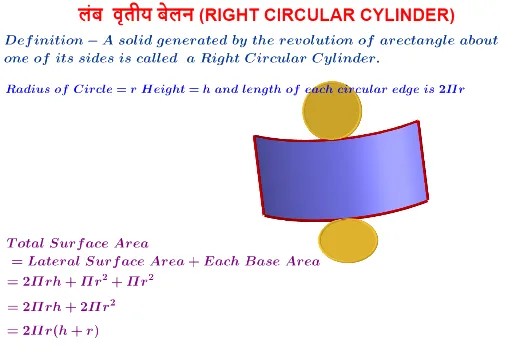
This GeoGebra example demonstrates how a cylinder’s surface-area-related quantities can be visualized and studied using parameter-driven geometry. It constructs a cylinder from basic primitives, then uses intersection lines and rotated generator lines to relate the cylinder’s radius and angular parameters to the evolving geometry on the surface. The key math ideas include solid geometry (cylinders), parameterized modeling, interpreting surface-area problems through spatial intersections, and conditional construction to switch between different geometric pieces when needed. Construction highlights drawn from the provided command summary: Point, Circle, and Cylinder create key points, a circle, and the cylinder; Intersect together with Line and OrthogonalLine determines intersection sets and enforces perpendicular/auxiliary constraints; Rotate generates configurations across angles; If and Segment select and connect the relevant segments conditionally. Parameters such as θ, r, ϕ, and t drive the animation/state, while text labels and buttons support step-by-step exploration. Suitable for high school to early undergraduate audiences, especially for instruction on solid geometry modeling and graphing/optimization-oriented reasoning.
GeoGebra Commands & Parameters
Point(yAxis) → BCircle(A, B) → cCylinder(c, 3) → b, e, fIntersect(zAxis, e) → C,Line(C, xAxis) → aOrthogonalLine(D, xOyPlane) → gCircle(g, C) → kRotate(Rotate[e, ϕ, a], ϕ, xAxis) → e'Rotate(Rotate[e, ϕ, a], ϕ, xAxis) → dCircle(A, B) → hIf(t < 1, ((r * sin((-θ))), ((r * (1 - cos((-θ)))) * cos(ϕ)) - (3 * sin(ϕ)), (3 * cos(ϕ)) + ((r * (1 - cos((-θ)))) * sin(ϕ))), ((-π), (-3 * sin(ϕ)), (3 * cos(ϕ)))) → EIf(t < 1, ((r * sin(θ)), ((r * (1 - cos(θ))) * cos(ϕ)) - (3 * sin(ϕ)), (3 * cos(ϕ)) + ((r * (1 - cos(θ))) * sin(ϕ))), (π, (-3 * sin(ϕ)), (3 * cos(ϕ)))) → FIf(t < 1, ((r * sin((-θ))), ((r * (1 - cos((-θ)))) * cos(ϕ)), ((r * (1 - cos((-θ)))) * sin(ϕ))), (-3.14159, 0, 0)) → GIf(t < 1, ((r * sin(θ)), ((r * (1 - cos(θ))) * cos(ϕ)), ((r * (1 - cos(θ))) * sin(ϕ))), (π, 0, 0)) → HSegment(E, G) → iSegment(F, H) → jLine((0, 1, 0), zAxis) → pCircle(p, B) → qIf(t < 1, Surface[(r * sin((u * θ))), ((r * (1 - cos((u * θ)))) * cos(ϕ)) - (v * sin(ϕ)), (v * cos(ϕ)) + ((r * (1 - cos((u * θ)))) * sin(ϕ)), u, -1, 1, v, 0, 3], Surface[(π * u), ((-v) * sin(ϕ)), (v * cos(ϕ)), u, -1, 1, v, 0, 3]) → lIf(t < 1, CurveCartesian[(r * sin((u * θ))), ((r * (1 - cos((u * θ)))) * cos(ϕ)), ((r * (1 - cos((u * θ)))) * sin(ϕ)), u, -1, 1], CurveCartesian[(π * u), 0, 0, u, -1, 1]) → mIf(t < 1, CurveCartesian[(r * sin((u * θ))), ((r * (1 - cos((u * θ)))) * cos(ϕ)) - (3 * sin(ϕ)), (3 * cos(ϕ)) + ((r * (1 - cos((u * θ)))) * sin(ϕ)), u, -1, 1], CurveCartesian[(π * u), (-3 * sin(ϕ)), (3 * cos(ϕ)), u, -1, 1]) → n
AI Drawing Prompt Reference
Draw a 3D cylinder with its base center at the origin, adjustable radius, and fixed height. Show the lateral surface and bases as semi-transparent surfaces, and display the base and top circles. Inside the cylinder, draw a helical curve starting from a point on the base circumference, varying with an angle parameter. Also draw two line segments from the base to the top on the lateral surface, corresponding to positive and negative angle directions, and rotating with a rotation parameter. Add a switchable surface or plane to illustrate the geometric relation for the cylinder's lateral area expansion. Include coordinate axes, auxiliary circles, and rotated curves to visualize how the surface area depends on radius and angle parameters.
The prompt above was compiled from the original drawing commands and is for reference only.