
Volume Calculation: Finding Cuboid Volume by Complementary Method
Loading the math board and drawing, please wait…
In collections
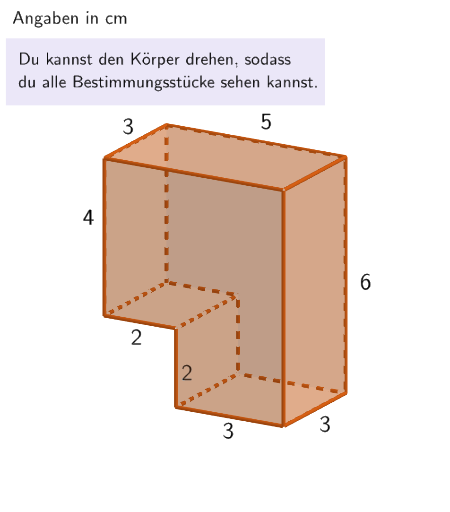
Rauminhalt zusammengesetzter Körper - Quader und Würfel
This GeoGebra example demonstrates how to calculate the volume of a cuboid using the complementary method. The core mathematical concept is volume calculation in solid geometry, involving the construction and volume computation of a rectangular prism (Quader). Key construction techniques: using the Volume command to calculate cuboid volume, applying Translate for geometric transformations, implementing answer verification with If conditions, building a 3D coordinate system with CornerThreeD, and generating random questions with Shuffle. The interactive design includes input boxes for learners to enter answers, with automatic correctness checking. Suitable for middle school mathematics curriculum on solid geometry, as well as self-study and practice of volume calculation methods.
GeoGebra Commands & Parameters
Translate({Prism[Polygon[(-2.5, -1.5, -1), (-2.5, -1.5, -1) + (2, 0), (-2.5, -1.5, -1) + (2, 3), (-2.5, -1.5, -1) + (0, 3)], 2]}, Vector[(-0.001, 0, -0.001 - dy)]) → object02Volume(object02(1)) → sol2Translate({Prism[Polygon[(-0.5, 1.5), (-0.5, 1.5) + (3, 0), (-0.5, 1.5) + (3, 0, 2), (-0.5, 1.5) + (0, 0, 2)], (-0.5, -1.5)]}, Vector[(0, 0, ((-dz)) / 2 - 1)]) → object122HintWaagrecht1Element(randomQuestions, Mod[questionCount, Length[randomQuestions]] + 1) → randomQuestionElement(allQuestions, randomQuestion) → actualQuestionShuffle(Sequence[Element[actualQuestion, i], i, 2, numberOfAnswers + 1]) → actualAnswersShuffled, {?, ?, ?, ?, ?, ?}Element(actualAnswersShuffled, 3) → actualAnswer03Element(actualAnswersShuffled, 2) → actualAnswer02Element(actualAnswersShuffled, 1) → actualAnswer01Element(actualAnswersShuffled, 4) → actualAnswer04Element(actualAnswersShuffled, 5) → actualAnswer05Element(actualAnswersShuffled, 6) → actualAnswer06Element(actualAnswer06, 2) → chk06ExpectedElement(actualAnswer05, 2) → chk05ExpectedElement(actualAnswer04, 2) → chk04ExpectedElement(actualAnswer01, 2) → chk01ExpectedElement(actualAnswer02, 2) → chk02ExpectedElement(actualAnswer03, 2) → chk03ExpectedCone((0, 0, 2), (0, 0, 5), 1) → figur022kegel, figur012kegel_{2}, figur012kegel_{3}Cone(((-2.7755575615628914E-17), 0, 1), ((-2.7755575615628914E-17), 0, -3), 1.5) → figur031kegel, figur021kegel_{2}, figur021kegel_{3}Cone((0, 0, 1), (0, 0, 4), 2.5) → figur042kegel, figur032kegel_{2}, figur032kegel_{3}Cone((0, 0, 1), (0, 0, 5), 1.5) → figur062kegel, figur062kegel_{2}, figur062kegel_{3}Textfield(input1) → InputBox1LaTeX(randomQuestion, true, true) → text1Remove(l1, {SelectedElement[l1]}) → l2Textfield(input2) → InputBox2LaTeX(page, true, true) → text5Sum({attemptCountInputBox1, attemptCountInputBox2}) → attemptCountTextfield(input3) → InputBox3If(page ≟ 2, showQuader2, page ≟ 8, correctInputBox3, true, page ≟ 4, correctInputBox1, page ≟ 5, dy ≥ 1.78, page ≟ 6, correctInputBox2, page ≟ 7, sliderGrey ≥ 0.97) → fixedCornerThreeD(-1, 11) → viewActual
AI Drawing Prompt Reference
Draw a cuboid and calculate its volume using the complementary method. First, create a cuboid with a base from (-2.5, -1.5, -1) to (-0.5, 1.5, -1), then generate another cuboid by translation. Set up input boxes for users to enter their answers and use conditional statements to check the answers. Finally, build a 3D coordinate system and randomly generate some questions for practice.
The prompt above was compiled from the original drawing commands and is for reference only.