
Tutorial: Rotating Rings in 3D
Loading the math board and drawing, please wait…
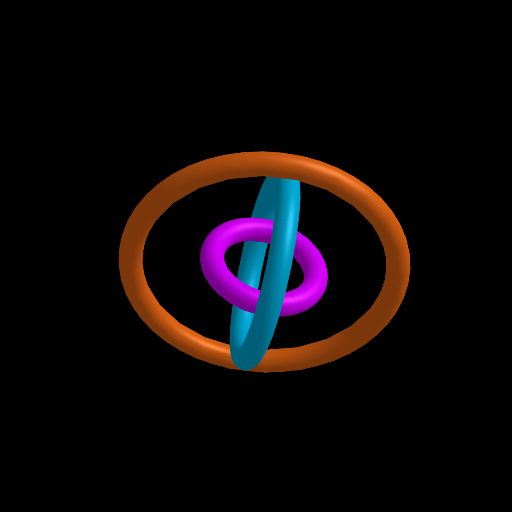
This example demonstrates how to build and animate ring-like geometry in 3D by applying rotation to a constructed surface. It helps learners visualize how rigid 3D transformations change the shape and orientation of an object over time. Key math concepts include solid/3D geometry, surface construction, axis-based rotation (Rotate in GeoGebra), and parameter-driven animation using a time/angle variable and a speed control. The construction uses Surface to create the ring surface geometry, Line to define an axis or key helper line for rotation, and Rotate to generate rotated copies/animated motion. The model includes objects such as Setup, c1/c2/c3 (core defining points/controls), s1/s2/s3 (surface components), l (line/axis object), t (a transformation/time parameter), r1/r2/r3 (rotation outputs), and speed to control animation rate. Suitable for secondary advanced geometry, intro STEM visualization, and GeoGebra-based learning activities focused on transformations and 3D modeling.
GeoGebra Commands & Parameters
Surface(c1, (2 * pi), yAxis) → s1Surface(c2, (2 * pi), yAxis) → s2Surface(c3, (2 * pi), yAxis) → s3Line((0, 0, 0), (1, 1, 1)) → lRotate(Rotate[s1, t, xAxis], t, l) → r1Rotate(Rotate[s2, t, yAxis], t, l) → r2Rotate(Rotate[s3, t, zAxis], t, l) → r3
AI Drawing Prompt Reference
Create a rotating ring structure in three-dimensional space. First, generate three toroidal surfaces similar to rings. Then define a diagonal line passing through the origin and pointing toward (1,1,1) as an auxiliary rotation axis. Set up a time variable t so that each surface first rotates by angle t around its respective coordinate axis (x, y, z), then rotates by angle t around the diagonal line, producing complex spatial rotational transformations. A speed controller animates the entire structure continuously.
The prompt above was compiled from the original drawing commands and is for reference only.