
Cross Sections of a Cube
Loading the math board and drawing, please wait…
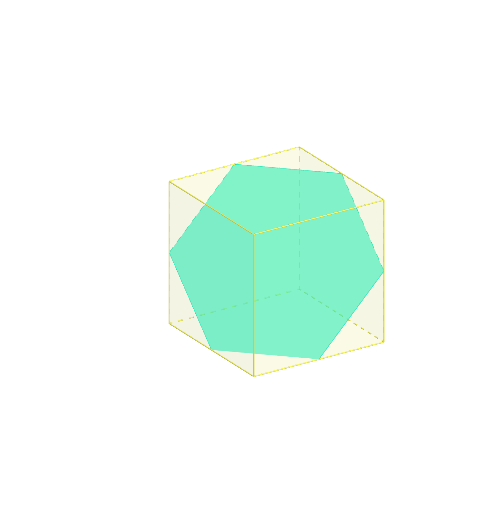
This example demonstrates the cross-sectional shapes of a cube when cut by various planes. Key mathematical concepts include solid geometry, algebraic equations, and geometric construction. The construction involves GeoGebra commands like Polygon, Intersect, and Plane. Suitable for middle school mathematics to understand the transformation from three-dimensional to two-dimensional and enhance spatial visualization skills.
GeoGebra Commands & Parameters
Polygon(F, G, H, E) → q1, f, g, h, ePrism(q1, 2) → b, I, edgeFI, edgeGJ, edgeHK, edgeEL, edgeIJ, edgeJK, edgeKL, edgeIL, J, K, L, faceFGJI, faceGHKJ, faceEHKL, faceEFIL, faceIJKLPolygon(I, G, E) → t1, e_1, i, g_1Midpoint(J, K) → AMidpoint(I, L) → BMidpoint(G, H) → CMidpoint(F, E) → DPolygon(A, C, D, B) → q2, a_1, c, d, b_1Polygon(J, H, E, I) → q3, j, h_1, e_2, i_1Point(edgeJK) → MMidpoint(I, J) → TMidpoint(J, G) → UMidpoint(G, H) → VMidpoint(H, E) → WMidpoint(E, L) → ZMidpoint(L, I) → A_1Polygon(A_1, T, U, V, W, Z) → poly2, l, t, u, v, w, z_1Sphere(I, 0.7) → kIntersect(edgeIJ, k) → N,Intersect(edgeIL, k) → B_1,Polygon(N, G, E, B_1) → q4, n, g_2, e_3, mPoint(edgeHK) → OPoint(edgeIL) → PPoint(edgeIJ) → QPlane(Q, O, P) → pIntersect(edgeGJ, p) → RIntersect(edgeEL, p) → SPolygon(Q, R, O, S, P) → poly1, q, r, o, s, p_1
AI Drawing Prompt Reference
Draw a cube with a square base and corresponding top vertices. Construct several cross-sections: first, connect midpoints of some edges to form a slanted quadrilateral section; then connect opposite vertices to form a triangular section; next, take a point on one edge and connect it with midpoints of adjacent edges to form a hexagonal section; finally, choose three points on three edges to define a plane that intersects the cube, producing a pentagonal section. Also place a small sphere on one edge to help visualize intersection points. Show the cube with these various cutting planes and resulting cross-sectional shapes.
The prompt above was compiled from the original drawing commands and is for reference only.